

Blog
DRV8837 Motor Driver Beginner Tutorial with Arduino
In many electronic devices and automation systems, motors are indispensable components for achieving mechanical motion. However, to make motors operate as expected, whether for smooth startup, precise speed regulation, or timely braking, a core component dedicated to power conversion and control is required, which is the motor driver.
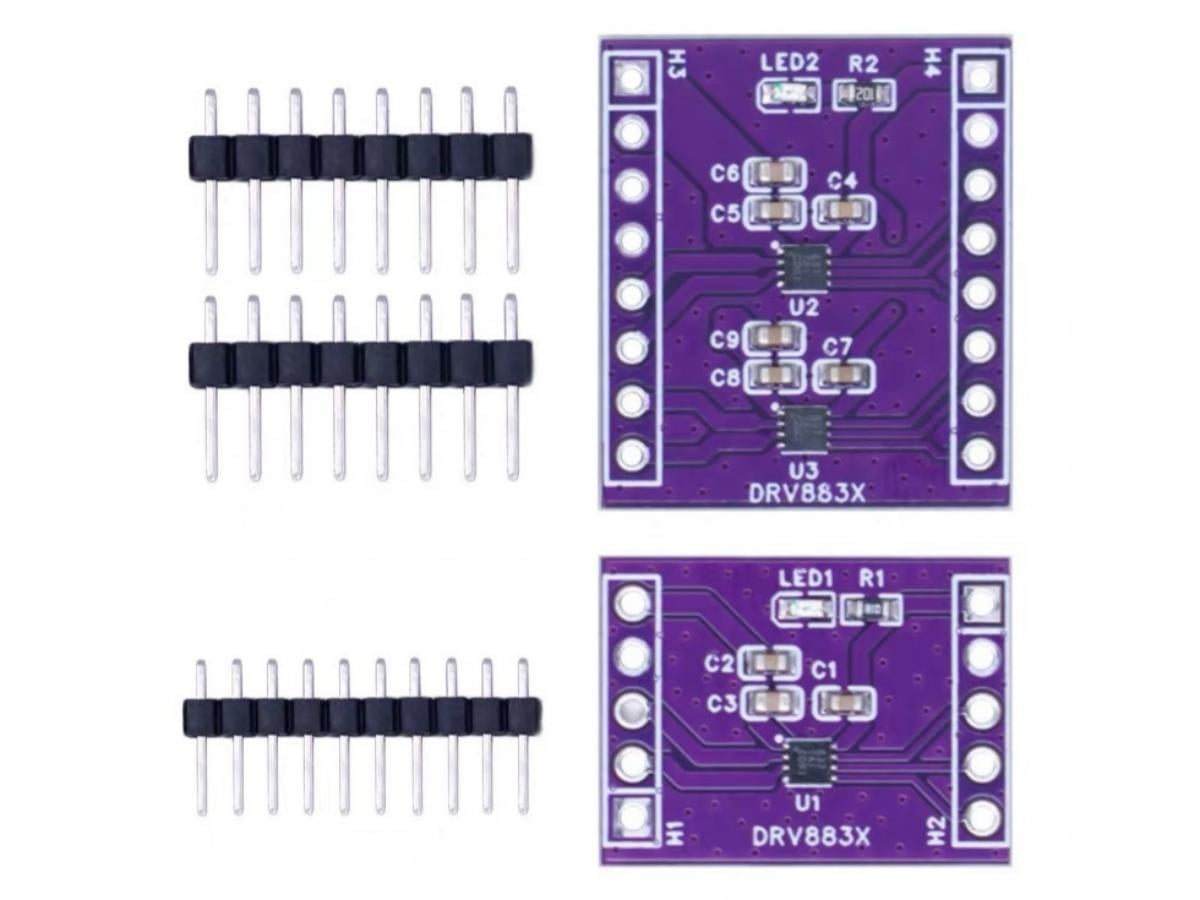
The DRV8837 is an integrated circuit solution commonly used in small motor driving scenarios, capable of providing efficient and stable driving capability for the windings of DC motors or stepper motors. Available in single-channel or dual-channel versions, this module is suitable for various low-voltage applications requiring motor control functions, such as embedded devices, handheld tools, and intelligent equipment. Its design goal is to achieve precise control of motor operating states under the constraints of limited power consumption and space.
What is DRV8837 IC?
The DRV8837 IC integrates an H-bridge driver and can drive a winding of a DC motor or a stepper motor, as well as other components such as electromagnetic coils. The output driver function block consists of N-channel power MOSFETs configured as an H-bridge to drive the motor windings. An internal charge pump generates the gate drive voltage required for operation.
To ensure an extended battery service life and maintain a constant motor speed, the DRV8837 is equipped with a PWM input interface, through which the motor operating status can be programmatically controlled via the input pins. The DRV8837 chip also provides comprehensive protection features, including overcurrent protection, short-circuit protection, undervoltage protection and overheating protection.
What is the one channel DRV8837 module and the two channel DRV8837 module?
DRV8837 is an integrated motor driver solution designed for applications such as cameras, consumer products, toys, and other low-voltage or battery-powered motion control devices. The DRV8837 driver module is available in two versions with single and dual chips, namely one channel DRV8837 driver module and two channel DRV8837 driver module, allowing users to select the suitable version according to their projects. It features a Sleep pin and comes with a low-power sleep mode.
DRV8837 Working Principle
Only the working principle of the DRV8837 IC is explained here.
The DRV8837 can conveniently control the motor through 2 control input terminals (IN1, IN2) to control the motor’s operating status. The sleep function can be utilized to minimize power consumption, the braking function can be employed to achieve rapid motor braking, and the system controller can detect the motor’s operating current. Its functions are mainly realized through the logic control and drive.
- DRV8837 Internal Functional Schematic Diagram
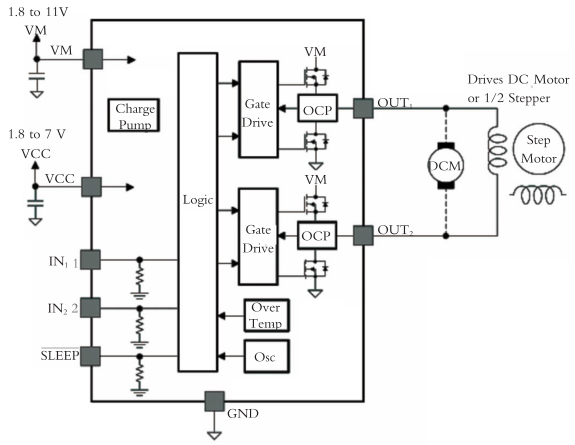
DRV8837 PWM Motor Drive Circuit
This drive circuit is an H-bridge circuit. It consists of a PWM voltage control circuit and a current limiting circuit. By controlling the driving circuit through the logic circuit, the motor can be controlled to rotate forward or reverse. The overcurrent circuit detects the current in the main circuit, once an overcurrent occurs, it limits the current of the circuit.
DRV8837 H-bridge Control Logic
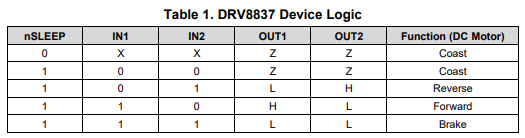
The input control terminals IN1 and IN2 control the output of the H-bridge.
- Control Logic of the H-bridge
| IN1 | IN2 | OUT1 | OUT2 | Function |
|---|---|---|---|---|
| 0 | 0 | High-impedance state | High-impedance state | Coasting state |
| 0 | 1 | Low level | High level | Reverse rotation |
| 1 | 0 | High level | Low level | Forward rotation |
| 1 | 1 | High level | High level | Brake |
It can be seen from the above table that when both inputs are at low level (0), the output of the H-bridge is in the off state, and the motor is in the standby or coasting state until it stops rotating.
DRV8837 Sleep Mode
The DRV8837 features a low-power sleep mode with power current. When the input pin is at a logic low level, the device enters the low-power sleep mode.
DRV8837 Power Supply and Input Pin
The input terminals can be driven under the allowable operating conditions. Each input pin is connected to a pull-down resistor of approximately 100 kΩ to ground.
The VCC and VM power supplies can be turned on or off in any order. When the VCC power supply is cut off, the logic circuit enters a low-power state and draws only a small amount of current from the VM power supply. If the supply voltage is between 1.8 V and 7 V, the VCC and VM terminals can be directly connected together.
DRV8837 Protection Circuit
The DRV8837 is equipped with comprehensive undervoltage protection, overcurrent protection and overheating protection functions.
Each FET on the H-bridge is integrated with an analog current-limiting circuit to restrict its current. Once the overcurrent condition in the circuit lasts longer than the set time, the analog current-limiting circuit will turn off the FETs on the H-bridge. After approximately 1ms, the H-bridge will automatically resume its normal functions.
When the temperature exceeds approximately 150°C, all FETs on the H-bridge are turned off completely. Once the temperature drops back to the safe range, the device automatically resumes normal operation.
At any time, if the voltage at the VCC terminal drops below the undervoltage lockout threshold voltage, all circuits of the driver are disabled and an internal logic circuit reset is triggered. The driver circuit will not resume normal operation until the voltage at the VCC terminal rises above the undervoltage lockout threshold voltage.
DRV8837 Pin Function
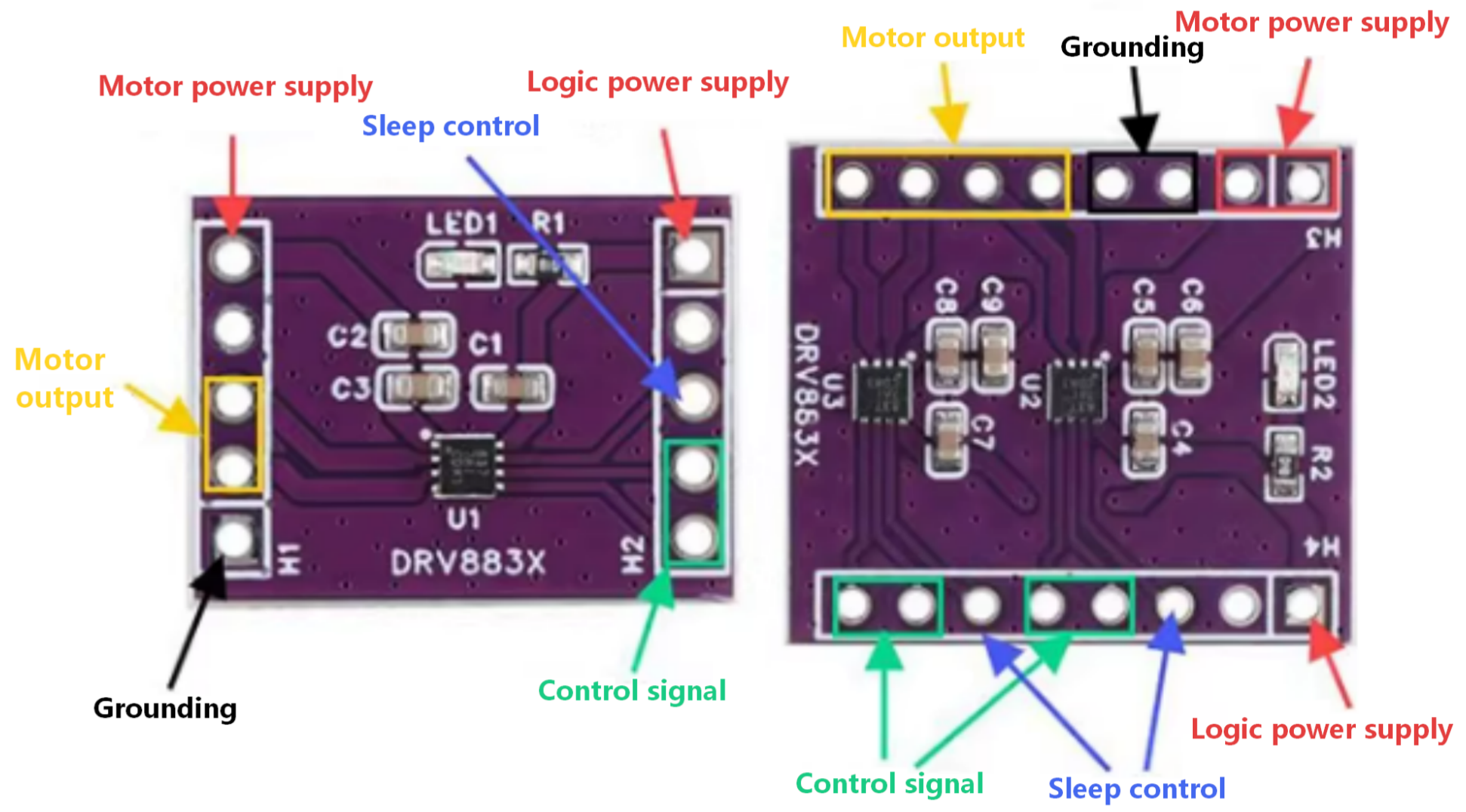
1. Please connect the power supply, drive signals and motor circuits as shown in the figure above.
2. Please refer to the logic truth table and descriptions below. The microcontroller can control the motor operation by providing control signals.
3. The onboard LED indicator facilitates observation for users.
Note : Please check the positive and negative poles of the power supply and the voltage value. Incorrect connection will cause permanent damage to the module.
One Channel DRV8837 Pin Description
| Pin | Description |
|---|---|
| IN1 | PWM input 1, voltage range: -0.3 ~ 7 V |
| IN2 | PWM input 2, voltage range: -0.3 ~ 7 V |
| OUT1 | Motor drive output 1, voltage range: -0.3 ~ 7 V |
| OUT2 | Motor drive output 2, voltage range: -0.3 ~ 7 V |
| IN1 and IN2 are the output ports of 1-channel H-bridge, which are connected to the two terminals of a DC motor. | |
| SLEEP | Low level puts the chip into sleep mode, while high level enables normal operation. An internal pull-down resistor to GND is integrated, voltage range: -0.5 ~ 7 V. |
| VCC | Chip power supply pin, voltage range: 1.8 ~ 7 V |
| GND | Grounding |
| VM | Motor power supply pin, voltage range: 1.8 ~ 11 V |
Two Channel DRV8837 Pin Description
| Pin | Description |
|---|---|
| INA1 | PWM input 1 of chip A, voltage range: -0.3 ~ 7 V |
| INA2 | PWM input 2 of chip A, voltage range: -0.3 ~ 7 V |
| INB1 | PWM input 1 of chip B, voltage range: -0.3 ~ 7 V |
| INB2 | PWM input 2 of chip B, voltage range: -0.3 ~ 7 V |
| OUTA1 | Motor drive output 1 of motor A, voltage range: -0.3 ~ 7 V |
| OUTA2 | Motor drive output 2 of motor A, voltage range: -0.3 ~ 7 V |
| OUTB1 | Motor drive output 1 of motor B, voltage range: -0.3 ~ 7 V |
| OUTB2 | Motor drive output 2 of motor B, voltage range: -0.3 ~ 7 V |
| INA1 and INA2 are the output ports of 1-channel H-bridge, which are connected to the two terminals of a DC motor. | |
| INB1 and INB2 are the output ports of the 2-channel H-bridge, which are connected to the two terminals of another external DC motor. | |
| SLEEPA | When the level is low, Chip A enters sleep mode. When the level is high, it operates normally. An internal pull-down resistor to GND is integrated, voltage range: -0.5 ~ 7 V. |
| SLEEPB | When the level is low, Chip B enters sleep mode. When the level is high, it operates normally. An internal pull-down resistor to GND is integrated, voltage range: -0.5 ~ 7 V. |
DRV8837 Arduino Tutorial
This tutorial mainly demonstrates the operation of the Two Channel DRV8837 module.
Components :
1. Arduino Development Board
2. Two Channel DRV8837 Module
3. DC Motors
DRV8837 Pinout
| Arduino | DRV8837 | Description |
|---|---|---|
| D2 | INA1 | Motor A PWM input 1 |
| D3 | INA2 | Motor A PWM input 2 |
| D4 | INB1 | Motor B PWM input 1 |
| D5 | INB2 | Motor B PWM input 2 |
| 5V | VCC | DRV8837 logic power supply |
| External DC | VM | Motor power supply (match motor voltage) |
| GND | GND | Common ground (Arduino/DRV8837/power supply) |
| \ | OUTA1 | Connect to Motor A pin 1 |
| \ | OUTA2 | Connect to Motor A pin 2 |
| \ | OUTB1 | Connect to Motor B pin 1 |
| \ | OUTB2 | Connect to Motor B pin 2 |
| D6 | SLEEPA | DRV8837 A chip enable (High = active) |
| D7 | SLEEPB | DRV8837 B chip enable (High = active) |
Note : Attention should be paid to the fact that the VM pin must be connected to the external motor power supply (instead of the Arduino’s 5V) during wiring, and all devices must share a common ground.
DRV8837 Code
					// Define pins for DRV8837 motor driver
const int INA1 = 2;
const int INA2 = 3;
const int INB1 = 4;
const int INB2 = 5;
const int SLEEPA = 6;
const int SLEEPB = 7;

void setup() {
  // Set all motor control pins as output
  pinMode(INA1, OUTPUT);
  pinMode(INA2, OUTPUT);
  pinMode(INB1, OUTPUT);
  pinMode(INB2, OUTPUT);
  pinMode(SLEEPA, OUTPUT);
  pinMode(SLEEPB, OUTPUT);

  // Enable DRV8837 chips (HIGH = active, LOW = sleep mode)
  digitalWrite(SLEEPA, HIGH);
  digitalWrite(SLEEPB, HIGH);
}

void loop() {
  // Motor A forward rotation (PWM speed: 0-255)
  motorRun(INA1, INA2, 200);
  // Motor B forward rotation
  motorRun(INB1, INB2, 200);
  delay(2000); // Keep running for 2 seconds

  // Motor A reverse rotation
  motorRun(INA2, INA1, 200);
  // Motor B reverse rotation
  motorRun(INB2, INB1, 200);
  delay(2000); // Keep running for 2 seconds

  // Stop both motors
  motorStop(INA1, INA2);
  motorStop(INB1, INB2);
  delay(1000); // Stop for 1 second
}

// Motor control function: control direction and speed
// pinForward: PWM pin for forward direction
// pinReverse: PWM pin for reverse direction
// speed: PWM value (0 = stop, 255 = maximum speed)
void motorRun(int pinForward, int pinReverse, int speed) {
  analogWrite(pinForward, speed);
  digitalWrite(pinReverse, LOW);
}

// Motor stop function: set both control pins to LOW
void motorStop(int pin1, int pin2) {
  digitalWrite(pin1, LOW);
  digitalWrite(pin2, LOW);
}
DRV8837 Effect Demonstration
DRV8837 Application Scenario
1. Small Electric Shutter / Curtain
2. Small Bionic Robot Joint
3. Fine-Tuning Motor of Gimbal Camera
4. Desktop 3D Printer Accessory
5. Medical Device
Relative Information
Purchase Link
FAQ
Does the DRV8837 support PWM speed control?
Yes, the DRV8837 supports PWM speed regulation. By applying a PWM signal to IN1 or IN2 (depending on the direction), the motor speed can be controlled by changing the duty cycle of the PWM signal. This is usually implemented using microcontrollers such as Arduino or ESP32.
What is the difference between single and dual DRV8837 modules?
A single-channel DRV8837 module uses IN1 and IN2 to control the winding of one DC motor or one stepper motor . A dual-channel DRV8837 module consists of two DRV8837 chips, which can independently control windings of two DC motors or two stepper motor , usually controlled by INA1/INA2 and INB1/INB2 respectively. Both types of modules are generally equipped with a low-power sleep mode.
What is the sleep mode in DRV8837 and how to enable it?
Sleep mode is a low-power state that shuts down most internal circuits to save power when the motor is not in use. To activate sleep mode, set the SLEEP pin to a low level. To wake up and resume normal operation, set it to a high level. This is very useful for battery-powered devices.