

Blog
How to achieve rs232 to ttl?
Understanding RS232
You can see that the various devices we use daily, such as mobile phones and computers, have different interfaces. There are a wide variety of interfaces like USB, TYPEC, Android, and Apple. RS232 is also one of them. The RS232 interface conforms to the serial data communication interface standard formulated by the Electronic Industries Alliance (EIA) in the United States. Its full original number is EIA-RS-232 (referred to as 232 or RS232 for short). It is widely used for connecting peripheral devices to computer serial interfaces. Data transmission between devices is achieved through RS232 cables, and it is often used to connect RS232 ports and external devices. RS232 connectors are used to ensure connection stability. The connection cables and mechanical, electrical characteristics, signal functions, and transmission processes are involved. In simple terms, it was the most commonly used form of data transmission in the past, using serial connections. Due to its prevalence and low cost, many manufacturers still use it today. The nature of the RS232 interface is the same as the common USB interface, both of which are used to connect mobile hard drives or mobile phones to computers for file transfer.
It has some disadvantages, such as low transmission rate: in asynchronous transmission, the bit rate is 20Kbps, which is somewhat inadequate compared to new technologies. Another drawback is the limited transmission distance. The standard maximum transmission distance is 50 feet, but in practice, it can only be used within about 15 meters. Therefore, it is generally not used for remote installation nowadays. For remote transmission, RS232 to Ethernet devices can be used in combination. Additionally, the interface uses one signal line and one signal return line, forming a common ground transmission form. This common ground transmission is prone to common mode interference and has weak noise immunity.
Typically, RS232 interfaces appear in the form of 9-pin (DB9) or 25-pin (DB25). Generally, personal computers have two RS232 interfaces, which are called COM1 and COM2 respectively.
Rs232 pinout

Explanation
- Public Ground (GND) Ground wire;
- Transmit Data (TXD) Transmit send data;
- Receive Data (RXD) Receiver receive data;
- Data Terminal Ready (DTR) The computer tells the modem that it is ready to transmit;
- Data Set Ready (DSR) The modem tells the computer that everything is ready;
- Request To Send (RTS) The computer requests the modem to submit data;
- Clear To Send (CTS) The modem notifies the computer that it can send data over;
- Data Carrier Detect (DCD) The modem notifies the computer that a carrier has been detected;
- Ring Indicator (RI) The modem notifies the computer that a call is coming in;
The signal labels are from the perspective of the DTE device. TXD, DTR, and RTS signals are generated by the DTE (Data Terminal Equipment, such as a computer); RXD, DSR, CTS, DCD, and RI signals are generated by the DCE (such as a modem). The ground signal is common to all connections.
To achieve serial communication, you also need to make some settings at the software level:
- Baud Rate (Baud): The baud rate from one device to another, that is, how many symbols per second. Typical baud rates include 300, 1200, 2400, 9600, 19200, 115200, etc. Generally, both ends of the communication devices should be set to the same baud rate, but some devices can also be set to automatically detect the baud rate.
- Parity: Used to verify the correctness of data. It works by modifying each transmitted byte and can be used by the receiving end to check if a transmission error has occurred – if the number of “1”s in a byte has changed, then there must have been an error during transmission. If the parity is correct, then either no error occurred or an even number of errors occurred.
- Stop Bit: Sent after each byte transmission to help the receiving signal end hardware resynchronize.
- Data Format (Typical Frame Structure):
- Start Bit: 1 bit, logical 0;
- Data Bits: 5 to 8 bits;
- Parity Bit: Optional (even parity/odd parity);
- Stop Bit: 1 or 2 bits.
- Troubleshooting methods:
- No communication: Check if TX/RX are correctly connected and if they are crossed (straight-through/crossover cable issue);
- Garbled or lost packets: Confirm that the baud rate, data bits, parity bits, etc. parameters match;
- Unstable communication: Shorten the cable length, use shielded cables, and check if the ground connection is good;
- Data loss: It may be that the handshake signals (RTS/CTS) are not correctly configured.
RS232 requires the receiver to recognize signals above +3 to +15V as logical 0 and below -3 to -15V as logical 1. TTL level is 5V for logical high and 0V for logical low. Generally, single-chip microcomputers use TTL level. RS232 and TTL (Transistor-Transistor Logic) levels are not compatible, so a level conversion circuit is needed to connect with TTL circuits. The module in this article is used for RS232 to TTL conversion, and the main control chip is MAX3232.

Understanding Max3232
The Max3232 is a low-power RS232 level conversion chip that can convert the CMOS/TTL logic signals of the microcontroller to RS232 signals. It is widely used in Arduino RS232-related embedded projects. Why is it considered low-power? Because when the supply voltage is 3.3V or 5V, its power consumption current is 0.3mA, which is much less than the 5mA power consumption current of Max232. Since RS232 uses positive and negative levels to represent the signals of 0 and 1, the MAX3232 needs to generate corresponding positive and negative voltages. After power-on, first check if there is a voltage of +5.4V or above at pin 2, if there is a voltage of -5.4V or above at pin 6, and if there is a voltage at pin 16. If not, you need to check the corresponding capacitors. Note that pin 16 must have a capacitor, otherwise it may not be able to generate the corresponding voltage. The Max3232 is externally connected with 4 0.1 microfarad (104) small capacitors to obtain twice the positive and negative voltages, matching the RS232 logic levels.
In addition, the Max3232 integrates a driver and a receiver within itself. It can precisely detect and interpret RS3232 signals, ensuring signal integrity. It enables serial communication between microcontrollers and peripheral devices, such as in some Internet of Things devices, embedded projects, automation systems, and the recently popular field of robotics. It also plays a significant role in many old industrial equipment, as most of them use the RS232 interface and cannot do without it.
Max3232 pinout

You should keep in mind one thing: The Max3232 converts the 0-5V TTL level of the single-chip microcontroller into the positive and negative voltages required by the RS232 device (such as +10V, -10V). Conversely, it can also convert the RS232 signal back into TTL.
First, take a look at the capacitors around the chip. The Max3232 has an internal charge pump that operates with the four external capacitors. C2 and C4 are the pump capacitors, responsible for boosting the 3.3V/5V power supply and generating negative voltages. C1 and C3 are for filtering, making the positive and negative voltages generated by the charge pump more stable. Additionally, a filter capacitor is connected to the power supply pin Vcc to make the power supply cleaner.
Then, look at how the signal is transmitted. The Tx pin of the single-chip microcontroller is connected to the T1IN (pin 11) of the chip. The chip converts this TTL signal into RS232 level and sends it out from T1OUT, which is connected to the plug of the DB9 interface. Conversely, the RS232 signal at the DB9 receiving end is connected to the R1IN of the chip, and the chip then converts it back into TTL level, sending it from R1OUT to the Rx pin of the single-chip microcontroller.
Max3232 datasheet

How to use rs232 to ttl module with arduino?
I believe you have acknowledged their transfer principle through study. Now I will introduce a simple and useful small module to you. It can help you achieve level transfer easily. It looks like this, only 2*3cm, is convenient to take.
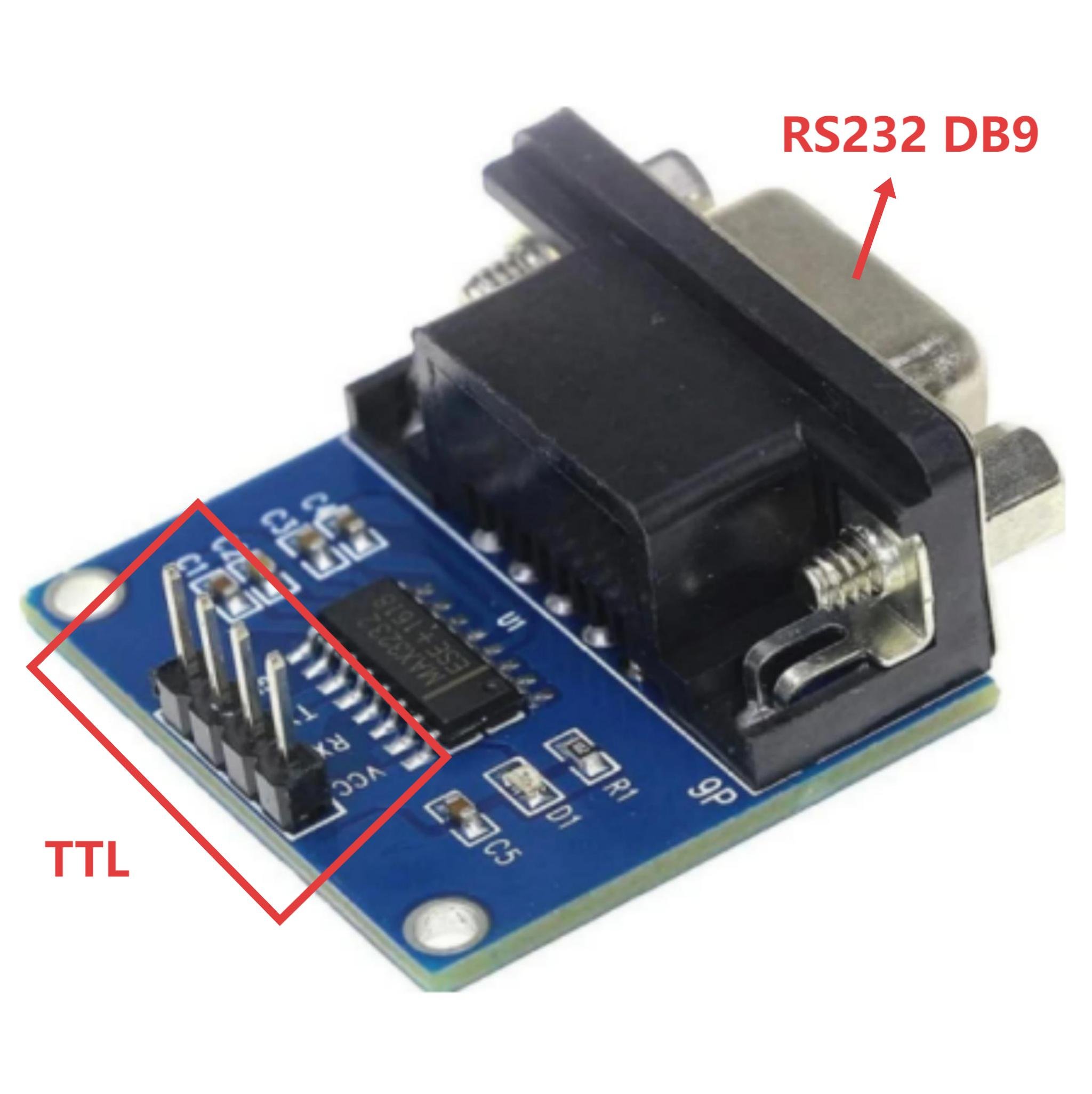
Module wiring: VCC — 3.3V; GND—ground; TXD – Port D7 of the Arduino development board; RXD – Port D6 of the Arduino development board. DB9 RS232 interface – Computer RS232 interface. LED indicator light – Port D13 of the Arduino development board.
code learning
					#include <ctype.h>
#define bit9600Delay 100
#define halfBit9600Delay 50
#define bit4800Delay 188
#define halfBit4800Delay 94
byte rx = 6;
byte tx = 7;
byte SWval;
void setup() {
  pinMode(rx,INPUT);
  pinMode(tx,OUTPUT);
  digitalWrite(tx,HIGH);
  delay(2);
  digitalWrite(13,HIGH);
  SWprint('o');
  SWprint('k');
  SWprint(10);
}
void SWprint(int data)
{
  byte mask;
  digitalWrite(tx,LOW);
  delayMicroseconds(bit9600Delay);
  for (mask = 0x01; mask>0; mask <<= 1) {
    if (data & mask){
     digitalWrite(tx,HIGH);
    }
    else{
     digitalWrite(tx,LOW);
    }
    delayMicroseconds(bit9600Delay);
  }
  digitalWrite(tx, HIGH);
  delayMicroseconds(bit9600Delay);
}
int SWread()
{
  byte val = 0;
  while (digitalRead(rx));
  if (digitalRead(rx) == LOW) {
    delayMicroseconds(halfBit9600Delay);
    for (int offset = 0; offset < 8; offset++) {
      delayMicroseconds(bit9600Delay);
val |= digitalRead(rx) << offset;
    }
    delayMicroseconds(bit9600Delay);
    delayMicroseconds(bit9600Delay);
    return val;
  }
}
void loop()
{
    SWval = SWread();
    SWprint(toupper(SWval));
}
The code begins by defining two delay parameters, bit 9600 Delay and half Bit 9600 Delay, both of which are used to simulate the timing of serial communication – since the Arduino’s built-in hardware serial port is not used, precise delays can be used to achieve data transmission and reception, saving hardware resources. Then, pin 6 is designated as the receiving end and pin 7 as the transmitting end. In the setup function, the pin modes are set first, with the tx pin initially pulled high (high level when the serial port is idle) and then turned on to light up the LED to indicate the program startup. It also sends “ok” to inform the external device that the Arduino is ready.
The core SWprint function is used to send data, following the serial port standard format: send a low level as the start bit first, then send the 8 data bits bit by bit, and end with a high level as the stop bit. Each step’s timing is controlled by the previously defined delays. The SWread function is responsible for receiving data. Wait for the rx pin to go low (to detect the start bit), and sample after half a bit – this can avoid signal jitter and read more accurately, then read out the 8 data bits one by one and store them.
The main loop is very simple – repeatedly read the data, convert it to uppercase, and then send the processed data back. When using it, be sure that the serial port parameters of the external device are consistent with the program. They are all 9600 baud rate, 8 data bits, no parity. Don’t let the Arduino perform too complex operations simultaneously, otherwise, inaccurate delay control will affect communication.

FAQ
1.What are the differences between MAX3232 and MAX232?
The MAX3232 consumes less power than the MAX232, making it more suitable for low-power embedded device projects. On the other hand, the MAX232 is mainly used in traditional industrial equipment.
2. What are the differences between RS232 and RS485?
RS232 uses single-ended transmission, has weak anti-interference ability, with a maximum transmission distance of 15 meters and a rate of 20 Kbps. It is suitable for short-distance point-to-point communication and relies on RS232 cables and ports. RS485 is differential transmission, has strong anti-interference ability, with a maximum transmission distance of 1200 meters and a rate of 10 Mbps. It supports multiple nodes and is suitable for industrial networking.
3. What is RS232 used for?
The RS232 protocol is mainly used for connecting computers with serial interface peripherals to achieve data transmission, such as in the communication of old-fashioned modems, industrial control equipment, and single-chip microcomputer peripherals.
4. Why is RS232 still used?
Because of its mature interface standard and low cost, a large number of old industrial equipment and peripherals still use this interface. At the same time, it is simple to connect and can work stably without complex configuration in short-distance and low-rate data transmission scenarios.
5. Is RS232 the same as RJ45?
Different. RS232 is an interface standard for serial data communication, typically featuring DB9 or DB25 interfaces. RJ45 is the physical form of the Ethernet interface, mainly used for network data transmission.
6. What is the difference between RS232 and serial port?
RS232 is a specific interface standard for serial ports. In simple terms, the RS232 interface belongs to the serial port category, but the serial port also includes other interface types such as USB and UART that conform to the logic of serial communication.
7. What is MAX3232 used for?
The MAX3232 is a low-power level conversion chip that enables bidirectional conversion between RS232 levels and TTL/CMOS levels. It is suitable for communication between single-chip microcontrollers and RS232 peripherals.
8. What is the speed of MAX3232?
The speed depends on the baud rate configuration of the connected device, and it supports common baud rates ranging from 300bps to 115200bps.
9. What is RS232 to TTL?
RS232 to TTL is the process of converting the positive and negative voltage levels of the RS232 signal (+3 to 15V represents logic 0, -3 to 15V represents logic 1) into TTL voltage levels (5V represents logic positive, 0V represents logic negative).
10. How to use RS232 to TTL converter?
First, connect the RS232 device through the RS232 interface of the rs232 to ttl converter module. Connect the TTL interface of the module to the microcontroller and other devices. Then, ensure that the module is powered normally (3.3V or 5V), and match the baud rate, data bits, etc. of the communication parameters of both devices. Then, bidirectional data transmission can be achieved.
11. Is RS232 voltage specification TTL compatible?
Incompatible. The voltage range of RS232 is ±3 to 15V, while the TTL level is 0 to 5V. The voltage amplitude and logic definitions are completely different. Direct connection will cause equipment damage. Communication can only be achieved by using a level conversion chip (such as MAX3232).