

Blog
Introduction and Use of Nixie Tube

As a classic display device, the nixie tube is widely used in electronic products. With its simple circuit and easy-to-control characteristics, it has become the first choice for many digital display systems. Whether in digital clocks, electronic counters, or temperature and humidity displays, nixie tube plays an important role in various products. Today, we will learn about the working principle, classification, and usage methods of nixie tubes.
Nixie Tube Definition
A nixie tube is an electronic display widely used to show numbers, letters, or symbols, usually composed of multiple LEDs (light-emitting diode). A common seven-segment display consists of 7 LEDs arranged in an “8” shape. It displays different numbers or characters by controlling the on/off state of each segment (LED). An ordinary nixie tube generally has a common terminal (common cathode or common anode), through which the overall on/off can be controlled. The other pins are used to control each segment of the nixie tube. Different combinations of on/off states can display different numbers and characters. For example, to display the number “1” on a seven-segment display, only the two rightmost LEDs (b and c) need to be lit, while the other LEDs (a, d, e, f, g) are turned off to achieve the effect.

Nixie tube usually needs to be used with driver chips (such as 74HC595 or MAX7219) to simplify the control process. Driver chips can convert the signals from microcontrollers into the current required to drive the nixie tubes, thereby controlling the display of the nixie tubes more efficiently.
Types of Nixie Tubes
Seven-segment display :
The seven-segment display is the most common type of segment display, consisting of seven LED segments arranged in the shape of the digit “8”. It is the original form of segment displays. The original intention of the invention was to display numbers using the least amount of resources, but it can also show some letters and characters.
Eight-segment display :
The eight-segment display has one additional segment compared to the seven-segment display. The extra segment is usually used as a decimal point at the lower right corner, and in some cases, it is used to display more characters, such as the “:” symbol in digital clocks. In terms of control, it is roughly the same as the seven-segment display. The extra segment adds an additional pin, which is usually defined as “DP” or “h”.
Other segment displays :
In special cases, such as displaying all letters, a nixie tube with a special structure is required, but the principle is the same. Those interested can learn about it on their own.
Dot Matrix Nixie Tube :
A dot matrix nixie tube is a more complex type of nixie tube, usually in a matrix form. In fact, because it has no special structure and is designed for displaying images. Currently, it is generally assumed that dot matrix nixie tubes are not truly nixie tubes but rather a type of display. Therefore, a more accurate name should be: LED dot matrix screen. The LED dot matrix display module used for learning is usually an 8*8 structure, that is, there are 8 LEDs in each row and each column, totaling 64 LEDs. Each LED (pixel) can be controlled individually. However, due to the particularity of its structure, only one row or one column can be controlled at a time in the precise control mode. Therefore, it usually needs to be controlled with the “scanning” mode.
This article will not introduce it in detail. If you need to know more, you can visit LED Dot Matrix Display for information.

Nixie Tube Usage Methods
Since a single nixie tube does not need to control the on/off state of all segments (LEDs), the number of pins connected to the MCU for control is actually 7. However, general primary MCUs are 8-bit, meaning one port controls 8 pins. Therefore, a decimal point is usually added to form an 8-segment nixie tube, so that one port can just control all segments of the nixie tube. This is why most of the nixie tubes you can buy are 8-segment instead of 7-segment. For this reason, this article mainly focuses on learning 8-segment nixie tubes.
Single Nixie Tube Usage Method
The structure of the 8-segment nixie tube is shown in the following figure :
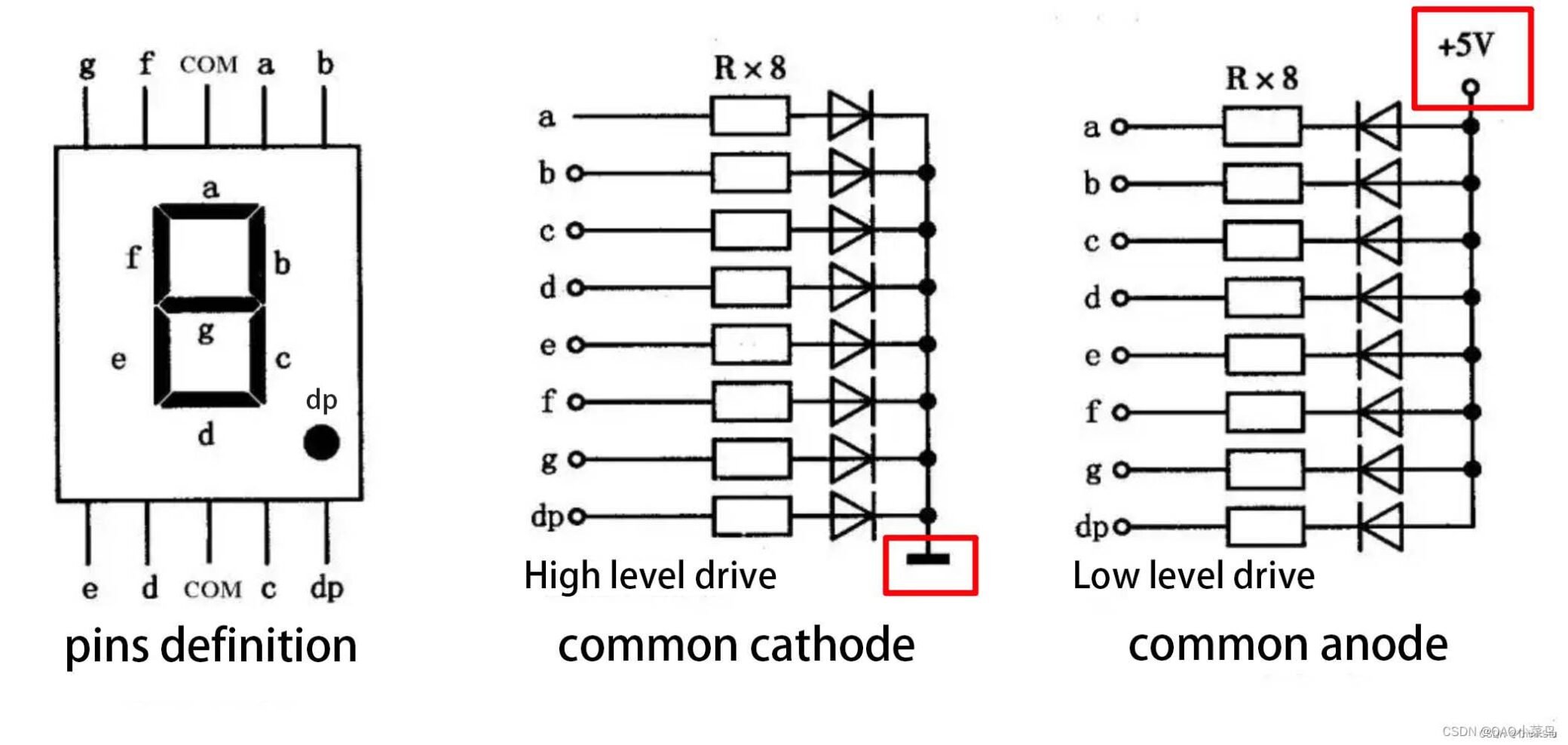
It consists of 8 LEDs in total, each with a fixed code. Generally, we connect them to the MCU in alphabetical order, with ‘a’ as the low bit and ‘dp’ as the high bit. That is, when outputting 0X37 (binary 00110111), it means that f, e, c, b, a are at high level, and dp, g, d are at low level.
Thus, we can obtain a decoding table for 0~F.
Decoding table
| NUMBER | COMMON CATHODE | COMMON ANODE |
|---|---|---|
| 0 | 0x3F | 0xC0 |
| 1 | 0x06 | 0xF9 |
| 2 | 0x5B | 0xA4 |
| 3 | 0x4F | 0xB0 |
| 4 | 0x66 | 0x99 |
| 5 | 0x6D | 0x92 |
| 6 | 0x7D | 0x82 |
| 7 | 0x07 | 0xF8 |
| 8 | 0x7F | 0x80 |
| 9 | 0x6F | 0x90 |
| A | 0x77 | 0x88 |
| b | 0x7C | 0x83 |
| C | 0x39 | 0xC6 |
| d | 0x5E | 0xA1 |
| E | 0x79 | 0x86 |
| F | 0x71 | 0x8E |
Here, use the 89C52 MCU to write an example code
					#include <REGX52.H>
unsigned char SEG_CC[]=
    {0x3f,0x06,0x5b,0x4f,0x66,0x6d,0x7d,0x07,
    0x7f,0x6f,0x77,0x7c,0x39,0x5e,0x79,0x71};
//common cathode segment '0~F'
unsigned char SEG_CA[]=
    {0xc0,0xf9,0xa4,0xb0,0x99,0x92,0x82,0xf8,
    0x80,0x90,0x88,0x83,0xc6,0xa1,0x86,0x8e};
//common anode '0~F'
void main()
{
	while(1)
	{
		P2=SEG_CA[1];
		P3=SEG_CC[2];
	}
}

If the MCUs (such as Arduino and STM32) that require separate control of their pins need to be controlled based on the position of the pins, the code will be much more complicated. It is recommended to use an additional decoding chip for connection. The introduction of the chip control will be explained later.
Multi-Digit Nixie Tubes Usage method
A single nixie tube is easy to use, but it is definitely insufficient for display purposes. Therefore, in most cases, we use multi-digit nixie tubes for control. However, you don’t need to worry too much about the difficulty of learning, because a multi-digit nixie tube is just formed by paralleling the A~DP pins of multiple nixie tubes and using the common terminal as the digit selection pin of the nixie tube. You can check the multi-digit nixie tube in the simulation software to confirm this.

Since the a~dp pins are all connected in parallel, all the lit nixie tubes will display the same content during control, which is obviously not what we want. So what should we do? At this time, the “scanning” mode is needed.
The “scanning” mode sounds advanced, but in fact, it just lights up one nixie tube at a time and then the next one. At this point, you may wonder “why? This way can’t make the nixie tubes light up at the same time”. Don’t worry, you can try to write such a code in the MCU: switch to high (low) level after time T, then connect an LED to the output port (remember to connect a current-limiting resistor in series). By continuously reducing the switching time, you will find that it seems to stop flickering when the time is below a certain value. This is the basic principle of scanning, which uses the persistence of vision effect of the human eye (simply put, the human eye will retain an image for about 0.2 seconds, and this image will overlap with the image seen now, forming the so-called “motion blur”). By switching at high frequency to deceive our eyes, we thus mistakenly think they are all on together.
At this point, our code idea is very clear, which is to control multi-digit nixie tubes through high-frequency scanning. The following is the code for 89C52.
					#include <REGX52.H>
unsigned char SEG_CC[]=
	{0x3f,0x06,0x5b,0x4f,0x66,0x6d,0x7d,0x07,
	0x7f,0x6f,0x77,0x7c,0x39,0x5e,0x79,0x71};
//common cathode segment '0~F'
unsigned char SEG_CA[]=
	{0xc0,0xf9,0xa4,0xb0,0x99,0x92,0x82,0xf8,
	0x80,0x90,0x88,0x83,0xc6,0xa1,0x86,0x8e};
//common anode '0~F'
void main()
{
	while(1)
	{
		P2=SEG_CC[1];
		P3_4=1;
		P3_1=0;
		P2=SEG_CC[2];
		P3_1=1;
		P3_2=0;
		P2=SEG_CC[3];
		P3_2=1;
		P3_3=0;
		P2=SEG_CC[4];
		P3_3=1;
		P3_4=0;
	}
}

It can be clearly seen that the expected effect is not achieved. What is the reason for this? The problem lies in the switching process.
Our ideal switching process is that the a~dp pins (here in after referred to as: data pins) and the digit selection pin signals of the currently output nixie tube switch to the high and low levels required by the next nixie tube at the same time. However, the MCU’s code execution and output modification take time, which causes mutual interference between the data signals and digit selection signals of the nixie tubes. This is a problem that most ordinary MCUs cannot solve, so we have introduced a new technology: blanking.
Simply put, blanking technology means that when the output data is to be changed, first stop the output of the current digit selection pin, modify the data, and then switch to the next digit selection pin for output. By briefly turning off the display of the digital tube, interference problems caused by modifying the output of the data pins can be avoided.
The modified code is:
					#include <REGX52.H>
unsigned char SEG_CC[]=
	{0x3f,0x06,0x5b,0x4f,0x66,0x6d,0x7d,0x07,
	0x7f,0x6f,0x77,0x7c,0x39,0x5e,0x79,0x71};
//common cathode segment '0~F'
unsigned char SEG_CA[]=
	{0xc0,0xf9,0xa4,0xb0,0x99,0x92,0x82,0xf8,
	0x80,0x90,0x88,0x83,0xc6,0xa1,0x86,0x8e};
//common anode '0~F'
void main()
{
	while(1)
	{
		P2=SEG_CC[1];
		P3_1=0;
		P3_1=1;
		P2=SEG_CC[2];
		P3_2=0;
		P3_2=1;
		P2=SEG_CC[3];
		P3_3=0;
		P3_3=1;
		P2=SEG_CC[4];
		P3_4=0;
		P3_4=1;
	}
}
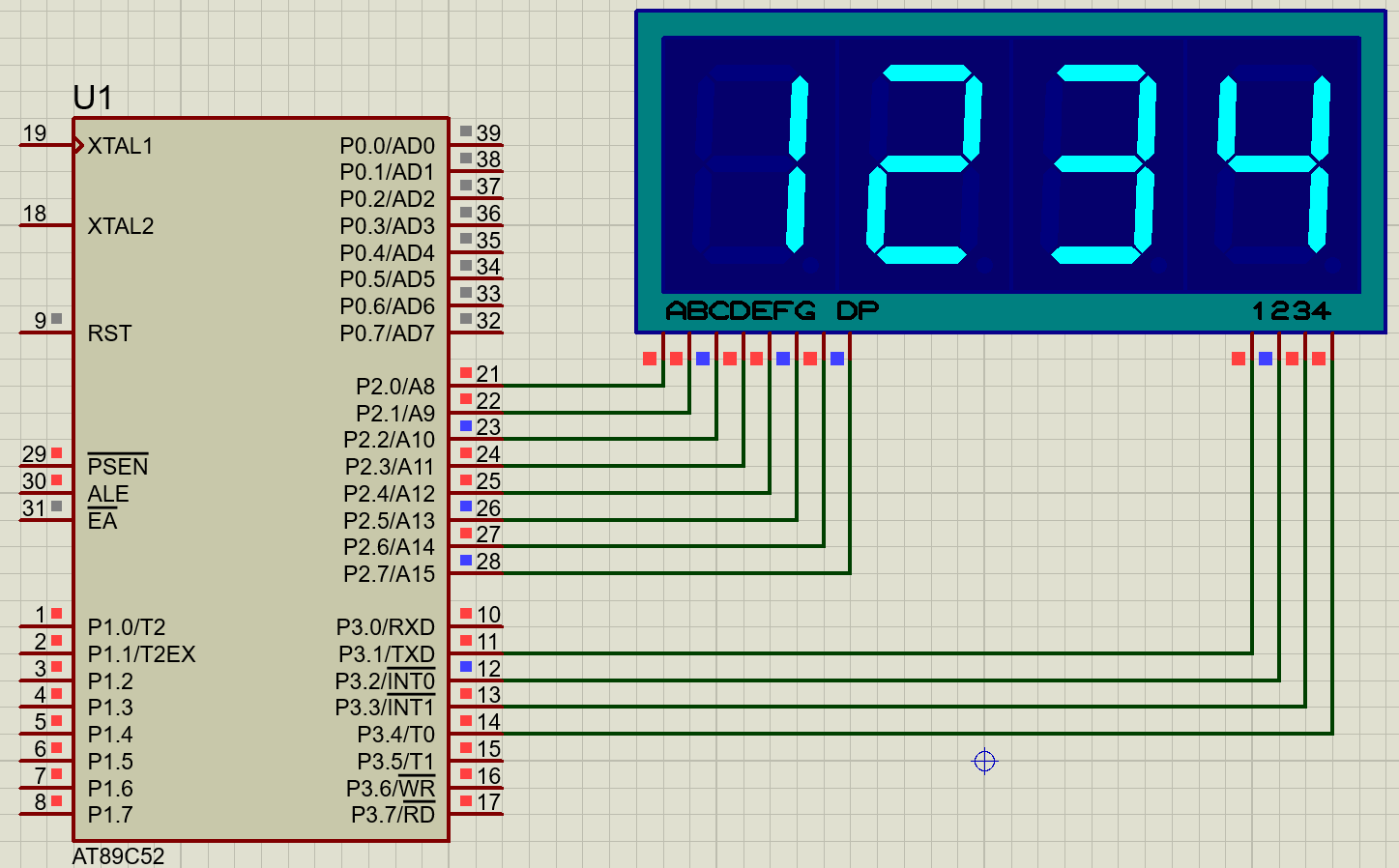
Although we have achieved the display of multi-digit nixie tubes, we can also see that too many I/O ports are used, and the wiring is very complicated each time. So is there a better design scheme? Then we need to use the theme of this time: 74HC595 chip.
What is 74HC595?
The 74HC595 is a common 8-bit serial-in parallel-out shift register, which is widely used in embedded systems, especially in nixie tube display and other application scenarios requiring multiple outputs. Its main feature is converting serially input data into parallel output, which can effectively save the pin resources of the microcontroller, thereby improving the expandability of the hardware.
74HC595 Working Principle
The working principle of the 74HC595 is based on a shift register. It inputs data serially, loads the data bit by bit according to the clock signal, and outputs the data in parallel at an appropriate time. The specific steps are as follows:
Data loading: Load data into the register through the serial input terminal (DS).
Clock signal: Data is shifted into the shift register under the trigger of the clock signal (SH_CP).
Data output: Obtain data through the parallel output terminals (Q0-Q7) and transmit it to other devices or modules.
Latch control: Use OE (Output Enable) and ST_CP (Storage Clock) to control whether data is output.
Application of 74HC595 in Nixie Tubes
In nixie tube applications, the 74HC595 is used to control the display of multi-digit numbers. Typically, a nixie tube display requires eight LEDs (8-segment nixie tube) and one control bit (digit selection). To display multiple numbers, multiple control signals are needed, and at this point, multiple 74HC595s can be used for expansion.
For example, if you want to use an Arduino to control a 4-digit nixie tube to display numbers, you can either use one 74HC595 for parallel data output to save data output pins, or use two cascaded 74HC595s for control. One responsible for data output and the other for digit selection signals. This way, only 3 data pins are needed to control the multi-digit nixie tube. In fact, many 4/8-digit nixie tubes are designed in this way, using serial signals to control the display content of each nixie tube, thereby reducing the number of required I/O pins.
74HC595 Nixie Tube Module Wiring
The connection method of the 74HC595 nixie tube module is relatively simple, and usually only the following pins need to be connected:
VCC and GND: Provide power supply.
SCLK: Data clock signal, reads data at high level.
RCLK: Chip select signal, low level is the active state.
DIO: Data input pin.
The names of data output pins used for cascading vary, which may be DOU/QH, and need to be judged by oneself.
Driving a 74HC595 to control a nixie tube with Arduino
The 74HC595 nixie tube display module commonly has 4/8 digits. Since only single pin needs to be controlled instead of a port, the code can be used in various MCUs, with only the pin output code being different. This design uses Arduino for control.
First, wire according to the following method in sequence. Of course, the wiring pins of the MCU are not fixed and can be modified in the code.
VCC – 3.3~5V
GND-GND
SCLK-PIN5
RCLK-PIN6
DIO-PIN7

The complete code is as follows
					#define CLK 5
#define CS 6
#define DIN 7
unsigned char SEG_CC[16]={0x3f,0x06,0x5b,0x4f,0x66,0x6d,0x7d,0x07,0x7f,0x6f,0x77,0x7c,0x39,0x5e,0x79,0x71};  // common cathode '0~F'
unsigned char SEG_CA[16]={0xc0,0xf9,0xa4,0xb0,0x99,0x92,0x82,0xf8,0x80,0x90,0x88,0x83,0xc6,0xa1,0x86,0x8e};  //common anode '0~F'
void setup() {
  pinMode(DIN, OUTPUT);
  pinMode(CLK, OUTPUT);
  pinMode(CS, OUTPUT);
}
void loop() {
  for(int i=0;i<100;i++){
    sendCmd(SEG_CA[0],0X08);
    delay(3);
    sendCmd(SEG_CA[1],0X04);
    delay(3);
    sendCmd(SEG_CA[2],0X02);
    delay(3);
    sendCmd(SEG_CA[3],0X01);
    delay(3);
  }
}
void sendCmd(byte add1, byte dat1) {
  digitalWrite(CS, LOW);    // Select chip
  //Send data
  for(byte i=0; i<8; i++){
    digitalWrite(CLK, LOW);
    digitalWrite(DIN,add1 & 0x80);
    add1 <<= 1;
    digitalWrite(CLK, HIGH);
  }
  //Send selection signal
  for(byte i=0; i<8; i++){
    digitalWrite(CLK, LOW);
    digitalWrite(DIN,dat1 & 0x80);
    dat1 <<= 1;
    digitalWrite(CLK, HIGH);
  }
  digitalWrite(CS, HIGH);
}
If your nixie tube has such a situation where the segments that need to be lit are not lit, and those that do not need to be lit are lit instead. It indicates that your nixie tube module is a common-cathode type. The array to be sent should be selected as “SEG_CC”, or you can just invert the array.

It should be noted that the sending order is to first send the nixie tube data and then send the nixie tube bit selection address. For a 8-segment display, only the bit selection address needs to be changed. In addition, it is not clear whether the interval of sending data using Arduino has become longer. This code can display normally without using blanking code. If you encounter display abnormalities, you can try to use blanking code to solve the problem.
FAQ
What is a 4 digit 7-segment display?
A 4-digit 7-segment display consists of 4 7-segment nixie tube displays. Each 7-segment nixie tube display needs to be controlled independently, and there are also special chips for multi-segment nixie tubes for control.
What devices use 7-segment display?
7-segment displays are widely used. They can be seen in occasions that only need to display numbers with high brightness, such as digital clocks, calculators, elevator floor displays, etc.
Can I use 7 segments to display letters?
Since 7-segment displays are specially designed for displaying numbers, their structure is relatively simple and can only display some letters such as “C”. Other letters cannot be displayed due to structural incompatibility. However, some nixie tubes now can meet other display requirements by increasing the number of segments and specific positions, but they require more control pins and have higher costs.
Logic gates for 7-segment display circuits
The 595 chip in the 74HC family is a serial-in parallel-out decoding chip. It can input data bit by bit and output data together during display. It not only has small input signal current and strong output power supply, but also can realize communication control with only 3 wires. Most importantly, it can be connected in series. Theoretically, only 3 I/Os can control a large number of nixie tubes. It is essentially a decoding chip designed solely for controlling the digital tube.
Are 7-segment displays still used?
Due to the advantages of simple structure and lower cost, nixie tubes are still used in some occasions that only need simple digital display, such as calculators, elevator floor displays, etc. Meanwhile, due to their characteristics of high contrast and high brightness, they have irreplaceable effects in some special occasions.
Do 7 segment displays need resistors?
Yes, a 7-segment display is essentially composed of multiple LEDs. To prevent the LEDs from being burned out, current-limiting resistors must be added. If your nixie tube is in a display mode with a control chip, there is basically no need to worry, because most of them have built-in current control or current-limiting resistors.
What does DP mean on a 7-segment display?
“DP” on a 7-segment nixie tube usually refers to an additional decimal point display, used to show non-integers. It is generally located at the lower right corner and can be controlled independently like other segments.
What voltage is required for 7-segment displays?
Only 3.3V-5V is required, and 5V is recommended as it can increase display brightness and stability.
How to make a digital clock with 7-segment display?
You need to first write a clock running code, and then use a multi-digit nixie tube (it is recommended to use an 8-digit nixie tube, which can display: 12-34-56) for display.
How to test 7-segment display without multimeter?
It is only necessary to make an LED test circuit, but it is essential to confirm the position of the common terminal of the 7-segment display. For a common-cathode nixie tube, the negative electrode needs to be connected to the common terminal (for a common-anode one, the positive electrode is connected to the common terminal). Then, connect the other end of the test circuit to the other pins of the nixie tube in sequence. Under normal circumstances, each pin except the common pin can light up one segment of the nixie tube.