

Blog
ky-037 high sensitivity sound detection module
What is the KY-037 module?
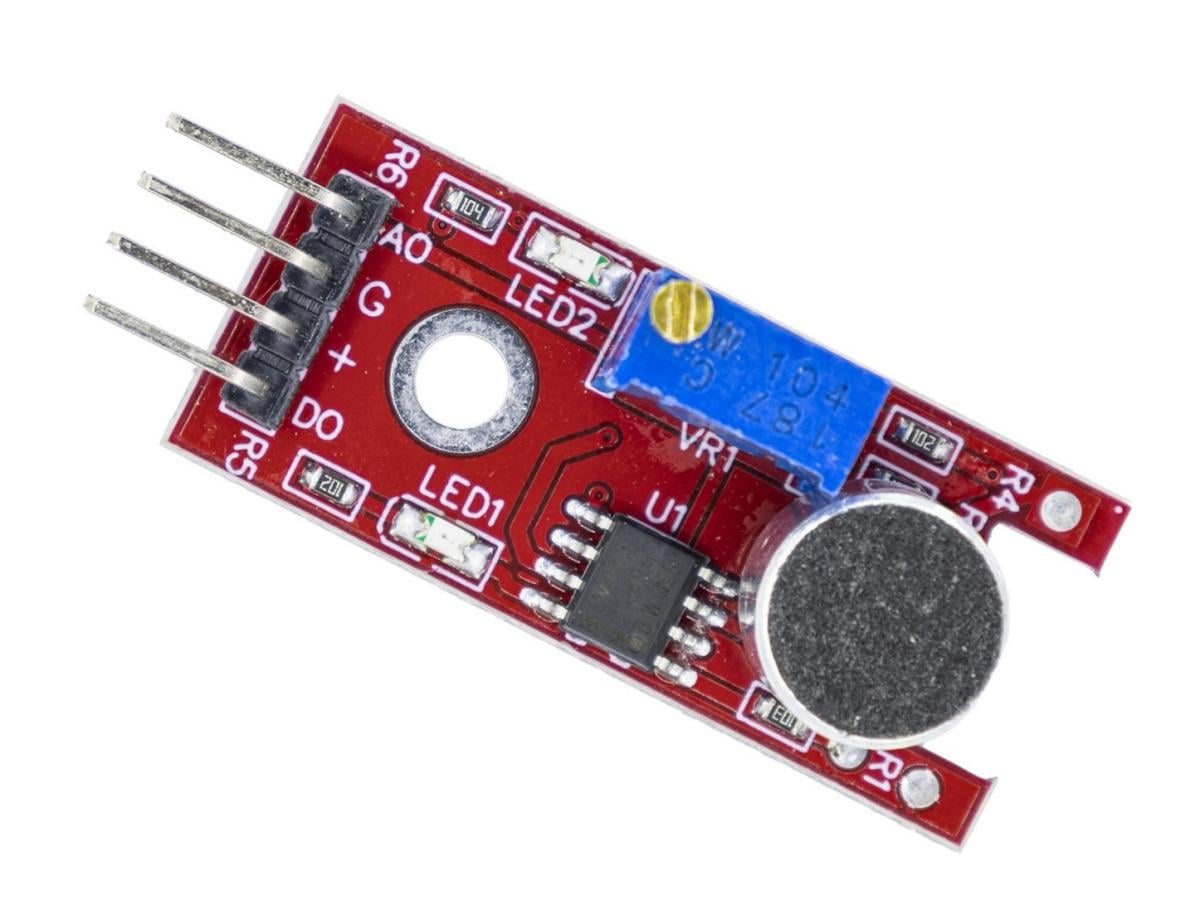
The KY-037 High-Sensitivity Microphone Module is an analog/digital signal sensor that use a condenser microphone to monitor changes in ambient noise. It captures even the slightest sound fluctuations and converts them into electrical signal outputs. This module is widely used in various applications requiring sound detection, such as smart homes, voice control systems, and sound alarm devices. The KY-037’s high sensitivity enables it to accurately respond to diverse sounds in the environment, providing users with a reliable sound monitoring solution.
What components does KY-037 consist of?
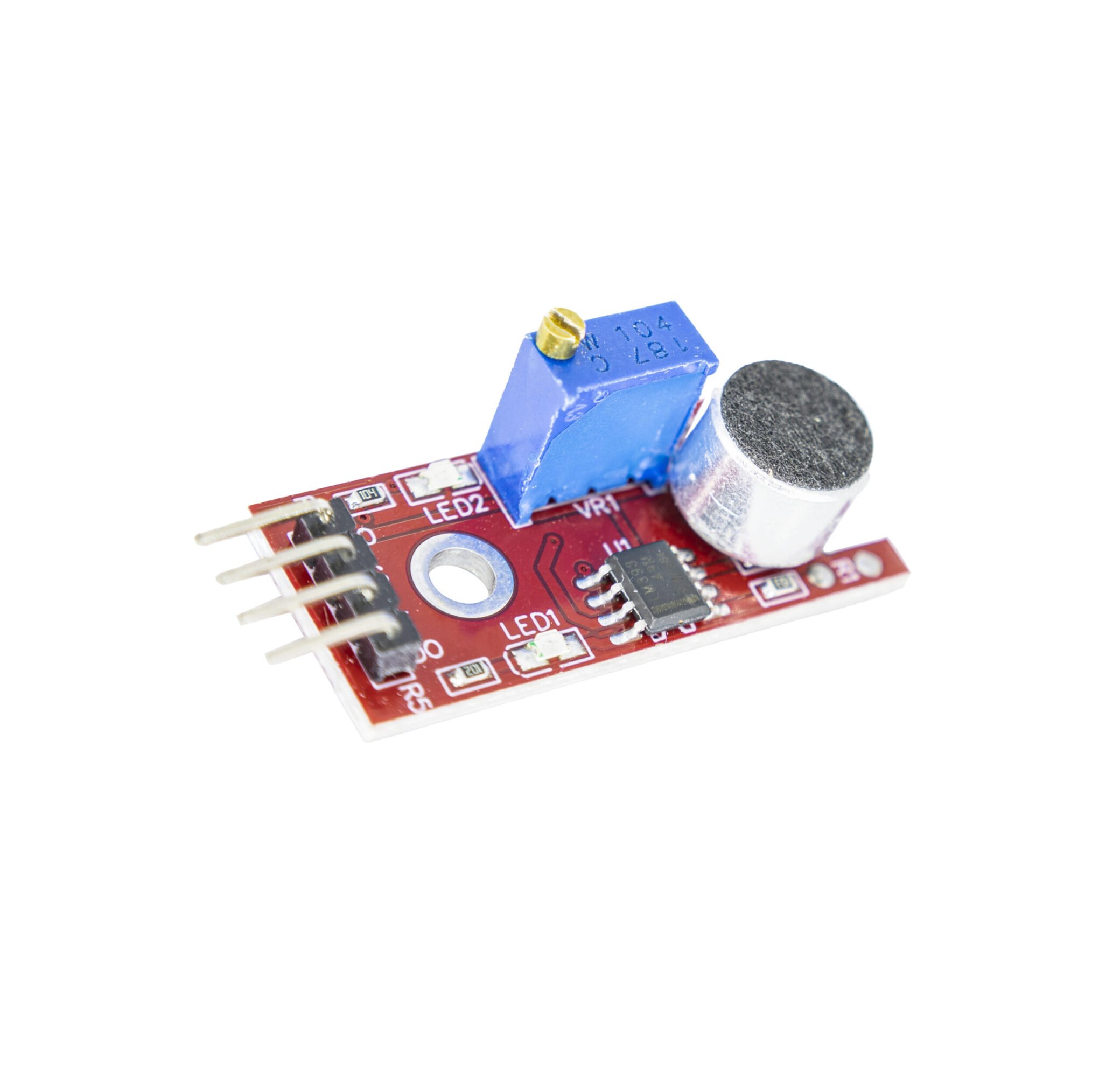
The KY-037 consists of a CMA-6542PF electret condenser microphone, an LM393 differential comparator for controlling digital output, a BAOTER3296W potentiometer for adjusting the detection threshold, 6 resistors, 2 LEDs, and 4 male pins. The CMA-6542PF electret condenser microphone captures sound waves, while the LM393 differential comparator compares the captured audio signal against a preset threshold to generate a digital output.
The BAOTER3296W potentiometer allows users to adjust the sound detection sensitivity as needed. Turning clockwise increases sensitivity, while counterclockwise reduces it. The 6 resistors provide current limiting and protection within the circuit. The 2 LEDs typically indicate the module’s operational status, such as lighting up when sound detection is successful.The 4 male pins make it convenient for users to connect the KY-037 module to other circuits or microcontrollers, like Arduino, enabling further development and application.
How does KY-037 work?
The working principle of KY-037 is as follows: When sound waves in the environment are captured by the CMA-6542PF electret condenser microphone, the microphone will convert the sound into an analog electrical signal. This analog electrical signal is then sent to the LM393 differential comparator. In the comparator, this signal is compared with a preset threshold. If the intensity of the sound signal exceeds this threshold, the LM393 will output a high-level signal; conversely, if the intensity of the sound signal is lower than the threshold, it will output a low-level signal.
This high and low level signal is the digital output of the KY-037 module, which can be used to trigger actions on other circuits or microcontrollers, such as triggering an alarm, recording sound events, etc. The BAOTER3296W potentiometer allows users to adjust this threshold according to the actual application scenario, thereby adjusting the sensitivity of the module to meet different sound detection requirements. At the same time, the LED light on the module will be turned on or off according to the status of sound detection, providing users with an intuitive visual feedback.
What is the advantage of KY-037?
The core advantage of the KY-037, and its most notable feature, lies in its integration of both analog and digital output capabilities.
- Integrated analog and digital outputs
- Adjustable sensitivity
- Built-in LM393 comparator
- Easy connectivity
- Low cost
KY-037 Functional Parameter Table
| Parameter | Value |
|---|---|
| Working Voltage | 3.3V ~ 5V |
| Main Chip | LM393 |
| Sensing Distance | Maximum sensing distance 0.5 meters |
| Microphone Reception Sensitivity | -42±3 dB |
| Product Dimensions | 15mm * 36mm |
KY-037 DATASHEET
Here, we provide you with the data manual for KY-037.
KY-037 pins

A0: Analog signal output, real-time output of microphone voltage signal
G: Ground
+: 3.3V/5V voltage input
D0: Digital signal output, outputs high/low level signal when sound intensity exceeds set threshold
KY-037 connected to Arduino
We can connect the KY-037 to an Arduino, then connect an OLED display. Using code, we can achieve the effect of picking up sound.

Sample code
					#include <Wire.h>
#include <Adafruit_GFX.h>
#include <Adafruit_SSD1306.h>

// OLED display settings
#define SCREEN_WIDTH 128
#define SCREEN_HEIGHT 64
#define OLED_RESET    -1
Adafruit_SSD1306 display(SCREEN_WIDTH, SCREEN_HEIGHT, &Wire, OLED_RESET);

// Microphone pin
#define MIC_PIN A0

// Data buffer
const int sampleWindow = 50; // Sampling window width (ms)
const int dataSize = 128;    // Number of data points
int waveData[dataSize];      // Store waveform data
int dataIndex = 0;           // Data index

// Sound parameters
unsigned int sample;
unsigned long startMillis;
unsigned int peakToPeak = 0;
unsigned int signalMax = 0;
unsigned int signalMin = 1024;

void setup() {
  Serial.begin(9600);

  // Initialize OLED
  if(!display.begin(SSD1306_SWITCHCAPVCC, 0x3C)) {
    Serial.println(F("SSD1306 allocation failed"));
    for(;;);
  }

  display.display();
  delay(2000);
  display.clearDisplay();

  // Set microphone pin
  pinMode(MIC_PIN, INPUT);

  Serial.println("System startup completed");
}

void loop() {
  // Collect sound data
  collectAudioData();

  // Update OLED display
  updateDisplay();

  // Short delay
  delay(50);
}

void collectAudioData() {
  startMillis = millis();
  signalMax = 0;
  signalMin = 1024;

  // Collect audio data within 50ms
  while (millis() - startMillis < sampleWindow) {
    sample = analogRead(MIC_PIN);
    if (sample < 1024) {
      if (sample > signalMax) {
        signalMax = sample;
      } else if (sample < signalMin) {
        signalMin = sample;
      }
    }
  }

  // Calculate peak-to-peak value
  peakToPeak = signalMax - signalMin;

  // Store data in buffer
  waveData[dataIndex] = peakToPeak;
  dataIndex = (dataIndex + 1) % dataSize;
}

void updateDisplay() {
  display.clearDisplay();

  // Draw title
  display.setTextSize(1);
  display.setTextColor(SSD1306_WHITE);
  display.setCursor(0, 0);
  display.print("Sound Level: ");
  display.print(peakToPeak);
  display.print("   ");

  // Draw waveform
  for (int i = 0; i < dataSize - 1; i++) {
    int currentIndex = (dataIndex + i) % dataSize;
    int nextIndex = (dataIndex + i + 1) % dataSize;

    // Map to screen height
    int y1 = map(waveData[currentIndex], 0, 1023, SCREEN_HEIGHT - 5, 15);
    int y2 = map(waveData[nextIndex], 0, 1023, SCREEN_HEIGHT - 5, 15);

    // Draw line segment
    display.drawLine(i, y1, i + 1, y2, SSD1306_WHITE);
  }

  // Draw X-axis
  display.drawLine(0, SCREEN_HEIGHT - 5, SCREEN_WIDTH, SCREEN_HEIGHT - 5, SSD1306_WHITE);

  // Real-time volume indicator
  int meterWidth = map(peakToPeak, 0, 500, 0, SCREEN_WIDTH);
  display.fillRect(0, SCREEN_HEIGHT - 3, meterWidth, 3, SSD1306_WHITE);

  // Display threshold line (optional)
  display.drawLine(0, SCREEN_HEIGHT - 20, SCREEN_WIDTH, SCREEN_HEIGHT - 20, SSD1306_WHITE);

  display.display();
}

// Optional: Serial plot function
void serialPlot() {
  Serial.print("Wave:");
  for (int i = 0; i < dataSize; i++) {
    Serial.print(waveData[i]);
    Serial.print(",");
  }
  Serial.println();
  Serial.print("Peak:");
  Serial.println(peakToPeak);
}
FAQS
How do you adjust the sensitivity of KY-037?
The KY-037 incorporates a BAOTER3296W potentiometer, which allows users to adjust the sound detection sensitivity as needed. Turning clockwise increases sensitivity, while turning counterclockwise decreases it.
How to check if a sound sensor is working?
If your sound sensor is working properly, you should see the sound waveform diagram and volume indicator updated in real time on the OLED screen. Additionally, when sound intensity exceeds the preset threshold, the KY-037’s digital output pin D0 will output a high-level signal. This can be verified by connecting an LED or other indicator device. If the LED illuminates upon sound detection, it confirms the sound sensor is operating correctly. Besides, you can also check the collected sound data through the serial monitor to further confirm the working status of the sensor.
What is the KY-037 module?
The KY-037 High-Sensitivity Microphone Module is an analog/digital signal sensor that use a condenser microphone to monitor changes in ambient noise. It captures even the slightest sound fluctuations and converts them into electrical signal outputs. This module is widely used in various applications requiring sound detection, such as smart homes, voice control systems, and sound alarm devices. The KY-037’s high sensitivity enables it to accurately respond to diverse sounds in the environment, providing users with a reliable sound monitoring solution.