

Blog
MOS Transistor Application in IRF520 Module
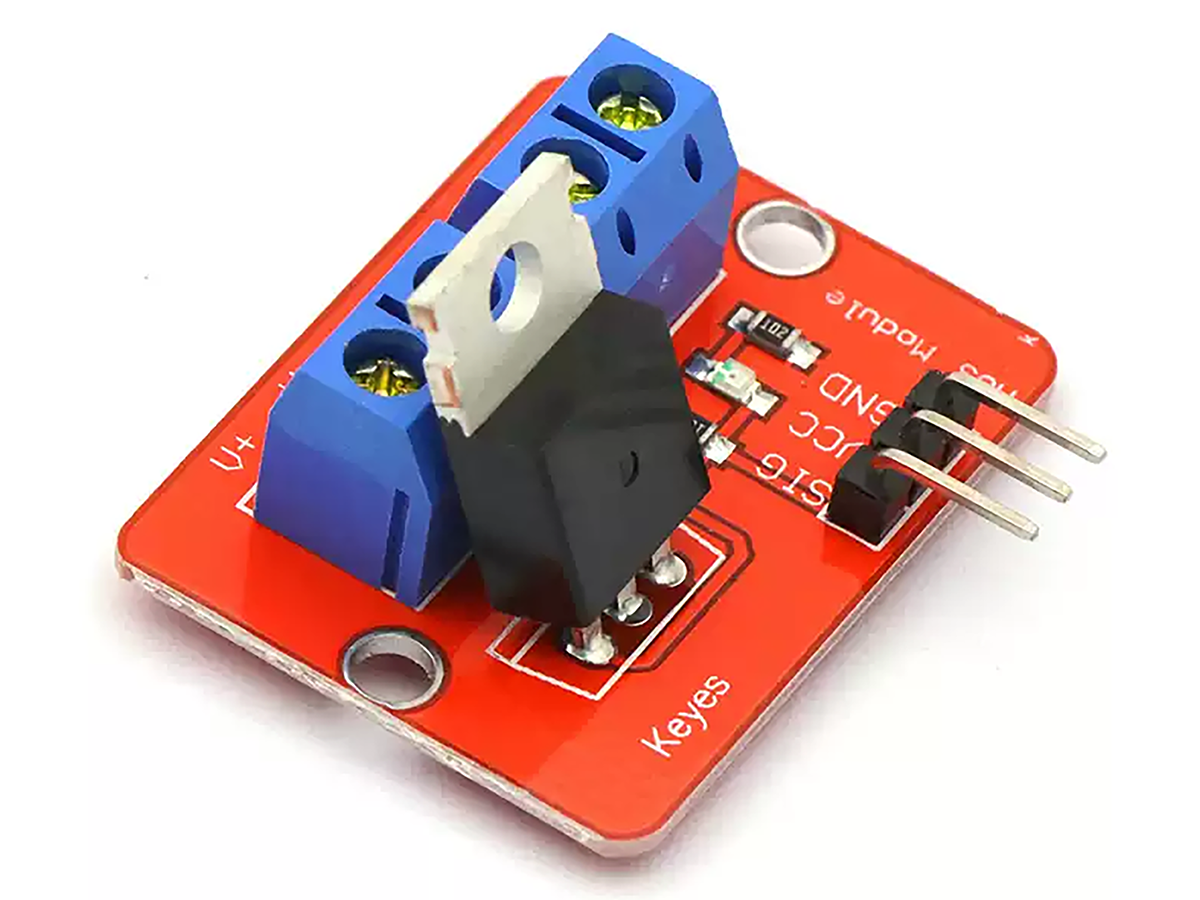
Introduction to IRF520 MOSFET
The IRF520 is a common N-channel power MOSFET with key performance parameters:
- Maximum drain-source voltage (Vds): 100V
- Maximum continuous drain current (Id): 9.2A (at 25°C)
- On-resistance (Rds(on)):0.27Ω @ Vgs=10V
This means the load can handle a maximum of 100V and 9.2A. Notably, its standard turn-on voltage is 10V. Driving it directly with a 5V power supply from a microcontroller will cause the MOSFET to heat up, result in insufficient motor speed, and lead to obvious voltage drops. However, it can drive small loads (like small motors) without significant heating due to low power consumption.
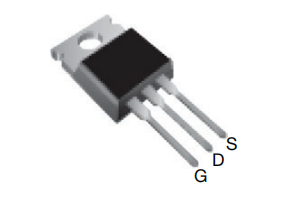
IRF520 Application
The IRF520 is mainly used for switching and power control, suitable for low-frequency switching circuits. It is commonly applied in low-end switching, PWM speed/dimming control, relay replacement, power management, and other fields, with wide usage in circuits.
IRF520 MOSFET Parameter Specification

Usage Method of the IRF520 Module
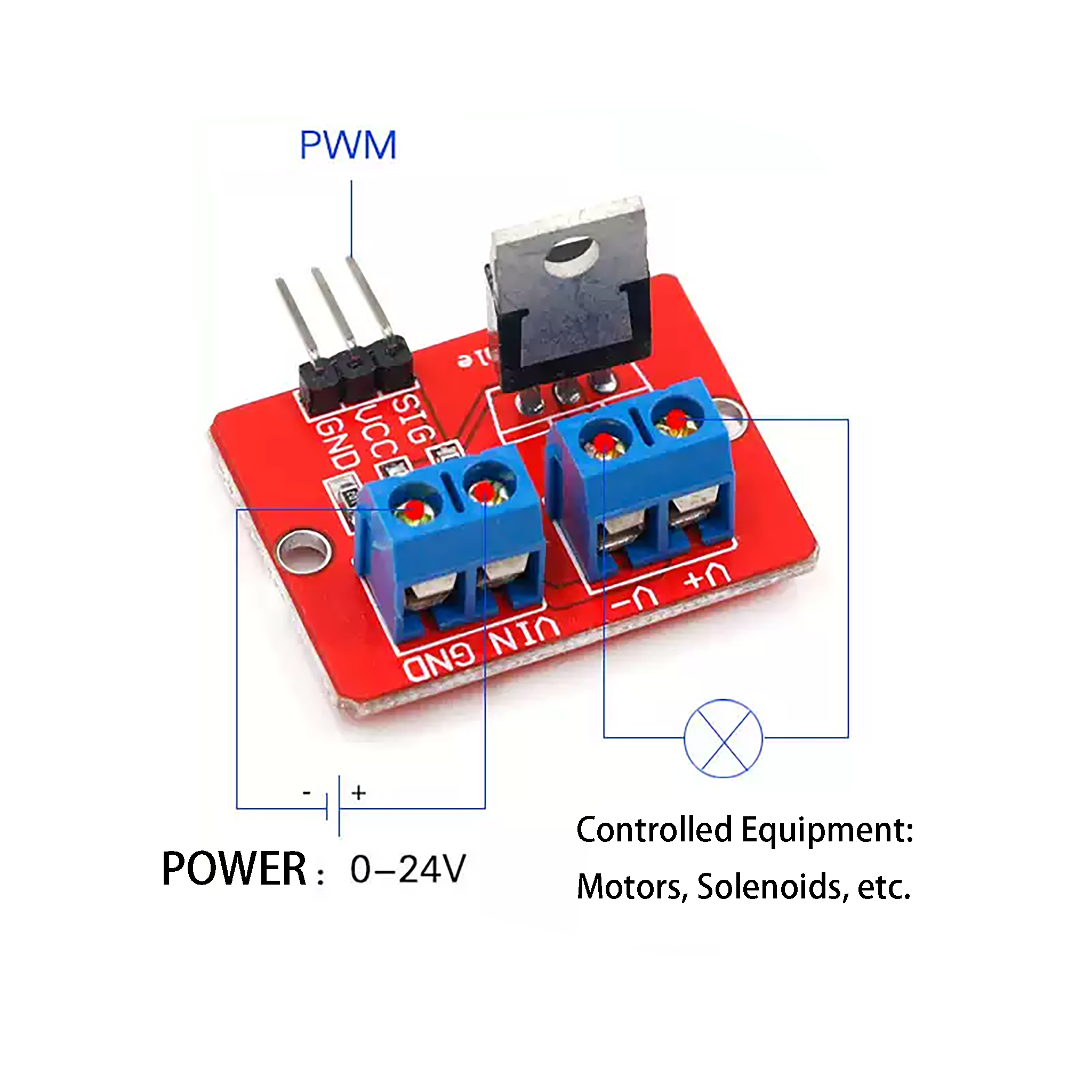
This module utilizes the IRF520 MOSFET. The module connects Vin to the positive pole of the load power supply to energize the load, and uses the SIG pin to supply power to the Gate of the IRF520 for driving.
- Connecting to Arduino’s 5V can turn on the MOSFET but not fully. It is only suitable for driving low-power motors (typically 1-3W) to avoid heat dissipation issues and insufficient motor speed.
- It is generally used for experiments and small motor demonstrations. For full conduction with 10V drive voltage and high-power devices, additional heat dissipation measures are required.
- The VCC pin can be left unconnected (no internal connections).
Effect Demonstration
This demonstration uses an Arduino UNO, a motor, and an IRF520 MOSFET module:
- Connect the IO pin: Connect the IO pin of the Arduino to the SIG pin of the module.
- Connect GND pins: Connect all GND pins together.
- Connect external power supply: Connect an external power supply and the motor to the module.
Control the high/low level duration and frequency of the IO pin via code to output PWM signals. The motor will operate successfully and respond as programmed. Note that using a 5V interface means the IRF520 is not fully conducting, so it can only drive such small motors.
Parameter Specification
| Parameter | Specification |
|---|---|
| PWM Voltage | 3.3V, 5V |
| Output Load Voltage | 0-24V |
| Output Load Current | <5A (heatsink required for currents above 1A) |
| Port Type | Digital Level |
| Product Weight | 10g |
| Product Size | 33×24mm |
Product Dimension

Pin Description
- SIG: PWM signal input terminal
- VIN: Positive pole of output load voltage
- GND: Ground (shared by all circuits)
- V+: Positive pole of the controlled device
- V-: Negative pole of the controlled device
Usage Demonstration
The following demonstration used an Arduino UNO as the PWM signal transmitter to control a motor that rotates correspondingly based on different PWM duty cycles. The reference code is as follows:
					int pwmPin = 9;        // PWM control pin
int buttonPin = 2;     // Button pin (connected to GND, using pull-up resistor)

int lowSpeed = 85;     // Low speed
int mediumSpeed = 170; // Medium speed
int highSpeed = 255;   // High speed

int currentSpeed = 0;  // Current speed level (0 = Off, 1 = Low, 2 = Medium, 3 = High)
int lastButtonState = HIGH; // Last button state
int buttonState;       // Current button state

void setup() {
  pinMode(pwmPin, OUTPUT);
  pinMode(buttonPin, INPUT_PULLUP); // Enable internal pull-up resistor
  analogWrite(pwmPin, 0); // Initial state: Off
}

void loop() {
  // Read button state
  buttonState = digitalRead(buttonPin);

  // Detect button press (falling edge)
  if (buttonState == LOW && lastButtonState == HIGH) {
    // Debounce delay
    delay(50);
    // Confirm button state again
    if (digitalRead(buttonPin) == LOW) {
      changeSpeed(); // Switch speed
    }
  }

  lastButtonState = buttonState;
}

void changeSpeed() {
  // Switch to next speed level (cycle: Off -> Low -> Medium -> High -> Off...)
  currentSpeed = (currentSpeed + 1) % 4;

  // Set PWM output according to current speed level
  switch(currentSpeed) {
    case 0:
      analogWrite(pwmPin, 0);        // Off
      break;
    case 1:
      analogWrite(pwmPin, lowSpeed);   // Low speed
      break;
    case 2:
      analogWrite(pwmPin, mediumSpeed); // Medium speed
      break;
    case 3:
      analogWrite(pwmPin, highSpeed);   // High speed
      break;
  }

  // Wait for button release to avoid continuous triggering
  while(digitalRead(buttonPin) == LOW) {
    delay(10);
  }
  delay(50); // Post-release debounce delay
}
The performance is shown in the video.
FAQ
What logic level is lRF520?
The IRF520 is not a logic-level MOSFET; it requires about 10V on the gate (Vgs) to fully turn on. At 3.3V or 5V logic levels from a microcontroller, it will only partially conduct, making it suitable for light loads like LEDs or small motors, but not for high-current applications.
What is the minimum gate voltage for lRF520?
The IRF520 has a threshold voltage of 2–4 V, which is the minimum gate voltage to start conducting a tiny current.