

Blog
The SHT20 Guide: Compact, Precise, Essential – Your Next Temp/Humidity Sensor
Introduction
In scenarios like the Internet of Things (IoT), smart homes, and industrial control, accurate collection of temperature and humidity data is a core component. A reliable, cost-effective sensor can make data acquisition solutions much more efficient. As a classic humidity and temperature sensor launched by Sensirion, the SHT20 temperature and humidity sensor has become a top choice for many developers thanks to its fully calibrated digital output, low-power design, and excellent long-term stability. It adopts a convenient I2C interface, allowing direct output of accurate data without complex calibration—making it easily adaptable to both entry-level DIY projects and industrial applications. Today, we’ll take you through a comprehensive exploration of the SHT20, covering everything from product understanding to practical application, so you can master this popular sensor at once.
What is the SHT20?
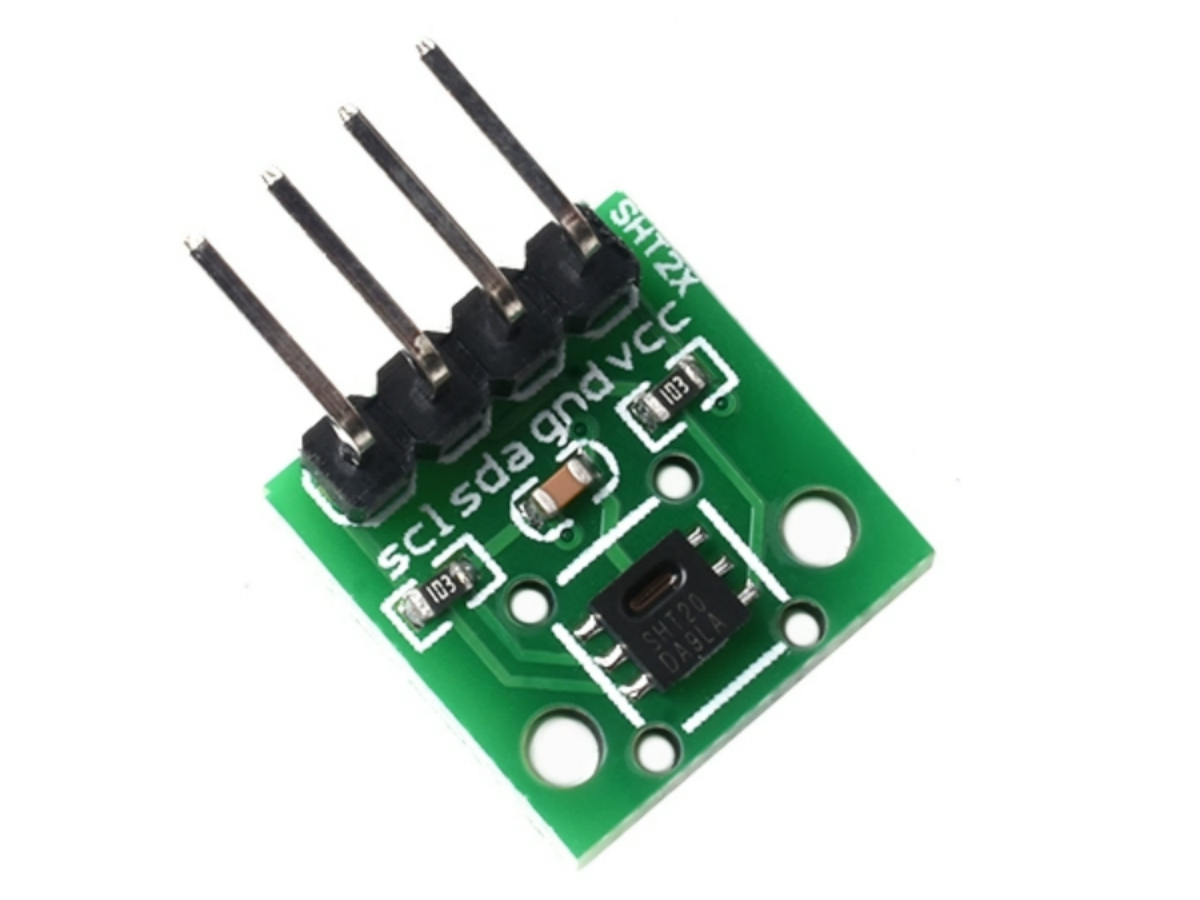
The SHT20 is a digital humidity and temperature sensor developed by Sensirion based on its 4th-generation CMOSens® technology. Housed in a compact 3x3mm Dual Flat No-leads (DFN) package with a height of just 1.1mm, its small size enables easy integration into various space-constrained devices.
It integrates a capacitive humidity sensor, a bandgap temperature sensor, and dedicated analog-to-digital integrated circuits onto a single chip. No external components are required to collect, calibrate, and digitally output temperature and humidity signals. It also supports adjusting measurement resolution (8–12 bits for humidity, 12–14 bits for temperature) via commands, and a checksum function significantly enhances communication reliability.
As a low-power sensor, the SHT20 consumes only 0.15–0.4μA in sleep mode and 200–330μA in measurement mode, making it ideal for battery-powered IoT end devices. Additionally, it fully complies with RoHS and WEEE standards, containing no harmful substances like lead, cadmium, or mercury—making it environmentally friendly and widely applicable.
SHT20 vs SHT30 vs SHT40—How to Choose?
The SHT series sensors dominate the market with their stable performance, and the SHT20, SHT30, and SHT40 are the three most frequently compared models. Many developers struggle to distinguish between them, the table below breaks down their core differences to help you decide quickly:
| FEATURE | SHT20 | SHT30 | SHT40 |
|---|---|---|---|
| Humidity Accuracy | ±3%RH (typical) | ±2%RH (typical) | ±1.8%RH (typical) |
| Temperature Accuracy | ±0.3°C (typical) | ±0.2°C (typical) | ±0.1°C (typical) |
| Response Time | 8s (63% humidity step) | 4s (63% humidity step) | 3s (63% humidity step) |
| Power Consumption | 0.6–1.0mW (measurement) | 1.2mW (measurement) | 1.5mW (measurement) |
| Package Size | 3×3×1.1mm (DFN) | 3×3×1.1mm (DFN) | 2.5×2.5×0.9mm (DFN) |
| Cost (Retail, 1pc) | $2.60–$9.80 | $2.99–$9.90 | $2.60–$9.99 |
| Key Strengths | Budget-friendly, general-purpose | Balanced accuracy and cost | Ultra-high accuracy, fast response |
In short: For most hobbyist projects or applications where extreme precision isn’t critical, the SHT20 offers unbeatable value. If you need slightly better accuracy, the SHT30 is a step up, while the SHT40 is reserved for industrial or scientific use cases where every decimal point matters.
We should also mention how the SHT20 stacks up against other popular sensors like the DHT22. Unlike the DHT22’s single-wire interface (which is prone to interference), the SHT20’s I2C interface is more reliable and supports higher data transfer rates. Plus, the SHT20’s long-term stability and factory calibration make it a more dependable choice for long-term projects.
| COMPARISON DIMENSION | SHT20 | DHT22 |
|---|---|---|
| Communication Interface | I2C | 1-Wire |
| Humidity Accuracy | Typical ±3% RH | Typical ±2% RH (20-80% RH) |
| Temperature Accuracy | Typical ±0.3°C | Typical ±0.5°C |
| Long-Term Stability | Humidity < 0.25% RH / year | Prone to Drift, Requires Periodic Calibration |
| Power Consumption (Sleep) | 0.15-0.4μA | <100μA |
| Supply Voltage | 2.1-3.6V | 3.3-5.5V |
| Anti-Interference Ability | Strong (I2C Bus) | Weak (1-Wire Susceptible to Interference) |
SHT20 Datasheet
If you want to learn more SHT20 temperature and humidity sensor details, you can refer to this datasheet.
Core Components of the SHT20
The SHT20’s high integration is one of its key strengths, with its internal structure including:
- Capacitive relative humidity sensor:Detects ambient humidity and converts changes in capacitance into electrical signals.
- Bandgap temperature sensor:Accurately measures ambient temperature with excellent temperature linearity.
- Signal amplifier: Amplifies weak sensor signals to improve detection sensitivity.
- A/D converter:Converts analog signals to digital signals to ensure data accuracy.
- OTP memory:Stores factory calibration data, eliminating the need for user re-calibration.
- Digital processing unit: Processes data and outputs it via the I2C interface, supporting command interaction and resolution adjustment.
SHT20 Pinout
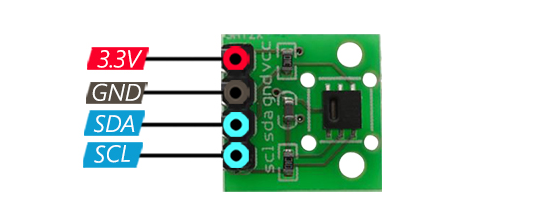
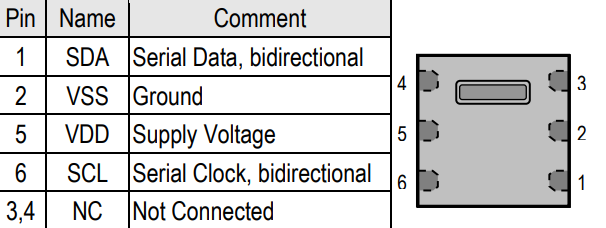
What’s more, the SHT20 uses a DFN package with 6 pins. The core functional pins are SDA , SCL , VDD, and VSS; the other two are NC pins (no connection, left floating). The chip’s central pad is internally connected to VSS—for better heat dissipation and stability, it is recommended to solder this pad to the PCB ground.
Parameter Specification
| Parameter | Value |
|---|---|
| Humidity Measurement Range | 0-100%RH |
| Humidity Measurement Accuracy | ±3%RH |
| Temperature Measurement Range | -40-125°C |
| Temperature Measurement Accuracy | ±0.3°C |
| Operating Voltage | 2.1V~3.6V DC |
| Interface Output | I2C |
| PCB Size | 12mm*12mm |
How to Use the SHT20? (Step-by-Step Guide from Wiring to Programming)
1. Hardware Wiring (Arduino Example)
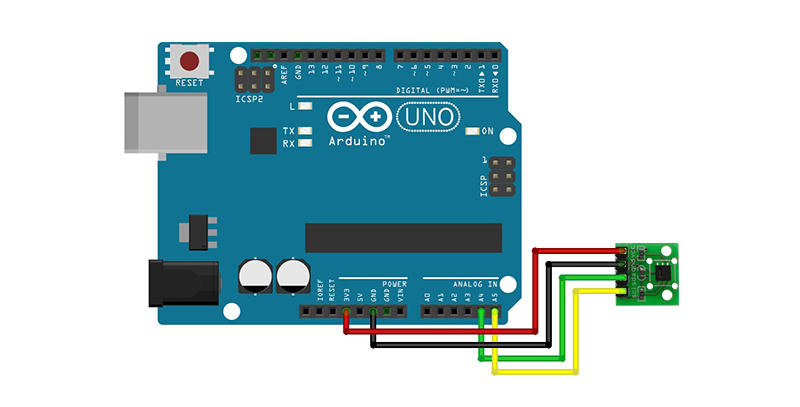
The SHT20’s I2C interface simplifies wiring—no complex circuits are needed. The core connections are as follows:
- VDD → Arduino 3.3V (Note: Do NOT connect to 5V, as this may damage the sensor)
- GND→ Arduino GND
- SDA → Arduino A4
- SCL → Arduino A5
2. Programming Implementation (Arduino Practical Example)
Programming the SHT20 is straightforward: Send commands via I2C to trigger measurements, read the returned data, and convert it to actual temperature and humidity values. Below is a complete Arduino example code, including data reading, conversion, and serial output:
					#include <Wire.h>

#define SHT20_ADDR 0x40
#define TRIG_TEMP_MEAS 0xF3
#define TRIG_HUMI_MEAS 0xF5

void setup() {
  Wire.begin();
  Serial.begin(9600);
  while (!Serial); // Wait for serial port to connect
  Serial.println("SHT20 Temperature and Humidity Sensor Test");
  delay(100);
}

void loop() {
  float temp = readTemperature();
  float humi = readHumidity();

  Serial.print("Temperature: ");
  Serial.print(temp);
  Serial.print(" °C, Humidity: ");
  Serial.print(humi);
  Serial.println(" %RH");

  delay(1000);
}

float readTemperature() {
  Wire.beginTransmission(SHT20_ADDR);
  Wire.write(TRIG_TEMP_MEAS);
  Wire.endTransmission();

  delay(50); // Wait for measurement (≈66ms for 14-bit resolution)

  Wire.requestFrom(SHT20_ADDR, 3);
  while (Wire.available() < 3);

  uint16_t tempData = (Wire.read() << 8) | Wire.read();
  Wire.read(); // Read checksum (optional for basic use)

  return -46.85 + 175.72 * (tempData & 0xFFFC) / 65536.0;
}

float readHumidity() {
  Wire.beginTransmission(SHT20_ADDR);
  Wire.write(TRIG_HUMI_MEAS);
  Wire.endTransmission();

  delay(30); // Wait for measurement (≈22ms for 12-bit resolution)

  Wire.requestFrom(SHT20_ADDR, 3);
  while (Wire.available() < 3);

  uint16_t humiData = (Wire.read() << 8) | Wire.read();
  Wire.read(); // Read checksum (optional for basic use)

  float humidity = -6.0 + 125.0 * (humiData & 0xFFFC) / 65536.0;
  return constrain(humidity, 0.0, 100.0);
}
FAQS
Can the I2C address of the SHT20 be modified?
No. The SHT20 has a fixed I2C address of 0x40, which cannot be changed via commands or hardware. If multiple temperature-humidity sensors are needed on the same I2C bus, choose models that support address modification (e.g., some SHT3x variants) or use an I2C multiplexer for expansion.
Does the SHT20 support Modbus?
The SHT20 itself doesn’t support Modbus natively, but you can pair it with a Modbus-I2C bridge or use a microcontroller to convert I2C data to Modbus. If you specifically need Modbus, search for “sht20 modbus” modules, which integrate this functionality.
What measurement modes does the SHT20 support?
It supports two measurement modes: Hold Master mode and No Hold Master mode. In Hold Master mode, the sensor pulls down the SCL pin to force the host to wait, then releases it once the measurement is complete. In No Hold Master mode, the host can handle other tasks while the sensor is measuring and needs to poll to confirm completion—suitable for scenarios with concurrent communication of multiple devices.