

Blog
GY-25 Tilt Angle Module MPU6050 Gyro Acceleration
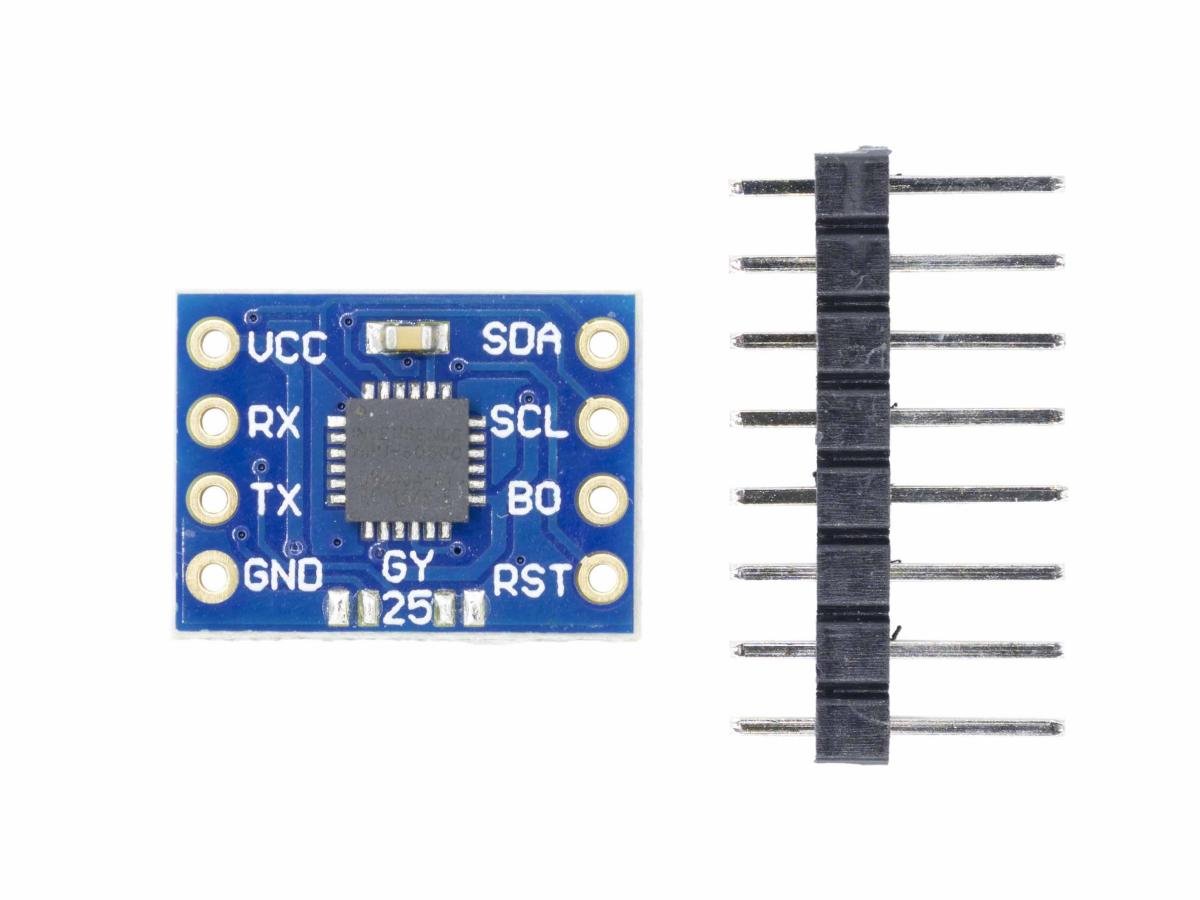
Hey, tech enthusiasts! If you’re on the hunt for an amazing angle – measuring gadget, don’t miss out on the GY – 25 tilt angle module! Just like the frequently searched “gyro” and “gyros near me”, with its precise angle measurement, it’s quietly “showing off” in all kinds of tech scenarios. Let’s dive in and uncover its secrets together!
When developing applications requiring attitude sensing, obtaining stable and reliable tilt angles is a core task. The GY-25 module, with its feature of ready-to-use angle output, greatly simplifies this process. Its internal core is equipped with an MPU6050 chip, which is directly responsible for collecting raw gyroscope and accelerometer data. A built-in processor executes complex sensor fusion algorithms. Finally, the accurately filtered Pitch and Roll angle values are output via the serial port. This article will elaborate on how to use the GY-25 module with MPU6050 to quickly and efficiently implement tilt angle measurement.
What is gyro mpu6050 chip?
The MPU6050 is an integrated 6-axis motion processing component. Compared with multi-component solutions, it eliminates the problem of time-axis discrepancy between combined gyroscopes and accelerometers, and significantly reduces packaging space. When connected to a 3-axis magnetometer, the MPU-60X0 provides complete 9-axis motion fusion output to its main I2C or SPI port (SPI is only available on the MPU-6000).
The MPU-6050 (MPU-6000) features a full-scale angular velocity sensing range of ±250, ±500, ±1000, and ±2000 degrees per second (dps), enabling accurate tracking of both fast and slow motions.
For data transmission, the product can use I2C with a maximum speed of 400kHz or SPI with a maximum speed of 20MHz (the MPU-6050 does not support SPI). The MPU-6000 can operate at different voltages.
What is GY-25 tilt angle module?
GY-25 is a low-cost tilt angle module. It has an operating voltage of 3-5 V, low power consumption and small size. GY-25 working principle is that it obtains direct angle data through data fusion algorithms based on gyroscopes and acceleration sensors. The GY-25 tilt module communicates with the host computer in a full-duplex manner with TTL level via serial port. This product features high precision and high stability. It can obtain accurate angles at any position, with output baud rates of 9600bps and 115200bps, and two output modes (continuous output and inquiry output). The GY-25 tilt module can adapt to different working environments. It can be connected to all single-chip microcomputers and computers.
More importantly, it comes with built-in temperature compensation and dynamic filtering algorithms, enabling stable output even in vibrating or moving scenarios, far from the “drifting” issue commonly seen with the MPU6050. Additionally, the module has a built-in calibration function. Zeroing operation can be completed with simple commands, making it easy for beginners to use.
GY-25 Working Principle
As the core chip of the GY-25 module, the MPU6050 plays a crucial role. It is a six-axis motion processing sensor integrating a three-axis accelerometer and a three-axis gyroscope, which can simultaneously measure the acceleration and angular velocity of an object in three axes. The accelerometer can detect the linear motion of the object, such as tilt under gravity, vibration, free fall and other states. The gyroscope focuses on measuring the rotational motion of the object and calculating its rotation angle. This integrated design with multiple functions greatly simplifies the hardware circuit design, reduces the occupied space, and also lowers the cost. It also integrates a 16-bit ADC inside, which can convert the analog signals collected by the sensor into digital signals and store them, facilitating subsequent data processing and transmission.
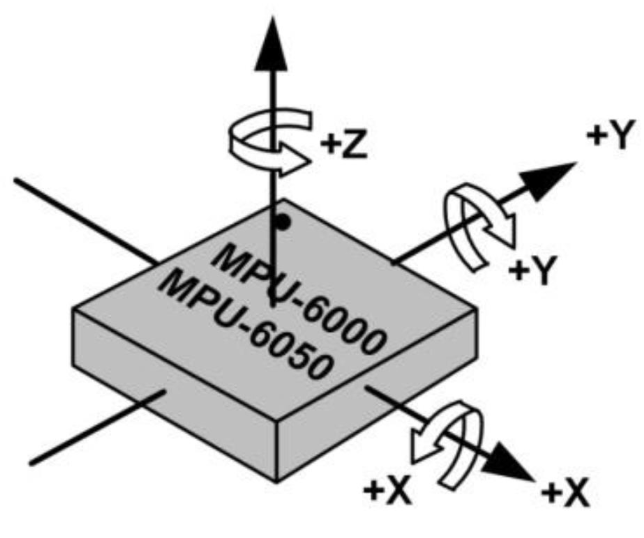
Dual-sensor collaboration
- Gyroscope
The gyroscope inside the MPU6050 chip is a key component for the GY-25 to achieve rapid angle detection, and its working principle is based on the law of conservation of angular momentum. Simply put, when a high-speed rotating object (such as the rotor inside the gyroscope) is not affected by external torque, the direction of its rotation axis will remain unchanged. In the GY-25, the gyroscope can quickly sense the direction change of the device in a short time and output the corresponding rotational speed information (i.e., angular velocity). For example, when a Unmanned Aerial Vehicle turns quickly in the air, the gyroscope can quickly capture this movement and accurately measure the angular velocity changes in each axis. This data provides key dynamic information for subsequent angle calculation. Due to its extremely sensitive response to rapid changes, the gyroscope plays an irreplaceable role in scenarios that require real-time tracking of rapid movements. However, the gyroscope also has certain limitations. As time passes, its measurement data will have a drift phenomenon, leading to a gradual increase in the cumulative error of angle calculation.
Gyroscopes are mostly used in navigation, positioning and other systems. Common examples include mobile phone GPS positioning and navigation, as well as satellite three-axis gyroscope positioning. A gyroscope is basically a directional instrument manufactured by utilizing the property that when an object rotates at high speed, its angular momentum is very large and the rotation axis will stably point in one direction. However, it must rotate fast enough or have sufficient inertia (which can also be said to have sufficient angular momentum). Otherwise, even a very small torque will seriously affect its stability.

- Acceleration sensor
The acceleration sensor is mainly responsible for detecting the direction of the static gravity vector to derive the angle change of the device relative to the horizontal plane. Its operation is based on Newton’s second law F=ma (force equals mass multiplied by acceleration). In a static state, the acceleration sensor mainly detects gravitational acceleration (approximately 9.8m/s²). When the GY-25 module tilts, gravity generates different components on each axis of the acceleration sensor. By measuring these components, the tilt angles of the module relative to the horizontal plane on each axis can be calculated using trigonometric relationships. For example, when the module rotates around the X-axis, the acceleration sensor can accurately calculate the pitch angle through the arctangent function based on the acceleration components on the X-axis and Z-axis. In a static or slow-moving state, the acceleration sensor can provide highly accurate angle data without time-accumulated drift errors. However, once the device is in dynamic motion, such as rapid vibration or accelerated movement, the acceleration measured by the acceleration sensor includes not only gravitational acceleration but also the acceleration generated by the device’s own motion, which increases measurement errors and affects the accuracy of angle detection in dynamic scenarios.
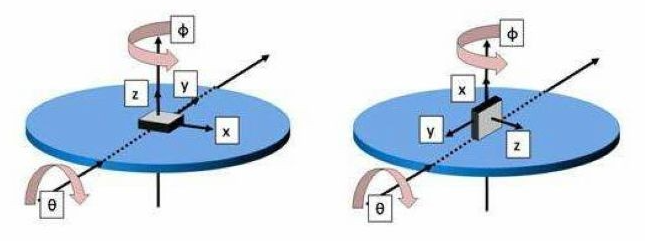
The key role of the data fusion algorithm
Relying solely on a gyroscope or an acceleration sensor cannot achieve high-precision angle detection in all scenarios, and the data fusion algorithm has become the key to solving this problem. It is like an experienced commander, reasonably integrating and analyzing the data collected by the gyroscope and the acceleration sensor, overcoming the limitations of a single sensor, and greatly improving the accuracy and stability of angle detection. Among common data fusion algorithms, the complementary filtering algorithm is widely used. It performs fusion based on the characteristic differences of the gyroscope and the acceleration sensor in different frequency bands. In a short time, it relies on gyroscope data to quickly track angle changes because the gyroscope is sensitive to dynamic changes. While on a longer time scale, it relies on the data of the acceleration sensor to correct the cumulative error generated by the gyroscope, because the acceleration sensor has relatively accurate angle measurement in static or slow movement. For example, in the application of a balance car, when the balance car starts to accelerate or turns quickly, the gyroscope data enables the system to quickly sense the instantaneous change of the angle and timely adjust the motor output to maintain balance. During the stable driving phase of the balance car, the acceleration sensor data calibrates the angle to ensure that the balance car always maintains the correct posture.
Another more complex but higher-precision algorithm is the Kalman filter algorithm. Based on the state-space model, it can perform optimal estimation of angles in the presence of noise interference by predicting the system state and updating the measurement data. Taking Unmanned Aerial Vehicle flight attitude control as an example, when a Unmanned Aerial Vehicle flies in the air, it will be subject to various interferences such as air currents and vibrations. The Kalman filter algorithm can integrate the data from the gyroscope and acceleration sensor, combine with the UAV’s motion model, and calculate the UAV’s attitude angles in real time and accurately, enabling the UAV to fly stably and complete various complex flight tasks.
The Differentiated Advantages of GY-25 and MPU6050
Although the GY-25 is built on the MPU6050 chip, it is not a simple application of the chip. Instead, it demonstrates unique advantages in overall performance and application scenarios. In terms of performance, the GY-25 surpasses the performance of the MPU6050 chip alone in terms of angle detection accuracy and stability through professional data fusion algorithms and optimized circuit design.
For instance, in the high-precision position monitoring scenarios of industrial automation equipment, the GY-25 can stably output accurate angle data over a long period of time, reducing the equipment operation deviations caused by sensor errors. If the MPU6050 chip has not undergone similar system optimization, it may experience certain data drift after prolonged operation. In terms of application scenarios, the GY-25 is more targeted and user-friendly. It supports direct output of angle data through the UART interface, allowing developers to integrate it into their projects quickly without delving into the complex register operations and data processing procedures of the MPU6050 chip. This significantly shortens the development cycle. As a result, the GY-25 has a clear advantage in small projects that demand high development efficiency, such as intelligent pan-tilt control in smart homes and simple posture adjustment in small robots.
In contrast, the MPU6050 chip is more suitable for large-scale projects that have higher requirements for the underlying control of sensors and need to customize functions deeply. Developers need to spend more time and effort on the development of underlying drivers and the writing of data processing algorithms.
Communication Protocol
(1) Serial Communication Parameters (Default Baud Rate: 115200 bps)
Baud rate: 9600 bps Parity bit: N Data bits: 8 Stop bits: 1
Baud rate: 115200 bps Parity bit: N Data bits: 8 Stop bits: 1
Note: The baud rate can be selected via the solder points on the PCB.

(2) Output format, each frame contains 8 bytes (Hex):
① Byte0: 0xAA Frame Header Flag
② Byte1: 0x00~0xFF High 8 Bits of Yaw Angle
③ Byte2: 0x00~0xFF Low 8 Bits of Yaw Angle
④ Byte3: 0x00~0xFF High 8 Bits of Pitch Angle
⑤ Byte4: 0x00~0xFF Low 8 Bits of Pitch Angle
⑥ Byte5: 0x00~0xFF High 8 Bits of Roll Angle
⑦ Byte6: 0x00~0xFF Low 8 Bits of Roll Angle
⑧ Byte7: 0x55 Frame end flag
Calculation method: Angle = ( (HIGH << 8) | LOW ) / 100;
Example : Given the following data [0xAA, 0x00, 0x64, 0x03, 0xE8, 0x27, 0x10, 0x55]
Yaw angle = 1.00 °
Pitch angle = 10.00 °
Roll Angle = 100.00 °
(3) Command Byte, sent from the external controller to the module (Hex)
① 0xA5 + 0x51: query mode, return directly to the angle value,this command needs to be sent each read.
② 0xA5 + 0x52: Automatic mode, return directly to the angle value, just send it once during initialization
③ 0xA5 + 0x53: Automatic mode, ASCII code output, convenient for direct viewing with a computer serial port assistant
④ 0xA5 + 0x54: correction mode, calibrate pitch angle and roll angle to 0 degrees, which needs to be sent when keeping horizontal
⑤ 0xA5 + 0x55: correction mode, calibrate yaw angle to 0 degrees, reset heading at any angle to zero
GY-25 Pin Function
VCC | Power Supply 3-5V | RST | For internal use, no connection required (Floating) |
RX | Serial Port Data Reception | B0 | For internal use, no connection required (Floating) |
TX | Serial Port Data Transmission | SCL | I2C Clock |
GND | Power Ground | SDA | I2C Data |
GY-25 Parameter
Product Name | Tilt angle module | Communication Method | Serial Communication (Baud Rate: 9600, 115200), I2C Communication (only read raw data) |
Power Supply | 3V-5V (with internal low dropout regulation) | Operating Temperature | -20°C~85°C |
Operating Current | 15mA | Storage Temperature | -40°C~125°C |
Measurement Range | -180°~180° | Module Size | 15.5mm×11.5mm |
Angle Resolution | 0.01° | Pin Pitch | 2.54mm |
Chip | MCU+MPU6050 | Pitch Angle | ±180°(±90°+ ±90°) |
Measurement Accuracy | 1 °(Inclination) | Roll Angle | ±180° |
Response Frequency | 100Hz(115200bps) | Yaw Angle | ±180° |
GY-25 Arduino Tutorial
GY-25 Pinout
Arduino | GY-25 | OLED |
3.3V | VCC | VCC |
GND | GND | GND |
RX | TX | \ |
TX | RX | \ |
SCL | \ | SCL |
SDA | \ | SDA |
GY-25 Code
					// GY-25 ARDUINO TEST CODE SSD1306 OLED DISPLAY WITH GRAPHICS
// Improved roll angle visualization

#include <Wire.h>
#include <Adafruit_GFX.h>
#include <Adafruit_SSD1306.h>

#define SCREEN_WIDTH 128
#define SCREEN_HEIGHT 64
#define OLED_RESET     -1

Adafruit_SSD1306 display(SCREEN_WIDTH, SCREEN_HEIGHT, &Wire, OLED_RESET);

int YPR[3];
unsigned char Re_buf[8], counter = 0;
unsigned char sign = 0;

//-----------------------------------------------------------
void setup()
{
  Serial.begin(115200);

  // Initialize OLED
  if(!display.begin(SSD1306_SWITCHCAPVCC, 0x3C)) {
    Serial.println(F("SSD1306 allocation failed"));
    for(;;);
  }

  display.display();
  delay(1000);
  display.clearDisplay();

  display.setTextSize(1);
  display.setTextColor(SSD1306_WHITE);
  display.setCursor(0, 0);
  display.println("GY-25 Initializing...");
  display.display();

  delay(2000);
  Serial.write(0XA5);
  Serial.write(0X52);    // Initialize GY25, continuous output mode

  display.clearDisplay();
  display.setCursor(0, 0);
  display.println("GY-25 Ready");
  display.display();
  delay(1000);
}

//-------------------------------------------------------------
void loop() {
  if(sign)
  {
     sign = 0;
     if(Re_buf[0] == 0xAA && Re_buf[7] == 0x55)
     {
        YPR[0] = (Re_buf[1] << 8 | Re_buf[2]) / 100;  // Yaw
        YPR[1] = (Re_buf[3] << 8 | Re_buf[4]) / 100;  // Pitch
        YPR[2] = (Re_buf[5] << 8 | Re_buf[6]) / 100;  // Roll

        // Serial output
        Serial.print("YPR:\t");
        Serial.print(YPR[0]); Serial.print("\t");
        Serial.print(YPR[1]); Serial.print("\t");
        Serial.println(YPR[2]);

        // Draw gyroscope visualization
        drawGyroscope();

        delay(50); // Slightly longer delay for smoother display
     }
  }
}

//---------------------------------------------------------------
void drawGyroscope() {
  display.clearDisplay();

  int centerX = SCREEN_WIDTH / 2;
  int centerY = SCREEN_HEIGHT / 2;

  // Draw reference horizon line (for roll visualization)
  int horizonY = centerY;
  display.drawLine(0, horizonY, SCREEN_WIDTH, horizonY, SSD1306_WHITE);

  // Draw roll indicator (airplane wing representation)
  drawRollIndicator(centerX, centerY, YPR[2]);

  // Draw pitch indicator (simple up/down marker)
  drawPitchIndicator(centerX, centerY, YPR[1]);

  // Draw yaw compass at the bottom
  drawYawCompass(YPR[0]);

  // Draw angle values
  display.setTextSize(1);
  display.setCursor(0, 0);
  display.print("Y:"); display.print(YPR[0]); display.print((char)247);
  display.print(" P:"); display.print(YPR[1]); display.print((char)247);
  display.print(" R:"); display.print(YPR[2]); display.print((char)247);

  display.display();
}

//---------------------------------------------------------------
void drawRollIndicator(int centerX, int centerY, int roll) {
  // Draw a simple airplane representation for roll
  int wingLength = 20;

  // Calculate wing positions based on roll angle
  float rollRad = roll * PI / 180.0;

  // Left wing
  int leftWingX = centerX - wingLength * cos(rollRad);
  int leftWingY = centerY - wingLength * sin(rollRad);

  // Right wing
  int rightWingX = centerX + wingLength * cos(rollRad);
  int rightWingY = centerY + wingLength * sin(rollRad);

  // Draw fuselage (center line)
  display.drawLine(centerX - 5, centerY, centerX + 5, centerY, SSD1306_WHITE);

  // Draw wings
  display.drawLine(centerX, centerY, leftWingX, leftWingY, SSD1306_WHITE);
  display.drawLine(centerX, centerY, rightWingX, rightWingY, SSD1306_WHITE);

  // Draw wing tips
  display.drawCircle(leftWingX, leftWingY, 2, SSD1306_WHITE);
  display.drawCircle(rightWingX, rightWingY, 2, SSD1306_WHITE);
}

//---------------------------------------------------------------
void drawPitchIndicator(int centerX, int centerY, int pitch) {
  // Simple pitch indicator (up/down marker)
  int pitchOffset = map(constrain(pitch, -30, 30), -30, 30, -15, 15);

  // Draw pitch reference lines
  for (int i = -2; i <= 2; i++) {
    int lineY = centerY + i * 10;
    if (lineY >= 0 && lineY < SCREEN_HEIGHT) {
      display.drawLine(centerX - 5, lineY, centerX + 5, lineY, SSD1306_WHITE);
    }
  }

  // Draw current pitch position
  int pitchY = centerY - pitchOffset;
  if (pitchY >= 0 && pitchY < SCREEN_HEIGHT) {
    display.drawTriangle(
      centerX - 8, pitchY,
      centerX + 8, pitchY,
      centerX, pitchY - 6, SSD1306_WHITE
    );
  }
}

//---------------------------------------------------------------
void drawYawCompass(int yaw) {
  // Draw a simple compass at the bottom
  int compassY = SCREEN_HEIGHT - 15;
  int compassWidth = SCREEN_WIDTH - 20;
  int compassCenter = SCREEN_WIDTH / 2;

  // Draw compass base line
  display.drawLine(10, compassY, SCREEN_WIDTH - 10, compassY, SSD1306_WHITE);

  // Draw compass needle (normalized to 0-360)
  int normalizedYaw = yaw % 360;
  if (normalizedYaw < 0) normalizedYaw += 360;

  // Map yaw to compass position
  int needlePos = map(normalizedYaw, 0, 360, 10, SCREEN_WIDTH - 10);

  // Draw needle
  display.drawTriangle(
    needlePos, compassY - 8,
    needlePos - 3, compassY,
    needlePos + 3, compassY,
    SSD1306_WHITE
  );

  // Draw compass markers
  display.setCursor(compassCenter - 5, compassY + 2);
  display.print("N");
  display.setCursor(10, compassY + 2);
  display.print("W");
  display.setCursor(SCREEN_WIDTH - 20, compassY + 2);
  display.print("E");
}

//---------------------------------------------------------------
void serialEvent() {
  while (Serial.available()) {
    Re_buf[counter] = (unsigned char)Serial.read();
    if(counter == 0 && Re_buf[0] != 0xAA) return;
    counter++;
    if(counter == 8)
    {
       counter = 0;
       sign = 1;
    }
  }
}
GY-25 Effect Demonstration
GY-25 Precautions
(1) The module performs self-calibration when powered on, requiring a static state for more than 3 seconds. It is recommended not to hold the module by hand.
(2) Due to the gimbal lock issue with Euler angles, roll and pitch will interact when they reach 90 degrees.
(3) Short-circuit the solder joints on the right side of the module. After restarting, the module enters IIC mode. The customer can operate the sensor independently, and the module’s MCU will not perform any operations on the sensor.
(4) The module’s I/O uses TTL level, which can be directly connected to the MCU’s serial port, but cannot be directly connected to the computer’s 9-pin serial port.
(5) Baud rate modification commands
A5 56 Modify the baud rate to 115200
A5 57 Modify the baud rate to 9600
GY-25 Application Scenario
- Attitude Correction for Small Unmanned Systems: Provides real-time tilt angle data for micro-UAVs (Unmanned aerial vehicles) and underwater unmanned submersibles, and corrects flight/navigation attitude deviations in conjunction with dynamic filtering algorithms, adapting to narrow-space operation scenarios.
- Motion Capture for Wearable Devices: Integrated into VR/AR somatosensory handles and sports bracelets, it accurately captures the tilt angles of wrists and arms, improving the real-time performance of virtual interaction or motion data monitoring.
- Anti-shake for Industrial Precision Equipment: Used in small laser measuring instruments and portable detection probes to offset tilt errors caused by hand shaking, ensuring the accuracy of precision detection data.
- Balance Control for Intelligent Robots: Provides pitch/roll angle feedback for small biped robots and spherical inspection robots, quickly adjusts power output, and realizes dynamic balance and adaptation to complex terrains.
Relying on the architecture of “dual sensors + algorithm fusion”, the GY-25 module achieves high-precision and anti-interference angle detection, demonstrating excellent performance in numerous fields. Its design based on the MPU6050 chip combines the advantages of gyroscopes and acceleration sensors, and performs data fusion through algorithms such as complementary filtering and Kalman filtering, effectively overcoming the limitations of a single sensor and providing a reliable solution for various applications that require accurate angle monitoring.
Looking to the future, with the continuous advancement of technology and the growing demand for applications, the GY-25 is expected to be applied in more emerging fields. For example, it can be used for head posture tracking in virtual reality (VR)/augmented reality (AR) devices to bring users a more immersive experience; in automated sorting equipment for intelligent logistics, it can accurately control the tilt angle of goods to improve sorting efficiency and accuracy. It is believed that the GY-25 module will continue to expand its application boundaries on the path of technological innovation and inject new vitality into the development of various industries.
Relative Information
Purchase Link
FAQ
- What is an tilt angle sensor?
Tilt sensors, also known as inclinometers, are a type of position sensor used to measure the angle or slope of an object. Inclinometers are one of the most common types of position sensors.
- Can a tilt sensor measure angles?
Capacitive inclination sensors have high accuracy and are particularly suitable for small angle variations. These sensors can measure various inclination angles ranging from small to large. They employ MEMS technology and are suitable for applications with limited space or lightweight requirements.
- Can the MPU6050 measure angles?
Using the MPU6050 to measure angles can be quite challenging, as it requires complex sensor fusion and offset calculations.