

Blog
GY-31 TCS230 TCS3200 Color Sensor
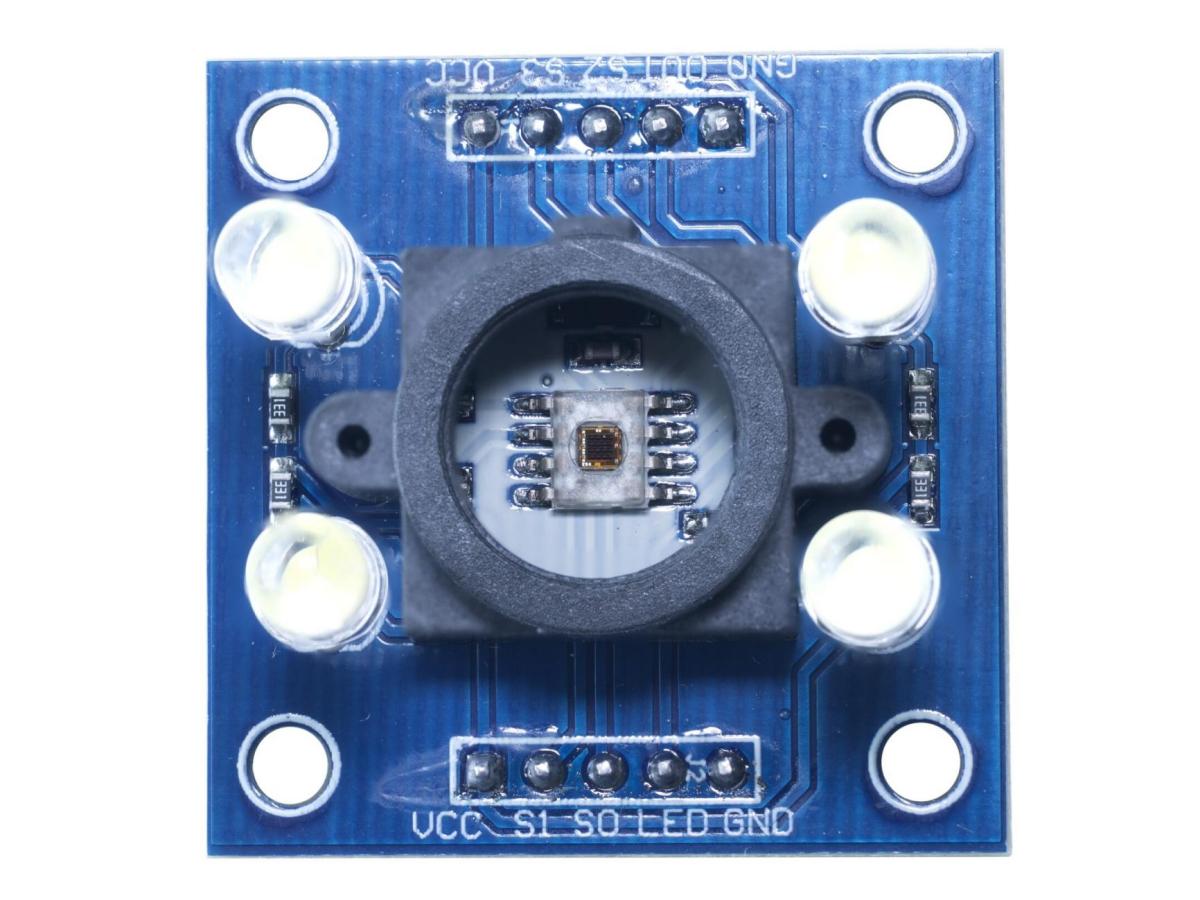
Have you ever wondered if machines can “see” colors? The GY-31 TCS230 TCS3200 Color Sensor is the key to achieving this magic! Whether you are an electronics enthusiast, a DIY expert, or a maker who wants to add some “color” to your project, this article will enable you to quickly understand this amazing color sensing module. From the basic principles, application scenarios, and hardware connections, it will guide you to explore the world of color recognition and enable your project to “understand” colors!
Color sensors are one of the indispensable components in modern electronic devices and industrial automation. And GY-31, as a common color sensor, is widely used in various application scenarios due to its simple design and efficient performance. The TCS3200 color sensor price is relatively affordable. The TCS3200 color sensor range typically covers RGB detection with adjustable sensitivity for various lighting conditions.
What is GY-31 TCS230 TCS3200 Color Sensor?
The GY-31 TCS230 is actually a color recognition module designed based on the TCS3200 chip. To put it simply, it is a little device that can “translate” colors into digital signals. The TCS3200 is the core chip, responsible for sensing colors and outputting frequency signals. The GY-31 is its “enclosure + driver board”, making it convenient for us to use directly.
It integrates a 16-bit analog-to-digital converter inside, capable of sensing red, green, and blue colors, and can also synthesize more rich color information through algorithms. In simple terms, it can “see” the color of an object and convert the color information into data that we can read.
TCS3200 Working Principle

TCS3200 Schematic Diagram
- The principle of primary colorsWhite is composed of a mixture of various frequencies of visible light, that is, white light contains various colored lights (such as Red, Yellow, Green, Cyan, Blue, and Purple). According to the trichromatic theory of the German physicist Helmholtz, all colors are formed by the mixture of three primary colors (red, green, and blue) in different proportions. Each color has a standard value. According to the above trichromatic induction principle, the value of a specific color is the linear combination of the standard values of the three primary colors (red, green, and blue).
- The identification principle of TCS320For the TCS3200, when a color filter is selected, it only allows a specific primary color to pass through and blocks the passage of other primary colors. For example, when the red filter is selected, only the red light in the incident light can pass through, while the blue and green lights are blocked. Thus, the intensity of the red light can be obtained. Similarly, by selecting other filters, the intensities of the blue and green lights can be obtained. Through these three light intensity values, the color of the light reflected onto the TCS3200D sensor can be analyzed. The TCS3200 sensor has four filters: red, green, blue, and clear. The filter mode can be selected through the high and low levels of its pins S2 and S3, as shown below.
S2 S3 PHOTODIODE TYPE L L Red L H Blue H L Clear (no filter) H H Green L represents low level, and H represents high level.
When the red, green, and blue light reflected by the measured object passes through the corresponding filters and reaches the TAOS TCS3200 RGB sensing chip, its built-in oscillator will output a square wave. The frequency of the square wave is proportional to the intensity of the sensed light. The stronger the light, the higher the frequency of the built-in oscillator’s square wave. The TCS3200 sensor has an OUT pin, where the frequency of the signal it outputs is also proportional to that of the built-in oscillator. The ratio factor can be selected by the high and low levels of the pins S0 and S1 , as shown below.
S0 S1 OUTPUT FREQUENCY SCALING (f0) L L Power down L H 2% H L 20% H H 100% Now we have processed the light intensity value, converting it into waves. Then, on this basis, we multiplied a factor to convert it into the signal frequency that is output from the OUT pin to the main control board. The only thing left is to obtain the corresponding RGB standard values for the color, and this requires us to perform white balance correction.
- White balance calibrationWhite balance is about telling the sensor what constitutes “white”. By using white as the reference color, it is possible to calculate the RGB standard values for other colors. Theoretically, white is formed by mixing equal amounts of red, blue, and green. Open the drawing software in your computer and select white to see it.

The editing color interface in the Window drawing function
However, in reality, the RGB values of white are not exactly the same, and the TCS3200 light sensor has different sensitivities to the three colors, resulting in different RGB outputs. Therefore, white balance correction must be performed to ensure that the “white” detected by TCS3200 has the same RGB value as the output.
TCS3200 calibration white balance method: Place a white object beneath the TCS3200 color sensor, with a distance of about 10mm between them. Turn on the 4 white LEDs on the sensor, then select the three primary color filters to allow the red, green, and blue light reflected by the measured object to pass through the filters respectively. Record the number of pulses output by the OUT pin. By dividing each corresponding color value by the white RGB standard value, the proportion factors of the three colors are obtained. With the RGB proportion factors obtained through white balance correction, the signals of other colors can be converted into RGB standard values.
S=255/ N0
E=S*N0
N0 is the measured pulse number for white balance, S is the RGB ratio factor, and E is the current RGB value of the detected color.
TCS3200 Feature
- Durable and long-lasting.
- Easy to install and simple to operate.
- High quality.
- Fine workmanship.
TCS3200 Pin Functions
| Pin | Definition |
|---|---|
| VCC | Connect to 2.7V~5.5V |
| GND | Connect to the power ground |
| LED | Connect to the IO port of the microcontroller (to control the states of four white LED lights) |
| OUT | Connect to the IO port of the microcontroller (for the output frequencies corresponding to the RGB primary colors) |
| S0/S1 | Connect to the IO port of the microcontroller (to select different output ratio factors) |
| S2/S3 | Connect to the IO port of the microcontroller (to select different color light filters) |
TCS3200 Parameters
| Specification | Value |
|---|---|
| Working Voltage | 2.7V ~ 5.5V |
| Recommended Detection Distance | 10mm |
| Size | 36.0mm * 20.6mm |
| Fixed Hole Size | 2.0mm |
TCS3200 vs TCS34725
| Parameter | TCS3200 | TCS34725 |
|---|---|---|
| Light Source | Requires external light source | Optional integrated white LED driver |
| Integration Control | None (fixed response) | Programmable (adjustable integration time) |
| Operating Voltage | 2.7V – 5.5V | 3.3V – 5V |
| Current Consumption | ~1mA (typical) | ~0.65mA (active mode, typical) |
| Output Type | Frequency (square wave) | Digital (I²C) |
| Accuracy | Moderate (affected by ambient light) | High (better color accuracy) |
| Applications | Simple color detection, sorting | High-precision color sensing (eg: displays, lighting control) |
| Key Advantages | Simple, low-cost, easy to use | High accuracy, digital interface, IR rejection |
| Key Limitations | No IR filtering, lower resolution | Higher cost, requires I²C protocol |
TCS3200 Color Sensor Arduino
TCS3200 Pinout
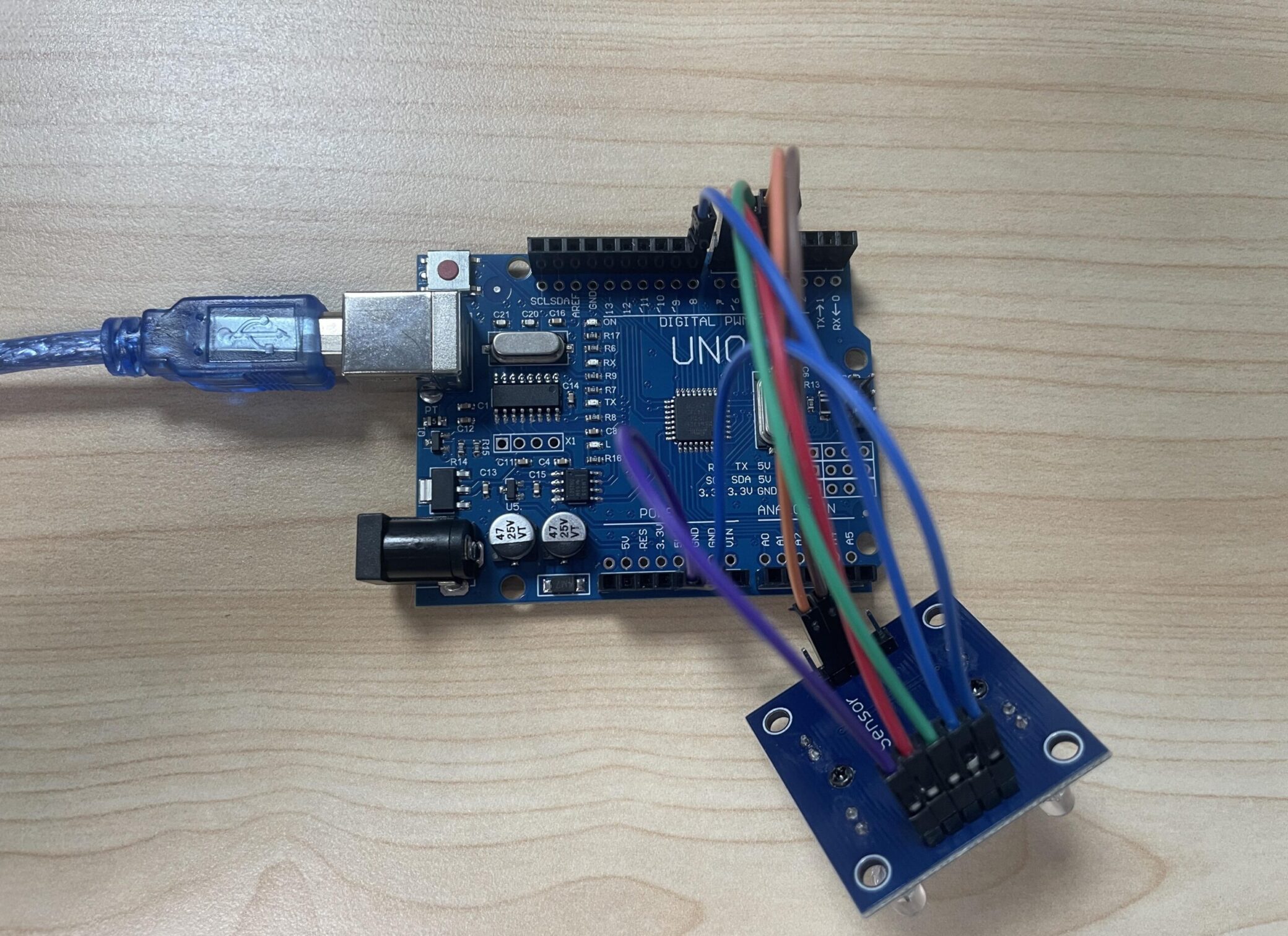
VCC ——> 5V
GND ——> GND
S0 ——> D4
S1 ——> D5
S2 ——> D6
S3 ——> D7
OUT ——> D8
Simulated Wiring Diagram

Physical Wiring Diagram
TCS3200 Color Sensor code
					// Define color sensor pins
#define S0 4
#define S1 5
#define S2 6
#define S3 7
#define sensorOut 8

// Variables for Color Pulse Width Measurements
int redPW = 0;
int greenPW = 0;
int bluePW = 0;

void setup() {
  // Set S0 - S3 as outputs
  pinMode(S0, OUTPUT);
  pinMode(S1, OUTPUT);
  pinMode(S2, OUTPUT);
  pinMode(S3, OUTPUT);

  // Set Pulse Width scaling to 20%
  digitalWrite(S0,HIGH);
  digitalWrite(S1,LOW);

  // Set Sensor output as input
  pinMode(sensorOut, INPUT);

  // Setup Serial Monitor
  Serial.begin(9600);
}

void loop() {
  // Read Red Pulse Width
  redPW = getRedPW();
  // Delay to stabilize sensor
  delay(200);

  // Read Green Pulse Width
  greenPW = getGreenPW();
  // Delay to stabilize sensor
  delay(200);

  // Read Blue Pulse Width
  bluePW = getBluePW();
  // Delay to stabilize sensor
  delay(200);

  // Print output to Serial Monitor
  Serial.print("Red PW = ");
  Serial.print(redPW);
  Serial.print(" - Green PW = ");
  Serial.print(greenPW);
  Serial.print(" - Blue PW = ");
  Serial.println(bluePW);
}


// Function to read Red Pulse Widths
int getRedPW() {
  // Set sensor to read Red only
  digitalWrite(S2,LOW);
  digitalWrite(S3,LOW);
  // Define integer to represent Pulse Width
  int PW;
  // Read the output Pulse Width
  PW = pulseIn(sensorOut, LOW);
  // Return the value
  return PW;
}

// Function to read Green Pulse Widths
int getGreenPW() {
  // Set sensor to read Green only
  digitalWrite(S2,HIGH);
  digitalWrite(S3,HIGH);
  // Define integer to represent Pulse Width
  int PW;
  // Read the output Pulse Width
  PW = pulseIn(sensorOut, LOW);
  // Return the value
  return PW;
}

// Function to read Blue Pulse Widths
int getBluePW() {
  // Set sensor to read Blue only
  digitalWrite(S2,LOW);
  digitalWrite(S3,HIGH);
  // Define integer to represent Pulse Width
  int PW;
  // Read the output Pulse Width
  PW = pulseIn(sensorOut, LOW);
  // Return the value
  return PW;
}
TCS3200 Effect Demonstration
By opening the serial port monitor, you can obtain such readings.

TCS3200 Usage Instructions
- When identifying colors, it is necessary to avoid interference from external light sources. Otherwise, it will affect the result of color identification. It is best to place the sensor and light source in a sealed and non-reflective box for testing.
- There are no special requirements for the light source. However, the light emitted by the light source should be as concentrated as possible. Otherwise, it will cause mutual interference between the sensors. For non-luminous objects, please use an LED supplementary light source for testing.
- When using TCS230 for the first time, or when the TCS230 identification module restarts or the light source is replaced, white balance adjustment is required.
TCS3200 Application Scenarios
Don’t think it can only be used for small experiments! The applications of GY-31 TCS230 TCS3200 are numerous.
For example, in industrial automation, it can be used in color sorting systems to identify different colors of products and classify them. In smart home, it can be made into an intelligent lighting system to automatically adjust the lights according to the environmental color. Even in artistic creation, it can also be used to identify the colors of paintings and cooperate with robots to perform “intelligent painting” and so on.
This not only has high technical content but also has a low learning threshold, and is especially suitable for those who like hands-on activities to enjoy! Whether you are a student, a maker, or a tech enthusiast who wants to make some small inventions, this color sensor is definitely worth giving a try!
Relative Information
TCS3200 Color Sensor Purchase Link
FAQ
What is the difference between a light sensor and a color sensor?
The light sensor is mainly used to detect the intensity of light (brightness or darkness), and it cannot distinguish colors.
The color sensor, on the other hand, not only measures light intensity but also can identify specific colors (such as red, green, and blue).
What are the three different modes of color sensors?
- colour mode.
- reflected light mode.
- ambient light mode.
Is the TCS3200 color sensor analog or digital?
TCS3200 is an analog sensor, which relies on an external MCU to convert the frequency signal into digital information, while digital sensors (such as TCS34725) directly output the digitized results.