

Blog
An Article Guide on the GY-68 BMP180 Sensor
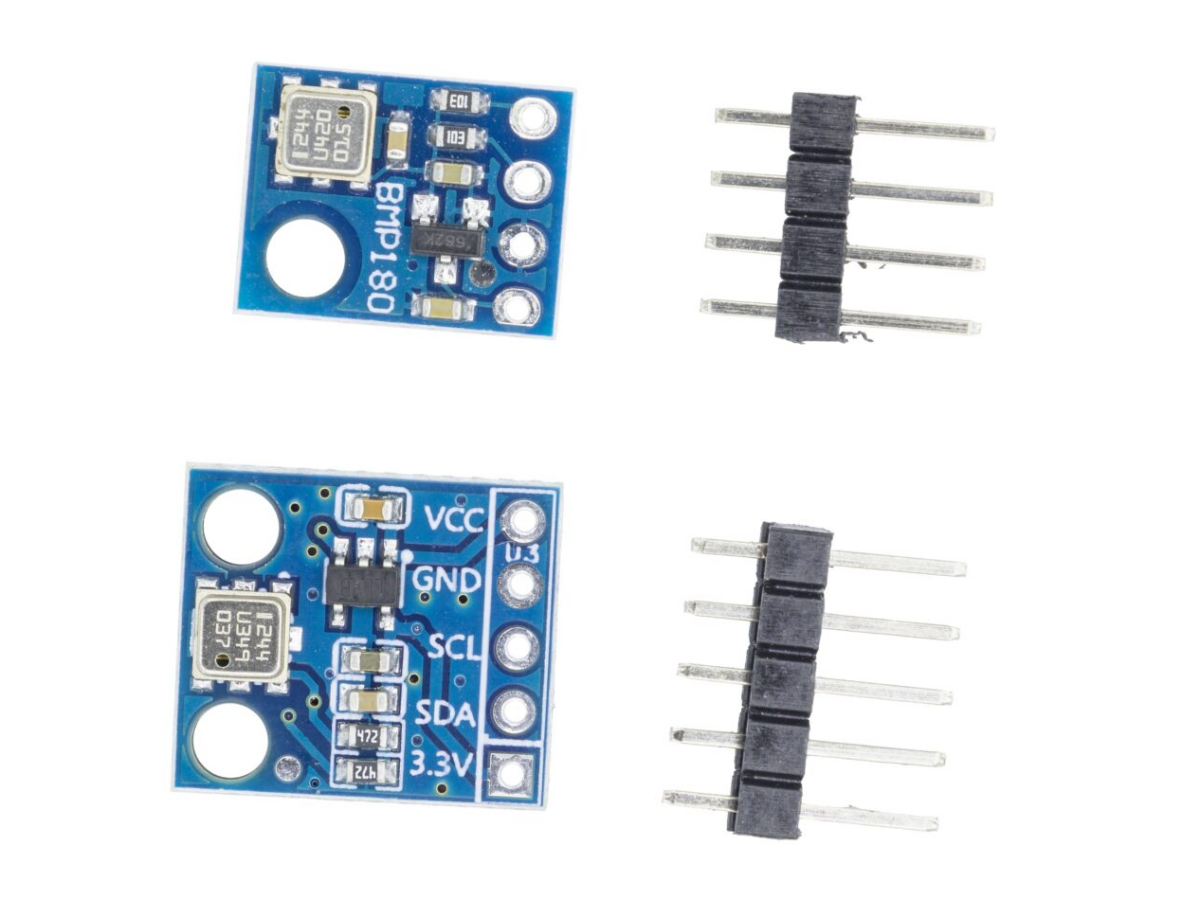
Welcome to the world of the BMP180 pressure sensor! A common question is about the BMP180 sensor price—good news, it’s very friendly for your wallet. Next, let’s talk about BMP180 accuracy, which is reliable for your DIY measurements. To then calculate BMP180 altitude, you can use the pressure data. And a great partner for it is the BMP180 NodeMCU combination, which makes building projects easy and fun. Start your journey here!

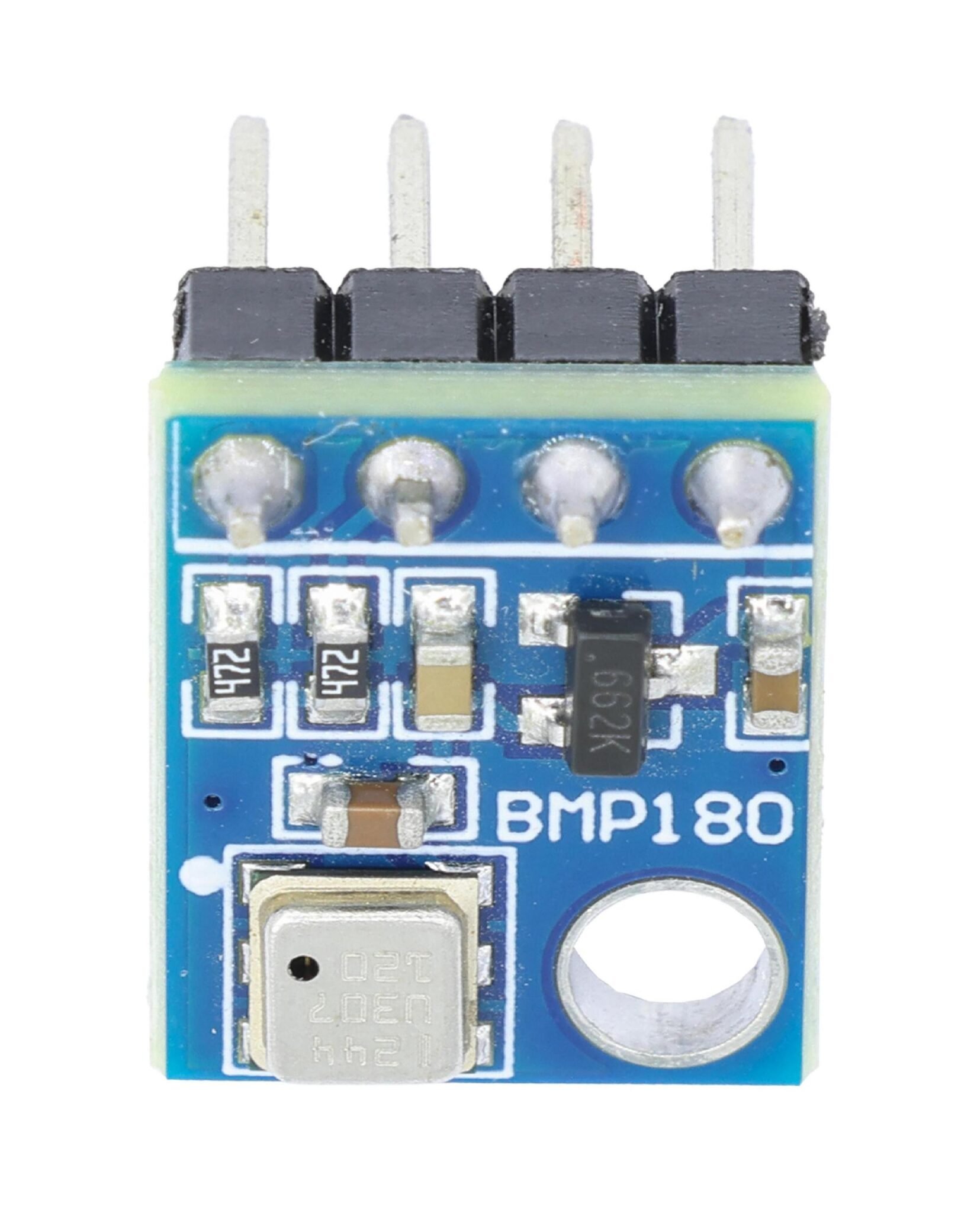
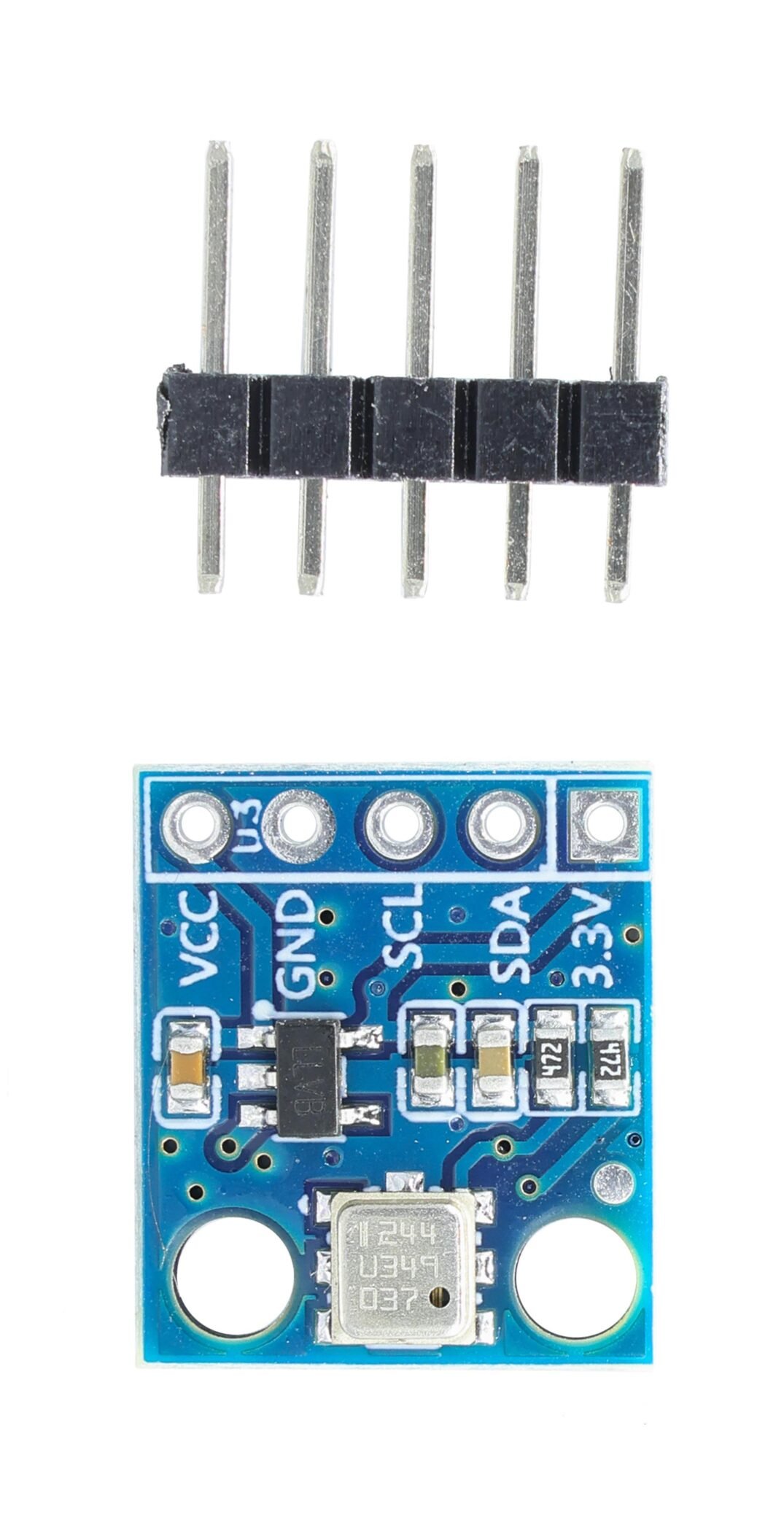
What is GY-68 BMP180 Pressure and Temperature Sensor?
The GY-68 BMP180 barometric pressure sensor is a high-precision, small-sized, and low-power consumption pressure sensor, which can be easily applied in mobile devices. When measuring the altitude, the traditional method is to measure the atmospheric pressure at a certain height and then perform conversion to obtain the altitude data. The BMP180 not only can measure the atmospheric pressure in real time, but also can measure the real-time temperature. At the same time, it has an IIC bus interface, which is convenient for the single-chip microcomputer to access. Moreover, its usage is also very convenient. Without too many operations, the air pressure and measurement data can be read.
GY-68 BMP180 Working Principle
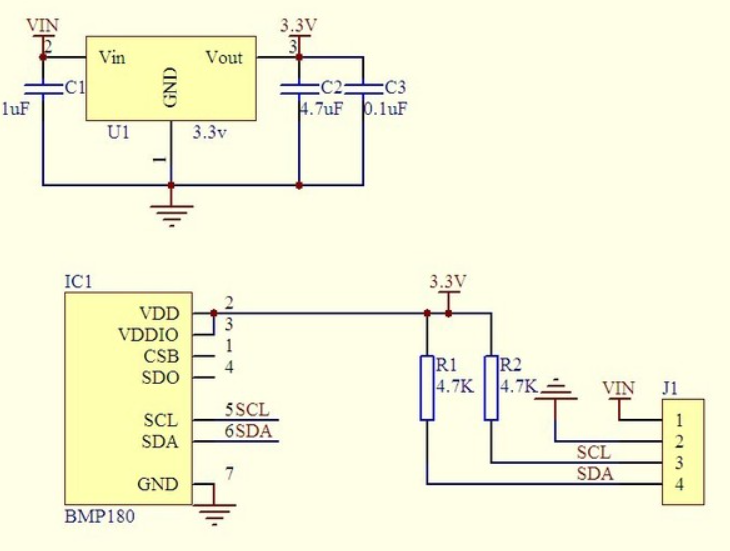
GY-68 BMP180 Schematic Diagram
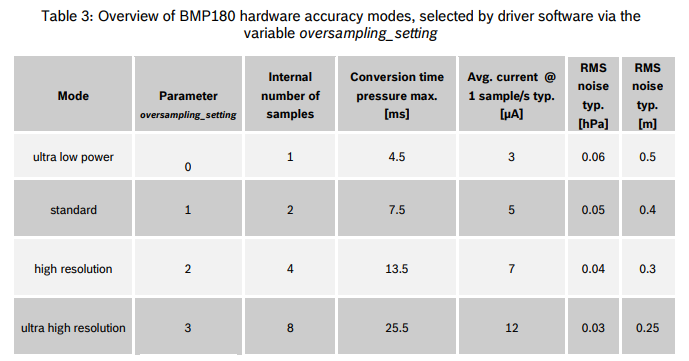
BMP180 has four working modes, each with different parameters such as sampling quantity, conversion speed and noise. The mode can be set by writing to the ctrl_meas register. The default mode is the first ultra low power mode.
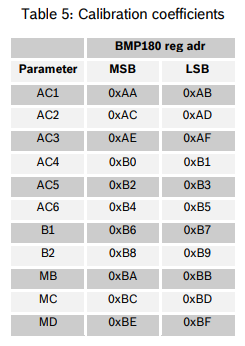
The pressure and temperature values of BMP180 cannot be directly read. Each different sensor has its own unique calibration values, which are stored in the built-in E2PROM memory. After the microprocessor reads the original temperature and pressure values from the sensor, it needs to perform a conversion based on the calibration values in the E2PROM to obtain the true temperature and pressure data. The storage locations of each calibration value are as follows. The microprocessor reads the calibration values through these addresses.
Like all IIC bus devices, the BMP180 also has a fixed device address. According to its data sheet, when manufactured, the slave address of the BMP180 is 0xEE (write direction) or 0xEF (read direction) by default.

The following are the steps for reading temperature and pressure:
- Read the 16-bit calibration values into the microcontroller. There are a total of 11 values. Note that the high bits are stored in the MSB address and the low bits in the LSB address. For example, for the value AC1, the high 8 bits are stored at address 0xAA and the low 8 bits at address 0xAB.
- Steps for reading the initial temperature value:
(1) Write 0x2e to register 0xf4 and wait for 4 to 5 ms.
(2) Read registers 0xf6 (high 8 bits) and 0xf7 (low 8 bits).
(3) Convert: UT = MSB << 8 + LSB.
- Steps for reading the initial pressure value:
(1) Write 0x34 to register 0xf4 (if not in the default working mode, add the result of oss left-shifted by six bits, where oss is the bit 7 and bit 6 of register 0xf4 for setting the working mode), and wait for 4 to 5 ms.
(2) Read registers 0xf6 (bits 16-23), 0xf7 (bits 8-15), and 0xf8 (bits 0-7).
(3) Convert: UP = MSB << 16 + LSB << 8 + XLSB >> (8 – oss (the same as in the initial temperature reading)).
- Based on the calibration coefficients read in step 1 and the UT and UP values read in step 2, perform the conversion. The final results are T (temperature, each value represents 0.1 degrees Celsius) and p (pressure, each value represents 1 Pascal).

GY-68 BMP180 Sensor Pin Functions
Pin | Definition |
VCC | Positive pole |
GND | Grounding |
SCL | I2C communication mode clock signal |
SDA | I2C communication mode data signal |
GY-68 BMP180 Sensor Parameter
Model | GY-68 BMP180 |
Operating Current | 0.1~1000uA |
Temperature Accuracy | ±1℃ |
Temperature Range | 0~65℃ |
Air Pressure Range | 300~1100 hPa |
Air Pressure Accuracy | 1 hPa |
Output Mode | IIC |
BMP180 vs BMP280
Feature | BMP180 | BMP280 |
Power Supply Voltage | 1.8V to 3.6V | 3V/3.3V DC |
Digital Interfaces | I²C (up to 3.4 MHz) | I²C (up to 3.4 MHz) and SPI (up to 10 MHz) |
Peak Current | Not specified | 1.12mA |
Resolution | Up to 0.03hPa / 0.25m | Not specified |
Temperature Accuracy | ±2°C | ±1.0°C |
Sample Rate | Not specified | 1Hz |
Current Consumption | Not specified | 2.7µA @ 1 Hz sampling rate |
Additional Features | EEPROM for data storage, extended pressure | Altimeter functionality, enhanced accuracy |
GY-68 BMP180 Arduino
GY-68 BMP180 Pinout
- BMP180 Arduino OLED Arduino
VCC ——> 3.3V VCC ——> 3.3V
GND ——> GND GND ——> GND
SCL ——> SCL SCL ——> A5
SDA ——> SDA SDA ——> A4
GY-68 BMP180 Code
					#include <Wire.h>
#include <Adafruit_BMP085.h>
#include <Adafruit_GFX.h>
#include <Adafruit_SSD1306.h>

#define SCREEN_WIDTH 128
#define SCREEN_HEIGHT 64
#define OLED_RESET -1

Adafruit_SSD1306 display(SCREEN_WIDTH, SCREEN_HEIGHT, &Wire, OLED_RESET);
Adafruit_BMP085 bmp;

void setup() {
  Serial.begin(9600);

  // Initialize OLED (try two common addresses)
  if(!display.begin(SSD1306_SWITCHCAPVCC, 0x3C)) { // Try 0x3C
    Serial.println(F("OLED init failed, trying 0x3D..."));
    if(!display.begin(SSD1306_SWITCHCAPVCC, 0x3D)) { // Try 0x3D
      Serial.println(F("SSD1306 allocation failed"));
      while(1);
    }
  }

  // Initialize BMP180
  if (!bmp.begin()) {
    Serial.println("BMP180 not found");
    while (1);
  }

  // Display initialization information
  display.clearDisplay();
  display.setTextSize(1);
  display.setTextColor(WHITE);
  display.setCursor(0,0);
  display.println("Initializing...");
  display.display();
  delay(1000);
}

void loop() {
  // Read sensor data
  float temp = bmp.readTemperature();
  float pressure = bmp.readPressure() / 100.0F;
  float altitude = bmp.readAltitude();

  // Clear the screen and display the data
  display.clearDisplay();

  // headline
  display.setTextSize(1);
  display.setCursor(0,0);
  display.println("BMP180 Sensor Data");
  display.drawLine(0, 10, 128, 10, WHITE);

  // temperature
  display.setCursor(0,15);
  display.print("Temp: ");
  display.print(temp, 1); // Display one decimal place
  display.println(" C");

  // air pressure
  display.setCursor(0,30);
  display.print("Press: ");
  display.print(pressure, 0); // Display integer
  display.println(" hPa");

  // altitude
  display.setCursor(0,45);
  display.print("Alt: ");
  display.print(altitude, 1);
  display.println(" m");

  display.display();

  // Serial port output
  Serial.print("Temperature: "); Serial.print(temp); Serial.println(" C");
  Serial.print("Pressure: "); Serial.print(pressure); Serial.println(" hPa");
  Serial.print("Altitude: "); Serial.print(altitude); Serial.println(" m");
  Serial.println();

  delay(2000); // Update every 2 seconds
}
Effect Demonstration
BMP180 Sensor Application Scenarios
① GPS precise navigation (position calculation, bridge detection, etc.)
② Indoor and outdoor navigation
③ Monitoring of leisure, sports and medical health, etc.
④ Weather forecast
⑤ Vertical speed indication (ascending/descending speed)
⑥ Fan power control
Relative Information
GY-68 BMP180 Purchase Link
FAQ
How to check if a pressure sensor is working?
To check if a pressure sensor works, first inspect for physical damage or leaks. Verify power supply voltage with a multimeter. Test output at zero pressure (e.g., 0.5V) and full scale (e.g., 4.5V), comparing with expected values. Apply dynamic pressure to check responsiveness. If readings are unstable or missing, check wiring, power, or replace the sensor. Calibration may be needed.
How much does a bmp180 sensor price ?
The BMP180 sensor is priced at 3.50–5.00 in the U.S. market, but we offer it for just $2.66 with the same high accuracy and fast shipping. Get a reliable sensor at a better price!
How long do pressure sensors last?
Pressure sensors typically last 5–15 years, depending on usage, environment (e.g., temperature, corrosion), and quality. Industrial-grade sensors with robust designs endure longer, while harsh conditions may reduce lifespan. Regular calibration and proper installation help maximize longevity.
Why do pressure sensors fail?
Pressure sensors can fail due to:
①Mechanical Damage — Overpressure, shock, or vibration exceeding rated limits.
②Environmental Factors — Corrosion, extreme temperatures, or moisture ingress.
③Electrical Issues — Power surges, incorrect wiring, or EMI/RFI interference.
④Clogging/Contamination– Blocked ports from dirt, oil, or process media buildup.
⑤Drift/Calibration Loss– Long-term wear or lack of periodic recalibration.
⑥Manufacturing Defects — Rare but possible (e.g., faulty seals or circuitry).
Pro Tip: Regular maintenance, proper installation, and selecting the right sensor for your application can prevent most failures.