W1209 Feature
1. Wave soldering, stable performance and good consistency
2. Embedded central Microcontroller Unit (MCU), more intelligent and lower power consumption
3. Automatic memory of power-off settings (MCU built-in EEPROM storage unit)
4. Control accuracy of 0.1℃
5. Hysteresis starts from 0.1 and can be set to control decimals (0.1-15.0)
W1209 Technical Specification
| Parameter | Details |
|---|
| Temperature control range | -50°C~110°C |
| Resolution | 0.1°C in the range of -9.9~99.9, and 1°C in other temperature ranges |
| Temperature measurement accuracy | 0.1°C |
| Control accuracy | 0.1°C |
| Hysteresis accuracy | 0.1°C |
| Refresh frequency | 0.5 s |
| Input power | DC 12V |
| Input measurement | NTC(10K 0.5%) waterproof sensor |
| Output | 1 channel relay output, capacity = 20A 125V AC, 20A 14V DC |
| Environmental requirement | -10°C~60°C humidity 20%~85% |
| Size | 48mm * 40mm |
| Overall power consumption | Quiescent current: ≤10MA Pull-in current: ≤65MA |
W1209 Usage Method
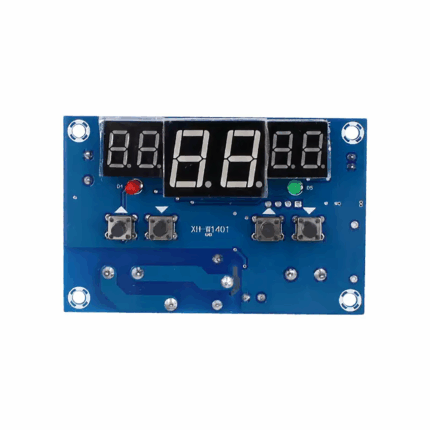
Connect the power supply and the equipment to power the controller. At this time, the measured temperature is displayed. Press the SET key once, the temperature on the display will flash. Press + or – to set the required temperature (hold + or – for quick adjustment). After setting, press SET to confirm and return. At this time, the controller will automatically switch the relay on and off according to the settings! The output of this temperature controller is a 20A relay, which can meet various high-power loads. Connect the control circuit to power the temperature controller, and the display will show the ambient temperature.
Description of W1209 controller indicator light and nixie tube status:
①Indicator light: Flashing indicates the start delay of cooling or heating, constant on indicates that the relay is closed.
②Nixie tube: Displaying “LL” indicates an open circuit of the sensor. Please connect the sensor according to the instructions. Displaying “HH” indicates exceeding the measurement range, and the temperature controller will force the relay to disconnect. Displaying “—” indicates a high-temperature alarm.
W1209 Parameter Function Description
Long press the SET key for 5 seconds to enter the main menu setting. Press + or – to switch between P0~P6. Long press SET or if there is no key operation for 10 seconds, the controller will automatically confirm and return.
1. P0 Cooling and heating modes:
Long press the SET key for 5 seconds to display P0. Press the SET key once to set the working mode. Press + or – to switch between 【H for heating mode】 and 【C for cooling mode】. Press the SET key once to return. Long press SET or if there is no key operation for 10 seconds, the controller will automatically confirm and complete the setting.
①Cooling mode: When the measured temperature ≥ the set temperature, the cooling relay pulls in and the cooler starts. When the measured temperature ≤ the set temperature – hysteresis, the cooling relay disconnects and the cooler turns off.
②Heating mode: When the measured temperature ≤ the set temperature, the heating relay pulls in and the heater starts. When the measured temperature ≥ the set temperature + hysteresis, the heating relay disconnects and the heater turns off.
2. P1 Hysteresis setting:
Long press the SET key for 5 seconds to display P0. Press + or – to switch to P1. Press the SET key once to set the hysteresis value. Press + or – to set the hysteresis within 0.1-15. After completion, press the SET key once to return. Long press SET or if there is no key operation for 10 seconds, the controller will automatically confirm and complete the setting.
①Cooling mode: When the measured temperature ≥ the set value, the relay pulls in and the cooler starts. When the measured temperature ≤ the set value – hysteresis value, the relay disconnects and the cooler turns off.
For example, if the ambient temperature is 30℃, the set value is 25℃, and the hysteresis is set to 2℃, the relay closes and the cooler starts after power-on. When the temperature is cooled to 23℃, the relay disconnects and the cooler turns off. At this time, since the cooler is disconnected, the temperature starts to rise. When it rises to the set value of 25℃, the relay closes and the cooler starts again, repeating the cycle to control the temperature not to exceed 25℃.
②Heating mode: When the measured temperature ≤ the set value, the relay pulls in and the heater starts. When the measured temperature ≥ the set value + hysteresis value, the relay disconnects and the heater turns off.
For example, if the ambient temperature is 10℃, the set value is 25℃, and the hysteresis is set to 2℃, the relay closes and the heater starts after power-on. When the temperature is heated to 27℃, the relay disconnects and the heater turns off. At this time, since the heater is disconnected, the temperature starts to drop. When it drops to the set value of 25℃, the relay closes and the heater starts again, repeating the cycle to control the temperature not to be lower than 25℃.
3. P2 Maximum temperature setting upper limit:
To prevent dangers caused by excessively high set temperatures due to misoperation by others, this temperature controller is equipped with a maximum setting upper limit function, which defines the setting range for the maximum temperature set point controlled by the controller.
Long press the SET key for 5 seconds to display P0. Press + or – to switch to P2. Press the SET key once to set the maximum upper limit. Press + or – to set the maximum settable temperature (the maximum value is 110). After completion, press the SET key once to return. Long press SET or if there is no key operation for 10 seconds, the controller will automatically confirm and complete the setting.
For example, if set to 60, the maximum temperature set point can only be set to 60℃. If a higher temperature set point or an expanded temperature range is required, the upper limit setting value must be adjusted first.
4. P3 Minimum temperature setting lower limit:
To prevent ice blockage caused by excessively low temperatures due to misoperation by others, this temperature controller is equipped with a minimum setting lower limit function, which defines the setting range for the minimum temperature set point controlled by the controller.
Long press the SET key for 5 seconds to display P0. Press + or – to switch to P3. Press the SET key once to set the minimum lower limit. Press + or – to set the minimum settable temperature (the minimum value is -50). After completion, press the SET key once to return. Long press SET or if there is no key operation for 10 seconds, the controller will automatically confirm and complete the setting.
For example, if set to 2, the minimum temperature set point can only be set to 2℃. If a lower temperature set point or an expanded temperature range is required, the lower limit setting value must be adjusted first.
5. P4 Temperature calibration:
When there is a deviation between the measured temperature and the standard temperature, or when the user’s hardware has special needs, this function can be used for calibration. The calibrated temperature = temperature before calibration + calibration value, with an effective range of -7.0~7.0.
Long press the SET key for 5 seconds to display P0. Press + or – to switch to P4. Press the SET key once to perform calibration. Press + or – to set the calibration value. After completion, press the SET key once to return. Long press SET or if there is no key operation for 10 seconds, the controller will automatically confirm and complete the setting.
For example, if the normal display is 25℃, it will display 25℃ when the temperature calibration is 0, 26.5℃ when the temperature calibration is 1.5, and 23.5℃ when the temperature calibration is -1.5.
6. P5 Delay start time (Unit: minutes):
When the cooler or heater requires a delay for operation, the delay function can be activated to protect the equipment’s service life.
Long press the SET key for 5 seconds to display P0. Press + or – to switch to P5. Press the SET key once to set the delay start time. Press + or – to set a value between 0-10 minutes. After completion, press the SET key once to return. Long press SET or if there is no key operation for 10 seconds, the controller will automatically confirm and complete the setting.
①Cooling mode: When powered on for the first time, if the current temperature ≥ the set value, the cooler will not start cooling immediately. It will start after the set delay time elapses.
②Heating mode: When powered on for the first time, if the current temperature ≤ the set value, the heater will not start heating immediately. It will start after the set delay time elapses.
If the shutdown time between two adjacent starts of the cooler or heater is longer than the set delay start time, the cooler will start immediately.
If the shutdown time between two adjacent starts of the cooler or heater is shorter than the set delay start time, the equipment can only start after the set cooler delay start time elapses before the next start. The delay time is calculated from the moment of shutdown.
For example, if the delay is set to 5 minutes in cooling mode, the cooler will start with a delay after power-on and turn on after 5 minutes. When the required temperature is reached, the cooler stops, and timing starts at this moment. When the timing for the next cooler start is completed, it works immediately. If the timing is not completed, it waits until the timing ends to work. The LED indicator flashes during the delay period.
Setting the delay start time to 0 is equivalent to disabling the delay function.
7. Factory Reset:
If the internal settings of the temperature controller are messed up due to human factors, and it takes a lot of time to set them one by one, this function can be used to restore the factory settings. The specific method is: in the power-off state, press and hold the + and – keys at the same time, then power on, and all the above parameters will be restored to the factory default values.
W1209 Function Diagram
Application Scenarios
1. Constant temperature control
2. Temperature control switch
3. Temperature alarm
4. DIY ovens/incubators/temperature guns, etc.







Reviews
There are no reviews yet.