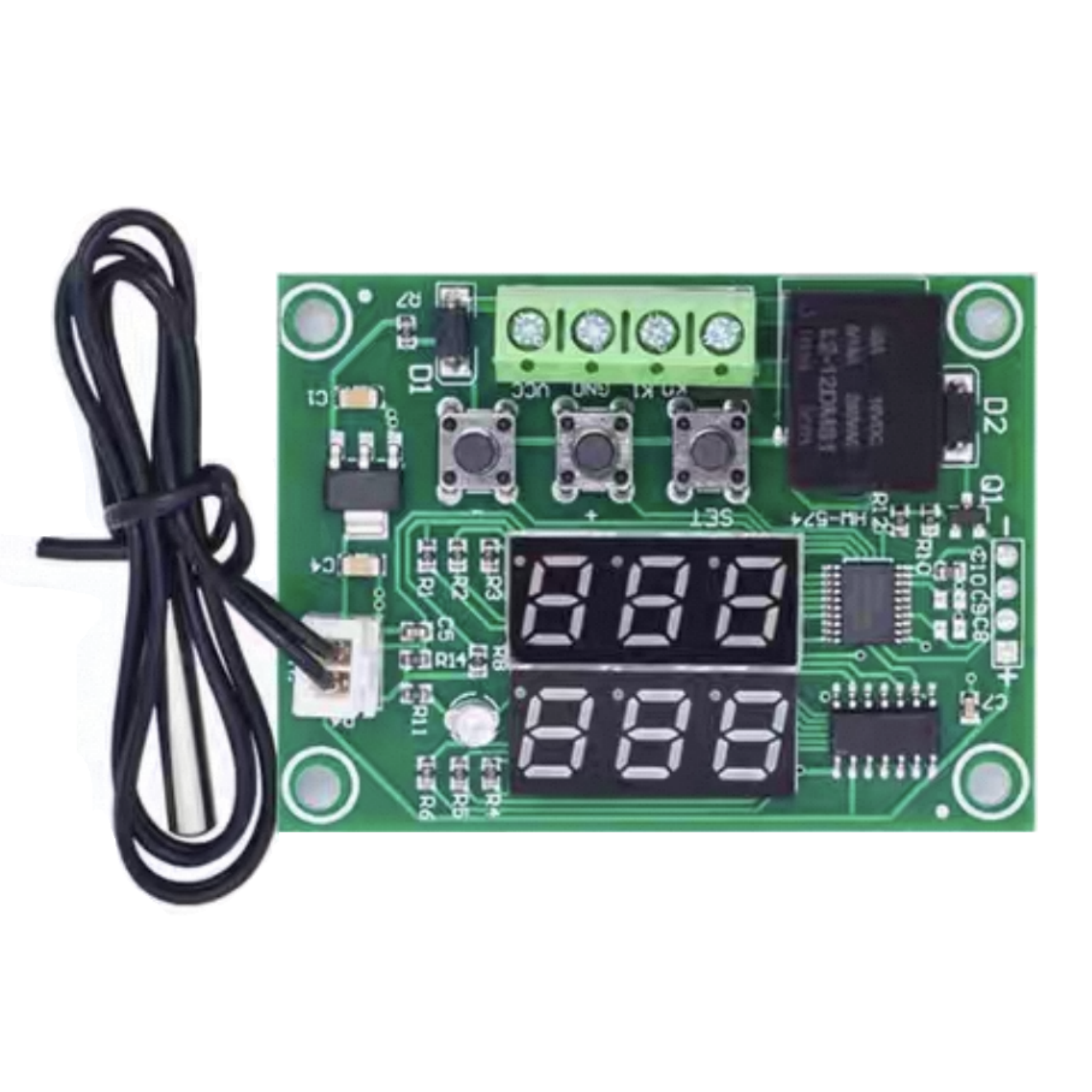
W1219 Dual-Color Dual-Display Digital Temperature Controller
$6.151pcs
W1219 12V dual‑color dual‑display temp controller, responsive and stable control, heating/cooling modes. Compact and easy to install, great for incubators, pet enclosures and DIY.
| Dimensions | 60.0 × 44.0 × 16.0 mm |
|---|---|
| Brand |
easyelecmodule |
3628 in stock
W1219 Parameter
| Parameter | Details |
|---|---|
| Control range | -50°C~110°C |
| Control accuracy | 0.1°C |
| Input measurement | NTC 10K waterproof sensor L=0.5M |
| High-temperature alarm | -49°C~110°C |
| Input voltage | DC 12V |
| Output type | Relay output is limited to 10A |
| Hysteresis setting | 0.1~30°C |
| Delay Start time | 0~10 minutes |
| Temperature calibration | -10°C~+10°C |
| Size | 60*44*16 mm |
W1219 Wiring
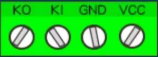
KO, K1 Description :
KO and K1 are equivalent to a relay-extended switch. The 12V power supply terminal supplies power to W1219. The temperature is detected by the probe. The internal temperature control program controls the relay to close and open according to the detected value and the set parameters, so as to control the load (if the load terminal is AC-powered, KO and K1 must be connected to the live wire for safety).
W1219 Usage Method
| Code | Description | Setting range | Factory setting |
|---|---|---|---|
| P0 | Temperature control | H/C | C |
| P1 | Hysteresis setting | 0.1~30°C | 2°C |
| P2 | Temperature calibration | -10°C~+10°C | 0°C |
| P3 | Delay start time | 0~10 minutes | 0 minute |
| P4 | High-temperature alarm | -50°C~+110°C | 110°C |
W1219 Factory Reset
- PO temperature control mode
- This value must be set when the temperature controller is used for the first time. Set it to H if it is used for heating. Set it to C if it is used for cooling.
- P1 hysteresis setting
- Long press the SET key to enter the internal settings, select P1 setting, then press the SET key again to set the hysteresis value. Hysteresis refers to the difference required for the temperature controller to resume operation after it stops when the set temperature is reached. For example, if we set it to heating mode, it stops heating when the temperature reaches 40°C and starts again when the temperature drops to 35°C, so the hysteresis is 5.
- P2 temperature calibration
- This function is used for temperature calibration. It can be used to calibrate when there is a deviation between the detected temperature and the actual temperature. The calibrated value = measured value + calibration value. For example, if the detected temperature is 25.6°C, but the actual temperature is 25.8°C, P4 can be set to 0.2. Then the result is 25.6 + 0.2 = 25.8°C.
- P3 delay start
- This function is generally used for compressor cooling. If the temperature controller is purchased for refrigerators or freezers, this value must be set. The setting value is generally 3-6 minutes according to the pressure recovery of the compressor. If you are not controlling the compressor or do not need the delay function, skip this item directly.
- P4 high-temperature alarm
- Set the high-temperature alarm value. When the real-time temperature exceeds this value, the screen will flash to indicate an alarm.
W1219 Mode Setting
1. Heating mode usage example
To control the electric heating equipment to stop heating when the temperature reaches 35°C and start heating again when the temperature drops to 30°C, how to set it?
① Long press the SET key for 3 seconds to enter the internal settings, and set PO to H.
② Long press the SET key to return to the real-time temperature interface, press the SET key once, the green nixie tube will flash, and set the value to 35°C.
③ The factory default hysteresis is 2°C. To make the temperature drop to 30°C and then heat again, the hysteresis value needs to be set to 5. Long press the SET key to enter the internal settings, select P1 and change the P1 value to 5, and the setting is completed.
2. Cooling mode usage example
To control the electric cooling equipment to stop cooling when the temperature reaches 23°C and start cooling again when the temperature rises to 27°C, how to set it?
① Long press the SET key for 3 seconds to enter the internal settings, and set PO to C.
② Long press the SET key to return to the real-time temperature interface, press the SET key once, the green nixie tube will flash, and set the value to 23°C.
③ The factory default hysteresis is 2°C. To make the temperature rise to 27°C and then cool again, the hysteresis value needs to be set to 4. Long press the SET key to enter the internal settings, select P1 and change the P1 value to 4, and the setting is completed.
Note :The hysteresis value refers to the temperature difference required for the device to start again after it stops working. The load will restart only when the temperature drop or rise equals the hysteresis value.
Application Scenarios
1. Constant temperature control
2. Temperature control switch
3. Temperature alarm
4. DIY ovens/incubators/temperature guns, etc.
Relative Information
Shipping Cost
We only ship to the United States. Shipping costs are calculated based on the total order amount.
Shipping Method And Delivery Time
All orders will be processed and shipped within 72 hours of placing the order (excluding weekends and holidays). They will ship from Shenzhen, China, primarily via 4PX logistics. Depending on the destination and logistics conditions, other carriers such as DHL, FedEx, UPS, USPS, etc., may also handle the delivery. Estimated shipping time is 7-12 business days, with actual delivery occurring in 10-17 business days, depending on logistics conditions.
Payment:
We accept Visa, Master card, Maestro, American Express, JCB, Dinner's Club, Discover, Paypal, Apple Pay, Google Pay .

Reviews
There are no reviews yet.