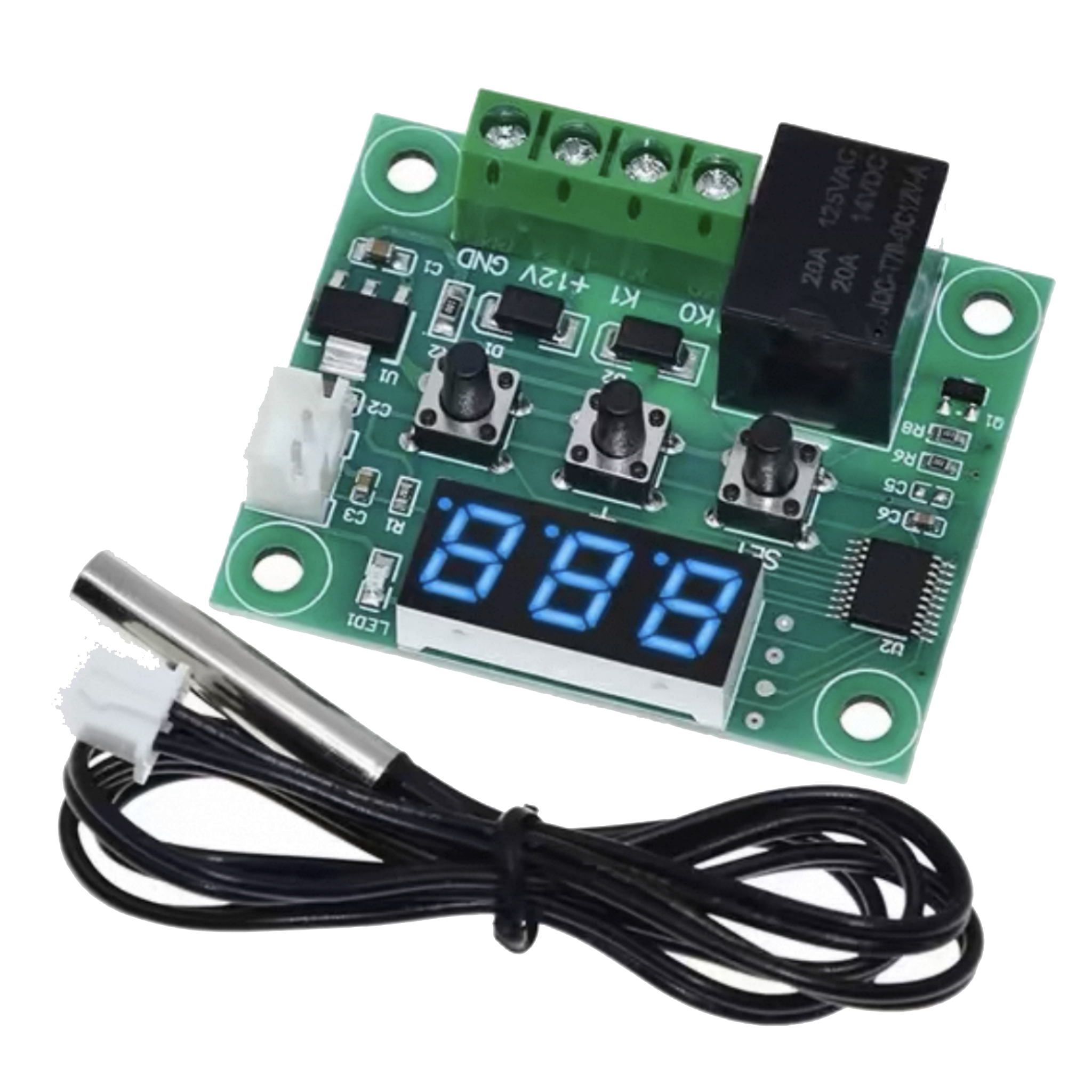
W1209 Temperature Controller Module Temperature Control Switch 12V With Digital Display

Price range: $1.23 through $13.391pcs

Dimensions N/A
Temperature control accuracy

±0.1℃

Product Status

New

Brand

easyelecmodule

SKU: N/A Categories: ,
DESCRPIPTION AND FEATURES

Product Introduction

W1209 Digital Display Temperature Controller

W1209 Digital Temperature Controller Temperature Control Switch, 12V with Digital Display
  • W1209 Feature
  1. Wave soldering, stable performance and good consistency
  2. Embedded central Microcontroller Unit (MCU), more intelligent and lower power consumption
  3. Automatic memory of power-off settings (MCU built-in EEPROM storage unit)
  4. Control accuracy of 0.1℃
  5. Hysteresis starts from 0.1 and can be set to control decimals (0.1-15.0)
  • W1209 Technical Specification

Temperature control range

-50℃~110℃

Resolution

0.1℃ in the range of -9.9~99.9, and 1℃ in other temperature ranges

Temperature measurement accuracy

0.1℃

Control accuracy

0.1℃

Hysteresis accuracy

0.1℃

Refresh frequency

0.5 s

Input power

DC 12V

Input measurement

NTC(10K 0.5%) waterproof sensor

Output

1 channel relay output, capacity = 20A 125V AC, 20A 14V DC

Environmental requirement

-10℃~60℃ humidity 20%-85%

Size

48mm * 40mm

Overall power consumption

Quiescent current :≤10MA       Pull-in current :≤65MA

  • W1209 Usage Method


W1209 Usage Method

     Connect the power supply and the equipment to power the controller. At this time, the measured temperature is displayed. Press the SET key once, the temperature on the display will flash. Press + or – to set the required temperature (hold + or – for quick adjustment). After setting, press SET to confirm and return. At this time, the controller will automatically switch the relay on and off according to the settings! The output of this temperature controller is a 20A relay, which can meet various high-power loads. Connect the control circuit to power the temperature controller, and the display will show the ambient temperature.

Description of W1209 controller indicator light and nixie tube status:

     ①Indicator light: Flashing indicates the start delay of cooling or heating, constant on indicates that the relay is closed.

     ②Nixie tube: Displaying “LL” indicates an open circuit of the sensor. Please connect the sensor according to the instructions. Displaying “HH” indicates exceeding the measurement range, and the temperature controller will force the relay to disconnect. Displaying “—” indicates a high-temperature alarm.

  • W1209 Parameter Function Description

     Long press the SET key for 5 seconds to enter the main menu setting. Press + or – to switch between P0~P6. Long press SET or if there is no key operation for 10 seconds, the controller will automatically confirm and return.

1. P0 Cooling and heating modes:

     Long press the SET key for 5 seconds to display P0. Press the SET key once to set the working mode. Press + or – to switch between 【H for heating mode】 and 【C for cooling mode】. Press the SET key once to return. Long press SET or if there is no key operation for 10 seconds, the controller will automatically confirm and complete the setting.

          ①Cooling mode: When the measured temperature ≥ the set temperature, the cooling relay pulls in and the cooler starts. When the measured temperature ≤ the set temperature – hysteresis, the cooling relay disconnects and the cooler turns off.

          ②Heating mode: When the measured temperature ≤ the set temperature, the heating relay pulls in and the heater starts. When the measured temperature ≥ the set temperature + hysteresis, the heating relay disconnects and the heater turns off.

2. P1 Hysteresis setting:

     Long press the SET key for 5 seconds to display P0. Press + or – to switch to P1. Press the SET key once to set the hysteresis value. Press + or – to set the hysteresis within 0.1-15. After completion, press the SET key once to return. Long press SET or if there is no key operation for 10 seconds, the controller will automatically confirm and complete the setting.

①Cooling mode: When the measured temperature ≥ the set value, the relay pulls in and the cooler starts. When the measured temperature ≤ the set value – hysteresis value, the relay disconnects and the cooler turns off.

     For example, if the ambient temperature is 30℃, the set value is 25℃, and the hysteresis is set to 2℃, the relay closes and the cooler starts after power-on. When the temperature is cooled to 23℃, the relay disconnects and the cooler turns off. At this time, since the cooler is disconnected, the temperature starts to rise. When it rises to the set value of 25℃, the relay closes and the cooler starts again, repeating the cycle to control the temperature not to exceed 25℃.

②Heating mode: When the measured temperature ≤ the set value, the relay pulls in and the heater starts. When the measured temperature ≥ the set value + hysteresis value, the relay disconnects and the heater turns off.

     For example, if the ambient temperature is 10℃, the set value is 25℃, and the hysteresis is set to 2℃, the relay closes and the heater starts after power-on. When the temperature is heated to 27℃, the relay disconnects and the heater turns off. At this time, since the heater is disconnected, the temperature starts to drop. When it drops to the set value of 25℃, the relay closes and the heater starts again, repeating the cycle to control the temperature not to be lower than 25℃.

3. P2 Maximum temperature setting upper limit:

     To prevent dangers caused by excessively high set temperatures due to misoperation by others, this temperature controller is equipped with a maximum setting upper limit function, which defines the setting range for the maximum temperature set point controlled by the controller.

     Long press the SET key for 5 seconds to display P0. Press + or – to switch to P2. Press the SET key once to set the maximum upper limit. Press + or – to set the maximum settable temperature (the maximum value is 110). After completion, press the SET key once to return. Long press SET or if there is no key operation for 10 seconds, the controller will automatically confirm and complete the setting.

     For example, if set to 60, the maximum temperature set point can only be set to 60℃. If a higher temperature set point or an expanded temperature range is required, the upper limit setting value must be adjusted first.

4. P3 Minimum temperature setting lower limit:

     To prevent ice blockage caused by excessively low temperatures due to misoperation by others, this temperature controller is equipped with a minimum setting lower limit function, which defines the setting range for the minimum temperature set point controlled by the controller.

     Long press the SET key for 5 seconds to display P0. Press + or – to switch to P3. Press the SET key once to set the minimum lower limit. Press + or – to set the minimum settable temperature (the minimum value is -50). After completion, press the SET key once to return. Long press SET or if there is no key operation for 10 seconds, the controller will automatically confirm and complete the setting.

     For example, if set to 2, the minimum temperature set point can only be set to 2℃. If a lower temperature set point or an expanded temperature range is required, the lower limit setting value must be adjusted first.

5. P4 Temperature calibration:

     When there is a deviation between the measured temperature and the standard temperature, or when the user’s hardware has special needs, this function can be used for calibration. The calibrated temperature = temperature before calibration + calibration value, with an effective range of -7.0~7.0.

     Long press the SET key for 5 seconds to display P0. Press + or – to switch to P4. Press the SET key once to perform calibration. Press + or – to set the calibration value. After completion, press the SET key once to return. Long press SET or if there is no key operation for 10 seconds, the controller will automatically confirm and complete the setting.

     For example, if the normal display is 25℃, it will display 25℃ when the temperature calibration is 0, 26.5℃ when the temperature calibration is 1.5, and 23.5℃ when the temperature calibration is -1.5.

6. P5 Delay start time (Unit: minutes):

     When the cooler or heater requires a delay for operation, the delay function can be activated to protect the equipment’s service life.

     Long press the SET key for 5 seconds to display P0. Press + or – to switch to P5. Press the SET key once to set the delay start time. Press + or – to set a value between 0-10 minutes. After completion, press the SET key once to return. Long press SET or if there is no key operation for 10 seconds, the controller will automatically confirm and complete the setting.

①Cooling mode: When powered on for the first time, if the current temperature ≥ the set value, the cooler will not start cooling immediately. It will start after the set delay time elapses.

②Heating mode: When powered on for the first time, if the current temperature ≤ the set value, the heater will not start heating immediately. It will start after the set delay time elapses.

     If the shutdown time between two adjacent starts of the cooler or heater is longer than the set delay start time, the cooler will start immediately.

     If the shutdown time between two adjacent starts of the cooler or heater is shorter than the set delay start time, the equipment can only start after the set cooler delay start time elapses before the next start. The delay time is calculated from the moment of shutdown.

     For example, if the delay is set to 5 minutes in cooling mode, the cooler will start with a delay after power-on and turn on after 5 minutes. When the required temperature is reached, the cooler stops, and timing starts at this moment. When the timing for the next cooler start is completed, it works immediately. If the timing is not completed, it waits until the timing ends to work. The LED indicator flashes during the delay period.

Setting the delay start time to 0 is equivalent to disabling the delay function.

7. Factory reset:

     If the internal settings of the temperature controller are messed up due to human factors, and it takes a lot of time to set them one by one, this function can be used to restore the factory settings. The specific method is: in the power-off state, press and hold the + and – keys at the same time, then power on, and all the above parameters will be restored to the factory default values.

  • W1209 Function Diagram
W1209 Function Diagram

W1209 Digital Temperature Controller Temperature Control Switch, 12V with Digital Display

W1209 Digital Temperature Controller Temperature Control Switch
  • W1209 Technical Specification

Control range

-50℃~110℃

Input power

 DC 12V

Resolution

0.1℃ in the range of -9.9~99.9, and 1℃ in other temperature ranges

Input measurement

NTC(10K 0.5%)waterproof sensor

Temperature measurement accuracy

0.1 ℃

Output range

1 channel 10A relay

Control accuracy

0.1 ℃

Environmental requirement

-10℃~60℃,humidity 20%-85%

Hysteresis accuracy

0.1 ℃

Size

48mm * 40mm

Refresh frequency

0.5 s

Overall power consumption

Quiescent current:≤35MA Pull-in current:≤65MA

High-temperature protection

0-110℃

Display type

0.28-inch three-digit nixie tube

  • W1209 Setting Comparison Table

Long press the SET key to enter the main menu setting

Code

Code Description

Setting range

Factory setting

P0

Cooling/Heating

C/H

C

P1

Hysteresis setting

0.1~15℃

2

P2

Maximum setting upper limit

110

110

P3

Minimum setting lower limit

-50

-50

P4

Temperature calibration

-7.0~7.0℃

0

P5

Delay start time

0~10 minutes

0

P6

High-temperature alarm

0~110℃

OFF

Long press the + and – keys in the power-off state, then power on to restore factory settings

  • W1209 Precautions for Use
  1. The supply voltage must not exceed ±10% of the nominal voltage of the temperature controller you purchased. Otherwise, the power chip may be damaged.
  2. The load power must not exceed the power range that the relay can withstand. Otherwise, the relay may be damaged and its contacts may be burned.
  3. Please use high-quality power supply. The surge voltage and current of inferior power supplies may far exceed their nominal voltage and current when first turned on, and the instantaneous high voltage and large current may breakdown the power chip.

W1219 12V Dual-Color Dual-Display Digital Temperature Controller

W1219 12V Dual-Color Dual-Display Digital Temperature Controller
  • W1219 Parameter

Control range

-50℃~110℃

Output type

Relay output is limited to 10A

Control accuracy

0.1℃

Hysteresis setting

0.1 ~30℃

Input measurement

NTC 10K waterproof sensor    L=0.5M

Delay Start time

0~10 minutes

High-temperature alarm

-49℃~110℃

Temperature calibration

-10℃~+10℃

Input voltage

DC 12V

Size

60*44*16 mm

  • W1219 Wiring

      KO, K1 Description :

KO, K1 Description

      KO and K1 are equivalent to a relay-extended switch. The 12V power supply terminal supplies power to W1219. The temperature is detected by the probe. The internal temperature control program controls the relay to close and open according to the detected value and the set parameters, so as to control the load (if the load terminal is AC-powered, KO and K1 must be connected to the live wire for safety).

  • W1219 Usage Method
W1219 Usage Method

Code

Description

Setting range

Factory setting

P0

Temperature control

H/C

C

P1

Hysteresis setting

0.1~30℃

2℃

P2

Temperature calibration

-10℃~10℃

0℃

P3

Delay start time

0~10 minutes

0 minute

P4

High-temperature alarm

-50℃~110℃

110℃

  • W1219 Factory Reset

① PO temperature control mode

      This value must be set when the temperature controller is used for the first time. Set it to H if it is used for heating. Set it to C if it is used for cooling.

② P1 hysteresis setting

      Long press the SET key to enter the internal settings, select P1 setting, then press the SET key again to set the hysteresis value. Hysteresis refers to the difference required for the temperature controller to resume operation after it stops when the set temperature is reached. For example, if we set it to heating mode, it stops heating when the temperature reaches 40°C and starts again when the temperature drops to 35°C, so the hysteresis is 5.

③ P2 temperature calibration

      This function is used for temperature calibration. It can be used to calibrate when there is a deviation between the detected temperature and the actual temperature. The calibrated value = measured value + calibration value. For example, if the detected temperature is 25.6°C, but the actual temperature is 25.8°C, P4 can be set to 0.2. Then the result is 25.6 + 0.2 = 25.8°C.

④ P3 delay start

      This function is generally used for compressor cooling. If the temperature controller is purchased for refrigerators or freezers, this value must be set. The setting value is generally 3-6 minutes according to the pressure recovery of the compressor. If you are not controlling the compressor or do not need the delay function, skip this item directly.

⑤ P4 high-temperature alarm

      Set the high-temperature alarm value. When the real-time temperature exceeds this value, the screen will flash to indicate an alarm.

  • W1219 Mode Setting
  1. Heating mode usage example

      To control the electric heating equipment to stop heating when the temperature reaches 35°C and start heating again when the temperature drops to 30°C, how to set it?

          ① Long press the SET key for 3 seconds to enter the internal settings, and set PO to H.

          ② Long press the SET key to return to the real-time temperature interface, press the SET key once, the green nixie tube will flash, and set the value to 35°C.

          ③ The factory default hysteresis is 2°C. To make the temperature drop to 30°C and then heat again, the hysteresis value needs to be set to 5. Long press the SET key to enter the internal settings, select P1 and change the P1 value to 5, and the setting is completed.

  1. Cooling mode usage example

      To control the electric cooling equipment to stop cooling when the temperature reaches 23°C and start cooling again when the temperature rises to 27°C, how to set it?

          ① Long press the SET key for 3 seconds to enter the internal settings, and set PO to C.

          ② Long press the SET key to return to the real-time temperature interface, press the SET key once, the green nixie tube will flash, and set the value to 23°C.

          ③ The factory default hysteresis is 2°C. To make the temperature rise to 27°C and then cool again, the hysteresis value needs to be set to 4. Long press the SET key to enter the internal settings, select P1 and change the P1 value to 4, and the setting is completed.

W1219 mode setting

Note :The hysteresis value refers to the temperature difference required for the device to start again after it stops working. The load will restart only when the temperature drop or rise equals the hysteresis value.

Digital Display Temperature Controller Module XY-T01

Digital Display Temperature Controller Module XY-T01
  • XY-T01 Mode Setting
  1. Heating mode ‘H’

      When the detected temperature ≤ set temperature – hysteresis temperature, the relay is turned on, and the heating equipment starts to work.

      When the detected temperature ≥ set temperature, the relay is turned off, and the heating equipment stops working.

  1. Cooling mode ‘C’

      When the detected temperature ≥ set temperature + hysteresis temperature, the relay is turned on, and the cooling equipment starts to work.

      When the detected temperature ≤ set temperature, the relay is turned off, and the cooling equipment stops working.

  1. High-temperature alarm function ALA

      When the actual temperature ≥ alarm temperature, the system activates the sound and light alarm and turns off the relay. Any key can stop the sound and light alarm.

  1. Delay start OPH

      After completing a normal heating or cooling operation, the system starts timing T. Only when T ≥ OPH can the system perform the next round of heating or cooling operation.

Note: After the timing is completed, if the temperature in heating mode is lower than the start temperature or the temperature in cooling mode is higher than the start temperature, it will be ignored.

  1. Temperature calibration function OFE (-10.0~10.0℃)

      The system may have deviations after long-term operation. Corrected by this function, the actual temperature = measured temperature + calibration value.

  1. Remote parameter reading and setting

      Parameters such as start temperature, stop temperature, and temperature correction can be set via UART.

  1. Real-time temperature reporting

      If the temperature reporting function is enabled, the product will transmit the detected temperature to the terminal via UART at 1-second intervals for easy data collection.

  1. Relay enable (enabled by default)

      If the relay enable is turned off, the relay remains in the open state.

  1. Restore factory settings

      Press the STOP and SET keys simultaneously for more than 3 seconds to restore factory settings.

  • XY-T01 Parameter

Product model

XY-T01

Probe type

Waterproof probe    L:0.5 m

Power supply

DC 6.0~30V

Temperature control range

-50℃~+110℃

Input measurement

NTC10K/B3950

Temperature control accuracy

0.1℃

Refresh frequency

0.5 s

Size

68*42*15 mm

Output type

Relay output 10A

Probe specification

4*20mm(stainless steel)

  • XY-T01 Setting Mode
  1. Working mode/Set temperature/Hysteresis temperature setting

     ① On the running interface, short-press the SET key to enter the quick setting interface.

     ② After entering the quick setting interface, short-press the SET key to switch the parameters to be set (working mode/set temperature/hysteresis temperature).

     ③ Use the UP and DOWN keys to modify the parameter values, supporting short press/long press.

     ④ Long press the SET key for more than 3 seconds or leave it without any key operation for 6 seconds to exit the quick setting interface and save the parameters.

  1. Alarm temperature/Delay start setting/Temperature calibration

     ① On the running interface, long press the SET key for more than 3 seconds to enter the parameter setting interface.

     ② After entering the parameter setting interface, short-press the SET key to switch the parameters to be set (alarm temperature/delay start setting/temperature calibration).

     ③ Use the UP and DOWN keys to modify the parameter values, supporting short press/long press.

     ④ Long press the SET key for more than 3 seconds or leave it without any key operation for 6 seconds to exit the parameter setting interface and save the parameters.

  1. How to enable high-temperature alarm (disabled by default)

     Enter the parameter setting interface and switch to the alarm parameter ALA interface. Short-press the STOP key to turn on or off the high-temperature alarm function. If the high-temperature alarm function is disabled, ALA will display ‘—-‘ as a reminder.

  1. How to enable delay start (disabled by default)

     Enter the parameter setting interface and switch to the delay parameter OPH interface. Short-press the STOP key to turn on or off the delay start function. If the delay start function is disabled, OPH will display “—-” as a reminder.  

  • XY-T01 Serial Port Control (MCU TTL Level Communication)

   Communication standards: 9600bps            Data bits: 8            Stop bits: 1            Parity: none            Flow control: none

Serial port command

Description

Serial port command

Description

start

Start temperature reporting

stop

Stop temperature reporting

read

Read the set parameters

on

Relay enable is turned on.

off

Relay enable is turned off.


S:XXX

Set the set temperature

B:XXX

Set the hysteresis temperature

(00.0~30.0)

-50 ~ -0.1

OFE:XX.X

Temperature calibration

(-10.0~10.0)

00.0~99.9

ALA:XX.X

Alarm temperature

(-50.0~110.0)

100~110

OPH:XXXX

Maximum conduction time (0~9999)

High-precision Digital Display Temperature Controller

  • XY-WT01 Function
  1. Heating mode ‘H’

      When the detected temperature ≤ set temperature – hysteresis temperature, the relay is turned on, and the heating equipment starts to work.

      When the detected temperature ≥ set temperature, the relay is turned off, and the heating equipment stops working.

  1. Cooling mode ‘C’

      When the detected temperature > set temperature + hysteresis temperature, the relay is turned on, and the cooling equipment starts to work.

      When the detected temperature ≤ set temperature, the relay is turned off, and the cooling equipment stops working.

  1. High-temperature alarm function ALA

      When the actual temperature ≥ alarm temperature, the system activates the sound and light alarm and turns off the relay. Any key can stop the sound and light alarm.

  1. Delay start OPH

      After completing a normal heating or cooling operation, the system starts timing T. Only when T = OPH can the system perform the next round of heating or cooling operation.

XY-WT01 Function
  1. Temperature calibration function OFE (-10.0~10.0℃)

      The system may have deviations after long-term operation. Corrected by this function, the actual temperature = measured temperature + calibration value.

  1. Remote parameter reading and setting

      Parameters such as start temperature, stop temperature, and temperature correction can be set via UART.

  1. Real-time temperature reporting

      If the temperature reporting function is enabled, the product will transmit the detected temperature to the terminal via UART at 1-second intervals for easy data collection.

  1. Relay enable (enabled by default)

      If the relay enable is turned off, the relay remains in the open state.

  1. Restore factory settings

      Press the STOP and SET keys simultaneously for more than 3 seconds to restore factory settings.

XY-WT01 Wiring
  • XY-WT01 Parameter

Product model

XY-WT01

Input measurement

NTC10K/B3950

Power supply

DC 6.0~30V

Refresh frequency

0.5 s

Temperature control range

-50℃~110℃

Output type

Relay output 10A

Temperature control accuracy

0.1℃

Probe type

Waterproof probe    L:0.5 m

  • XY-WT01 Setting Mode
  1. Working mode/Set temperature/Hysteresis temperature setting

      ① On the running interface, short-press the SET key to enter the quick setting interface.

      ② After entering the quick setting interface, short-press the SET key to switch the parameters to be set (working mode/set temperature/hysteresis temperature).

      ③ Use the UP and DOWN keys to modify the parameter values, supporting short press/long press.

      ④ Long press the SET key for more than 3 seconds or leave it without any key operation for 6 seconds to exit the quick setting interface and save the parameters.

  1. Alarm temperature/Delay start setting/Temperature calibration

      ① On the running interface, long press the SET key for more than 3 seconds to enter the parameter setting interface.

      ② After entering the parameter setting interface, short-press the SET key to switch the parameters to be set (alarm temperature/delay start setting/temperature calibration).

      ③ Use the UP and DOWN keys to modify the parameter values, supporting short press/long press.

      ④ Long press the SET key for more than 3 seconds or leave it without any key operation for 6 seconds to exit the parameter setting interface and save the parameters.

  1. How to enable high-temperature alarm (disabled by default)

      Enter the parameter setting interface and switch to the alarm parameter ALA interface. Short-press the STOP key to turn on or off the high-temperature alarm function. If the high-temperature alarm function is disabled, ALA will display ‘—-‘ as a reminder.

  1. How to enable delay start (disabled by default)

      Enter the parameter setting interface and switch to the delay parameter OPH interface. Short-press the STOP key to turn on or off the delay start function. If the delay start function is disabled, OPH will display “—-” as a reminder.  

  • XY-WT01 Serial Port Control (MCU TTL Level Communication)

   Communication standards: 9600bps            Data bits: 8            Stop bits: 1            Parity: none            Flow control: none

Serial port command

Description

Serial port command

Description

start

Start temperature reporting

stop

Stop temperature reporting

read

Read the set parameters

on

Relay enable is turned on.

off

Relay enable is turned off.


S:XXX

Set the set temperature

B:XXX

Set the hysteresis temperature

(00.0~30.0)

-50 ~ -0.1

OFE:XX.X

Temperature calibration

(-10.0~10.0)

00.0~99.9

ALA:XX.X

Alarm temperature

(-50.0~110.0)

100~110

OPH:XXXX

Delay Start Time  (0~9999)

Application Scenarios

  1. Constant temperature control
  2. Temperature control switch
  3. Temperature alarm
  4. DIY ovens/incubators/temperature guns, etc.

Relative Information

Reviews (0)

Reviews

There are no reviews yet.

Be the first to review “W1209 Temperature Controller Module Temperature Control Switch 12V With Digital Display”

Your email address will not be published. Required fields are marked *

Shipping and Delivery

Shipping Cost

We only ship to the United States. Shipping costs are calculated based on the total order amount.

Shipping Method And Delivery Time

All orders will be processed and shipped within 72 hours of placing the order (excluding weekends and holidays). They will ship from Shenzhen, China, primarily via 4PX logistics. Depending on the destination and logistics conditions, other carriers such as DHL, FedEx, UPS, USPS, etc., may also handle the delivery. Estimated shipping time is 7-12 business days, with actual delivery occurring in 10-17 business days, depending on logistics conditions.

Payment:

We accept Visa, Master card, Maestro, American Express, JCB, Dinner's Club, Discover, Paypal, Apple Pay, Google Pay .