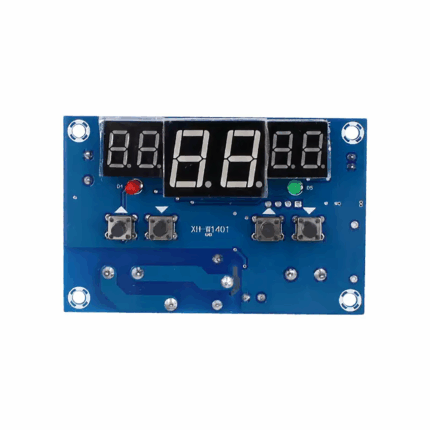
XY-WT01 Parameter
| Product model | XY-WT01 |
|---|
| Power supply | DC 6.0~30V |
| Temperature control range | -50°C~110°C |
| Temperature control accuracy | 0.1°C |
| Input measurement | NTC10K/B3950 |
| Refresh frequency | 0.5 s |
| Output type | Relay output 10A |
| Probe type | Waterproof probe L:0.5 m |
XY-WT01 Function
- Heating mode ‘H’
When the detected temperature ≤ set temperature – hysteresis temperature, the relay is turned on, and the heating equipment starts to work.
When the detected temperature ≥ set temperature, the relay is turned off, and the heating equipment stops working.
- Cooling mode ‘C’
When the detected temperature > set temperature + hysteresis temperature, the relay is turned on, and the cooling equipment starts to work.
When the detected temperature ≤ set temperature, the relay is turned off, and the cooling equipment stops working.
- High-temperature alarm function ALA
When the actual temperature ≥ alarm temperature, the system activates the sound and light alarm and turns off the relay. Any key can stop the sound and light alarm.
- Delay start OPH
After completing a normal heating or cooling operation, the system starts timing T. Only when T = OPH can the system perform the next round of heating or cooling operation.
- Temperature calibration function OFE (-10.0~10.0℃)
The system may have deviations after long-term operation. Corrected by this function, the actual temperature = measured temperature + calibration value.
- Remote parameter reading and setting
Parameters such as start temperature, stop temperature, and temperature correction can be set via UART.
- Real-time temperature reporting
If the temperature reporting function is enabled, the product will transmit the detected temperature to the terminal via UART at 1-second intervals for easy data collection.
- Relay enable (enabled by default)
If the relay enable is turned off, the relay remains in the open state.
- Restore factory settings
Press the STOP and SET keys simultaneously for more than 3 seconds to restore factory settings.
XY-WT01 Setting Mode
- Working mode/Set temperature/Hysteresis temperature setting
① On the running interface, short-press the SET key to enter the quick setting interface.
② After entering the quick setting interface, short-press the SET key to switch the parameters to be set (working mode/set temperature/hysteresis temperature).
③ Use the UP and DOWN keys to modify the parameter values, supporting short press/long press.
④ Long press the SET key for more than 3 seconds or leave it without any key operation for 6 seconds to exit the quick setting interface and save the parameters.
- Alarm temperature/Delay start setting/Temperature calibration
① On the running interface, long press the SET key for more than 3 seconds to enter the parameter setting interface.
② After entering the parameter setting interface, short-press the SET key to switch the parameters to be set (alarm temperature/delay start setting/temperature calibration).
③ Use the UP and DOWN keys to modify the parameter values, supporting short press/long press.
④ Long press the SET key for more than 3 seconds or leave it without any key operation for 6 seconds to exit the parameter setting interface and save the parameters.
- How to enable high-temperature alarm (disabled by default)
Enter the parameter setting interface and switch to the alarm parameter ALA interface. Short-press the STOP key to turn on or off the high-temperature alarm function. If the high-temperature alarm function is disabled, ALA will display ‘—-‘ as a reminder.
- How to enable delay start (disabled by default)
Enter the parameter setting interface and switch to the delay parameter OPH interface. Short-press the STOP key to turn on or off the delay start function. If the delay start function is disabled, OPH will display “—-” as a reminder.
XY-WT01 Serial Port Control (MCU TTL Level Communication)
Communication standards: 9600bps Data bits: 8 Stop bits: 1 Parity: none Flow control: none
| Serial port command | Description | Serial port command | Description |
|---|
| start | Start temperature reporting | stop | Stop temperature reporting |
| read | Read the set parameters | on | Relay enable is turned on. |
| off | Relay enable is turned off. | | |
| S:XXX | Set the set temperature | B:XXX | Set the hysteresis temperature (00.0~30.0) |
| | -50 ~ -0.1 | OFE:XX.X | Temperature calibration (-10.0~10.0) |
| | 00.0~99.9 | ALA:XX.X | Alarm temperature (-50.0~110.0) |
| | 100~110 | OPH:XXXX | Delay Start Time (0~9999) |
Application Scenarios
1. Constant temperature control
2. Temperature control switch
3. Temperature alarm
4. DIY ovens/incubators/temperature guns, etc.
Relative Information







Reviews
There are no reviews yet.