

Blog
Quick User Guide for Sipeed Lichee NanoKVM
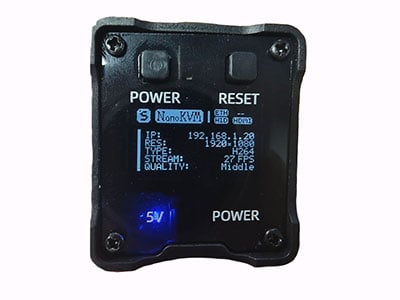
what is Sipeed Lichee NanoKVM?
The Sipeed Lichee Nano KVM is a high-performance, compact KVM over IP device built on T-Head’s 64-bit RISC-V chip. It allows you to remotely access and control one or more computers via a network. Meanwhile, it supports 1080P 60Hz video input and encoding, which is fully adequate for daily maintenance. It is configured with a Gigabit Ethernet interface to achieve low latency in network transmission.
It comes with several ports: HDMI, USB-A, USB-C, and an Ethernet port. These are used respectively for connecting to the server or computer under control, simulating a virtual keyboard and mouse, powering the device and enabling debugging, and connecting to the network.
It delivers high performance and offers an extremely high cost-effectiveness compared to traditional KVM over IP switches. Moreover, its size is designed to be very small, small enough to fit in your pocket. Both its hardware and software are open-source, facilitating secondary development and learning.
The Sipeed Lichee Nano KVM is not just a KVM device, but rather a “high-performance RISC-V development board in KVM’s clothing”. With its powerful performance, open-source features, and affordable price, it is highly popular among professional operation and maintenance personnel as well as geek communities, and serves as a disruptive alternative to traditional expensive commercial KVMs.

Features of Sipeed Lichee Nano KVM
| Feature | Description | Benefit |
|---|---|---|
| High-performance RISC-V | TH1520 SoC with quad-core 64-bit RISC-V C910 CPU @ 2.0GHz | Strong processing power, smooth operation |
| Professional Video | 1080p 60Hz input, H.264/H.265 encoding | Clear and smooth video, low bandwidth usage |
| Network | Gigabit Ethernet | Low latency, high bandwidth for real-time operation |
| Interface Design | HDMI input, USB-A, USB-C, and Gigabit Ethernet | Compact structure with complete functionality |
| BIOS-level Management | Control before OS installation or during system crashes | Deep operations like system installation and troubleshooting |
| Low Latency | Powerful hardware encoding and Gigabit network | Near real-time operation experience |
| Access Methods | WebUI and VNC protocol support | Easy to use, no dedicated client needed |
| Virtual Media | Virtual CD-ROM and USB storage devices | Remote system installation without physical media |
| Open Source | Both hardware and software are open source | High transparency and freedom |
| Community Support | Active RISC-V/geek community | Rich resources and solutions |
| Cost-effective | Professional KVM functions at very low price | Get professional features at extremely low cost |
| Performance Core | Quad-core RISC-V C910 @ 2.0GHz | Strong processing capability, smooth operation |
| Open Source Spirit | Open hardware and software | High degree of freedom, customizable, rich community ecosystem |
| Value | Price much lower than commercial KVM | Professional-level functionality at extremely low cost |
Sipeed Lichee Nano KVM Pinout


Sipeed NanoKVM Parameter Description
| Feature | Description |
|---|---|
| Computing Unit | LicheeRV Nano (RISC-V) |
| Resolution | 1080P @ 60fps |
| Video Encoding | MJPEG, H264 (developing) |
| Video Latency | 90 ~ 230ms |
| UEFI/BIOS Support | ✔ |
| USB Keyboard/Mouse Emulation | ✔ |
| USB Storage Emulation | ✔ |
| IPMI | ✔ |
| Wake-on-LAN | ✔ |
| ATX Power Control | USB Interface IO Control Board |
| OLED Display | 128×64 0.96” white |
| External Serial Port | 2 ports |
| TF Card | Included, ready to use |
| Expansion Accessories | WiFi or PoE |
| Power Consumption | 0.2A@5V |
| Power Input | PC USB powered, also supports auxiliary power |
| Cooling | Fanless, silent |
| Dimensions | 40x36x36mm ~1/7 PiKVM V4 volume |
Simple Usage Tutorial for Sipeed Lichee Nano KVM
Simply connect the cables as shown in the diagram and log in to easily control a server or host.


Application Scenarios of Sipeed Lichee Nano KVM
The Sipeed Lichee Nano KVM is mainly used for remote control, remote installation, and remote monitoring, and can be applied to the construction and maintenance of servers. Due to its ultra-small size, it can be carried around and used for temporary server maintenance, temporary computer control, etc. In short, the Sipeed Lichee Nano KVM can not only accomplish most tasks related to controlling or assembling servers or hosts, but also, with its price much lower than that of common commercial KVMs, as well as its ultra-small size, good response speed and frame rate, it is widely used in the market.

Sipeed NanoKVM Demo Video
FAQ
What is the difference between Sipeed Lichee Nano KVM and traditional remote desktop software (such as TeamViewer, RDP)?
Sipeed Lichee Nano KVM is a hardware-level remote management solution that provides complete remote control even before the operating system is installed, when the system crashes, or after the server is powered off and restarted. Unlike traditional software solutions, it supports BIOS/UEFI settings, system installation processes, and underlying hardware management, providing true out-of-band management capabilities.
What video encoding and resolution does Sipeed Lichee Nano KVM support? What is its latency performance?
The device supports high-definition video transmission at 1080P @ 60fps. It currently supports MJPEG encoding, with H264 encoding under development. Video latency ranges between 90-230ms, providing near real-time operation experience. Combined with a Gigabit Ethernet interface, it ensures smooth remote control.
How does Sipeed Lichee Nano KVM enable remote system installation and virtual media functionality?
Through virtual optical drive and virtual USB storage device functions, users can remotely mount local ISO images or disk images to the target server, completely replacing physical optical drives and USB flash drives. This makes it possible to install operating systems remotely, run diagnostic tools, or load drivers without needing to be physically present at the server location.