In-depth analysis of the LSM6DS3 chip, a hands-on guide to teach you how to master the GY-LSM6DS3 module with Arduino! Covering detailed pinout explanation, I2C/SPI communication, library function usage, data calibration, low-power techniques, comparison with the MPU6050, application examples, and common problem solving. A step-by-step guide to lead you to a detailed understanding of the GY-LSM6DS3.
Introduction
Have you ever wondered how robots perceive their orientation? How drones get real-time data about their state to maintain stability? Or how self-balancing scooters manage to stay upright? The answer to all these questions lies in a tiny component: the 6-axis Inertial Measurement Unit (IMU). In the world of electronics, the most common IMUs are the well-known MPU6050 and the star of our guide today, the GY-LSM6DS3.
A Detailed Breakdown of the GY-LSM6DS3 Module and the LSM6DS3 Chip
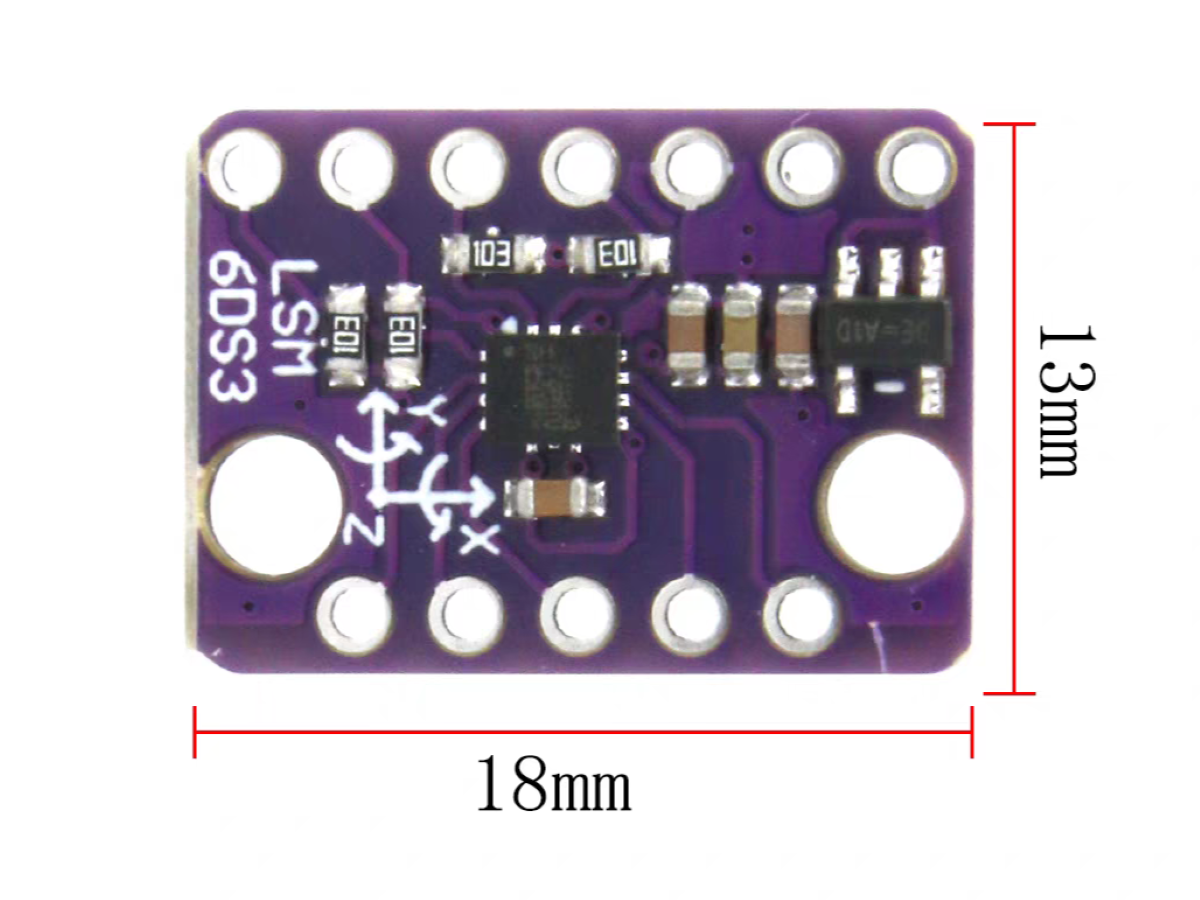
The GY-LSM6DS3 is a common development module you’ll find in the electronics market. It integrates the core LSM6DS3 chip, essential power circuitry (typically including a 3.3V voltage regulator), and standard pin headers, allowing for easy integration with development boards.
The LSM6DS3 itself is a high-precision, low-power, six-axis motion sensor produced by STMicroelectronics. It features a 3-axis accelerometer (measuring acceleration on the X, Y, and Z axes) and a 3-axis gyroscope (measuring angular velocity around the X, Y, and Z axes). The chip supports both I2C and SPI communication interfaces, making it compatible with a wide range of hardware platforms, including Arduino, ESP32, and STM32. It is widely used in fields such as motion tracking, robotics, drones, and consumer electronics. By providing accurate motion sensing and data acquisition capabilities, it enables developers and engineers to design more precise and efficient systems.
Some of the things the LSM6DS3 can do
Read accelerometer data up to 6.7 kilosamples per second, for super accurate movement sensing
Read gyroscope data up to 1.7 kilosamples per second
Operates at 1.25mA for up to 1.7 ksps modes
Read temperature
Buffer up to 8 kbytes of data between reads (built-in FIFO)
Count steps (Pedometer)
Detect shocks, tilt, motion, taps, double-taps
Host other sensors into its FIFO
Drive interrupt pins by embedded functions or by FIFO low-capacity/overflow warning.
What is an accelerometer, and what is a gyroscope?
Accelerometer: An accelerometer measures how fast an object’s speed is changing in 3D space—a concept known as acceleration. This measurement is expressed in either meters per second squared (m/s²) or G-forces (g), where 1G on Earth is equal to the pull of gravity, or 9.8 m/s². The data from an accelerometer is incredibly useful for calculating an object’s velocity, displacement, or even detecting vibrations. To suit different needs, the GY-LSM6DS3’s accelerometer offers a variety of selectable ranges, including ±2g, ±4g, ±8g, and ±16g.
Gyroscope: A gyroscope, on the other hand, measures how fast an object is rotating around its three axes. This rotational speed is called angular velocity and is typically measured in degrees per second (°/s) or revolutions per second (RPS). Gyroscopes are essential for tasks like maintaining orientation (attitude control) and monitoring rotation. The GY-LSM6DS3’s gyroscope is highly versatile, offering selectable ranges of ±125°/s, ±250°/s, ±500°/s, ±1000°/s, and ±2000°/s to enable precise angular velocity sensing.
LSM6DS3 IC: Specs, Key Features, and Architecture
LSM6DS3 Electrical Specifications
| FEATURE |
LSM6DS3 PARAMETERS |
SIGNIFICANCE / IMPLICATION |
| Accelerometer / Gyroscope Range |
Accel: ±2 / ±4 / ±8 / ±16 g
Gyro: ±125 / ±250 / ±500 / ±1000 / ±2000 dps |
Covers a wide dynamic range, from low-vibration to high-shock events. |
| Operating Current |
~0.9 mA (in mixed mode, high-performance mode) |
Low-power design extends the battery life of portable and battery-powered devices. |
| Digital Interface |
I²C, SPI |
Compatible with a wide range of host MCUs (e.g., Arduino, ESP32, STM32), making it easy to integrate into various projects. |
| FIFO Buffer |
32-level FIFO |
Reduces the data processing load on the host MCU, enabling efficient data stream management and reducing system overhead. |
| Built-in Functions |
Free-fall detection, Wake-up, 6D orientation detection, etc. |
Minimizes the need for external circuitry, simplifying system design while lowering development difficulty and overall cost. |
MPU6050 vs LSM6DS3: Which IMU Should You Choose?
| FEATURE |
GY-LSM6DS3 (LSM6DS3 CHIP) |
GY-521 (MPU6050 CHIP) |
| Accelerometer Range |
±2 / ±4 / ±8 / ±16 g |
±2 / ±4 / ±8 / ±16 g |
| Noise Density |
~90 µg/√Hz |
~400 µg/√Hz |
| Gyroscope Range |
±125 / ±250 / ±500 / ±1000 / ±2000 dps |
±250 / ±500 / ±1000 / ±2000 dps |
| Communication Interface |
I²C & SPI |
I²C |
| FIFO Buffer |
32-level |
Yes |
| DMP (Digital Motion Processor) |
Yes |
Yes |
| Power Consumption |
~0.9 mA |
~3.9 mA |
| Built-in Temperature Sensor |
Yes |
Yes |
| Interrupt Function |
Yes |
No |
Pin Description
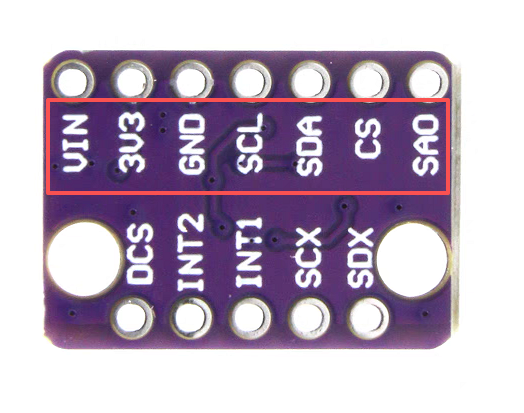
I²C and Power Interface
| Pin Label |
Pin Function |
Notes |
| GND |
Ground |
0V voltage supply. Spare GND pin to connect more stuff! |
| VDD |
Power Supply |
Supply voltage to the chip. Should be regulated between 1.8V and 3.6V. Spare VDD provided for general use as well. |
| SDA/SDI |
I²C: Serial Data |
I²C: Serial data (bi-directional)
SPI: MOSI (Device data in) |
| SCL |
Serial Clock |
I²C and SPI serial clock. |
| SDO/SA0 |
I²C: Address |
I²C: Address LSB
SPI: MISO (Device data out) |
| CS |
I²C: Mode |
I²C: Select I²C (disconnected)
SPI: CS (Chip select) |
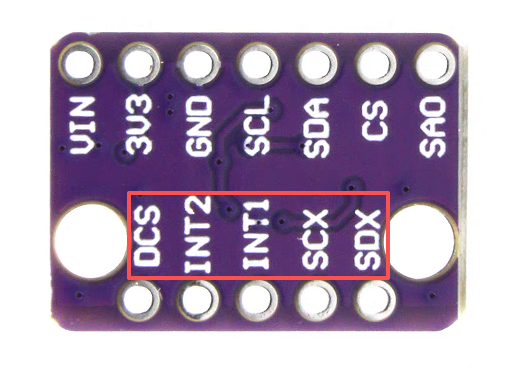
SPI and Interrupt Interface
| Pin Label |
Pin Function |
Notes |
| INT2 |
Accel/Gyro Interrupt 2 |
INT1 and INT2 are programmable interrupts for the accelerometer and gyroscope. They can be set to alert on over/under thresholds, data ready, or FIFO overruns. Make sure these are connected to an INPUT pin to prevent driving 5V back into the LSM6DS3. |
| INT1 |
Accel/Gyro Interrupt 1 |
Accel/Gyro Interrupt 1, used for alert functions similar to INT2. |
| OCS |
Aux SPI 3-wire |
These pins are used to attach slave I²C and 3-wire devices for FIFO data collection. This function is not covered in this tutorial. |
| SCX |
Aux Clock |
Auxiliary clock pin used for clock functionality in the auxiliary data system. |
| SDX |
Aux Data |
Auxiliary data pin used for data transfer in the auxiliary data system. |
Hardware Design and Integration
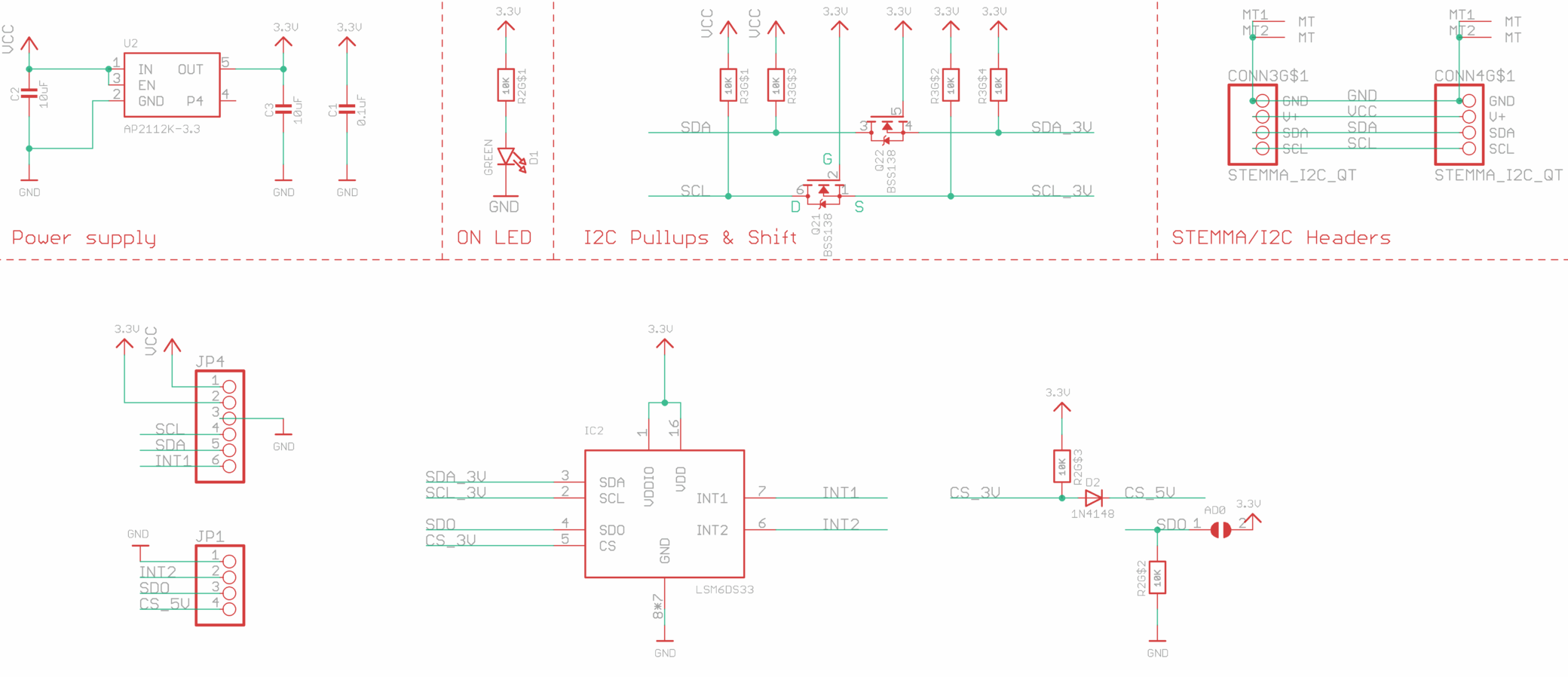
GY-LSM6DS3 Module Schematic
How to Wire the GY-LSM6DS3 to an Arduino
Connect according to the table below
| GY-LSM6DS3 |
ARDUINO UNO |
KEY NOTES |
| VCC |
5V |
Module has LDO, can connect to 5V |
| GND |
GND |
|
| SCL/SPC |
A5 |
|
| SDA/SDI/SDO |
A4 |
|
| SA0 |
NC |
Set I2C address to 0x6A |
| CS |
NC |
Must be connected to high level in I2C mode |
| INT |
D2 |
|
Measuring Data with Arduino
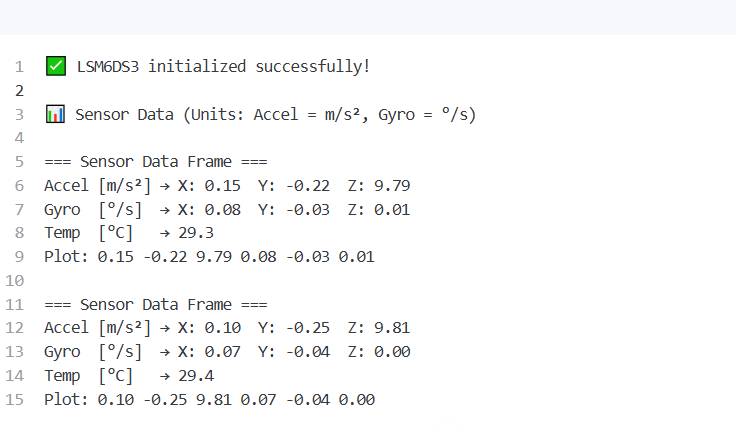
1. Code to View Data Using the Serial Monitor
Example Serial Monitor Output
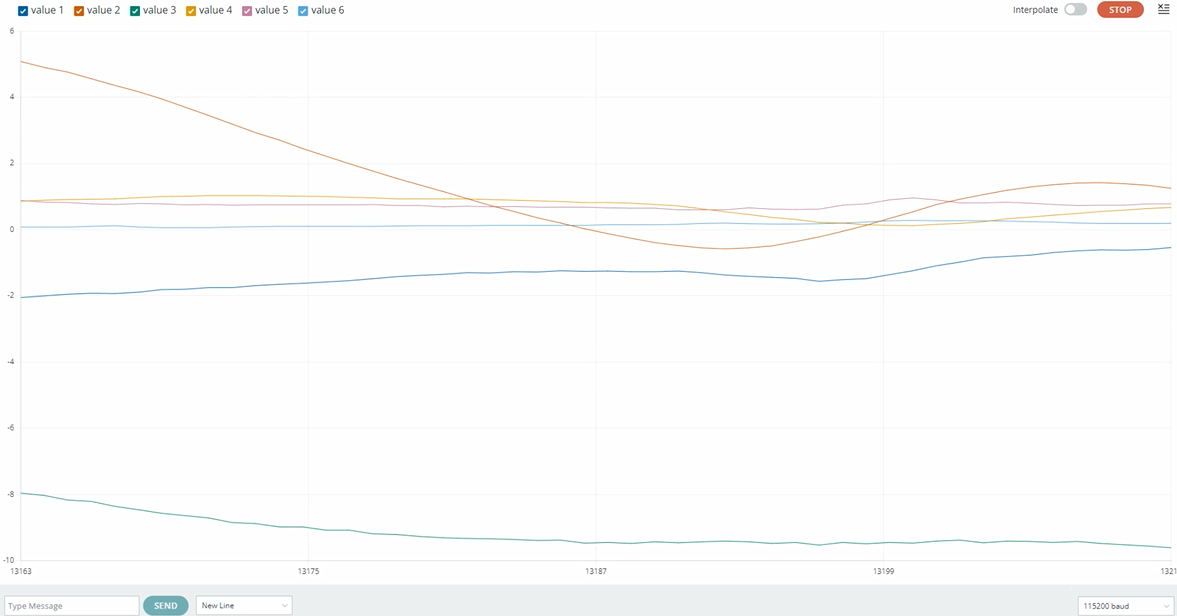
2.Viewing the Waveform with the Serial Plotter
Example Serial Monitor Output
FAQ and Solutions
1.Is the MPU6050 obsolete?
Not at all. The MPU6050 remains a capable sensor with solid performance. Compared to the GY-LSM6DS3, each has its own pros and cons, so the best choice depends on the user’s specific needs.
2.What replaced the MPU6050?
Modules like the GY-LSM6DS3 (a 6-Axis Gyro & Accelerometer) are increasingly becoming the go-to choice for DIY projects, gradually taking the place of the MPU6050.
3.Can I use an MPU6050 or GY-LSM6DS3 6-Axis Gyro & Accelerometer with Arduino?
4.Is the GY-LSM6DS3 easy to use?
Yes, the GY-LSM6DS3 has an extensive codebase and is both simpler to use and more advanced than the MPU6050.
5.How accurate is the GY-LSM6DS3?
Depending on the full-scale range selected, the typical sensitivity of the accelerometer is as follows:
±2 g: approx. 0.061 mg/LSB (acceleration per quantization step)
±4 g: approx. 0.122 mg/LSB
±8 g: approx. 0.244 mg/LSB
±16 g: approx. 0.488 mg/LSB
6.Does the MPU6050 have a temperature sensor?
Yes, the GY-LSM6DS3 can measure temperature.
7.The sensor fails to initialize, the begin() function returns false, or it cannot communicate with the microcontroller via I2C.
Solutions:
Check the connections: Ensure the SDA, SCL, and VCC pins are correctly connected and that the supply voltage is compatible with the GY-LSM6DS3 (typically 3.3V or 5V).
Check the I2C address: The default I2C address is 0x6A (or 0x6B, depending on the state of the SA0 pin). Confirm that the correct address is used in your code.
Power Issues: Ensure the power supply is stable. Check for voltage fluctuations or an insufficient power supply.
Use an I2C Scanner: Run an I2C scanner sketch to detect if the sensor is on the bus and to ensure there are no I2C address conflicts.
8.The accelerometer or gyroscope returns abnormal data
Solutions:
Check the data configuration: Ensure the sensor’s range and Output Data Rate (ODR) are correctly configured. For example, if the range for the accelerometer or gyroscope is set too high, the changes in data may not be significant.
Check the I2C configuration: If you are using I2C communication, ensure the sensor’s I2C address matches the one set in your code.
Re-initialize: Try resetting the sensor, re-initializing the communication, and then check the data output.
9. Excessive Data Noise
Solutions:
Add a filter: Use a low-pass filter (such as a moving average filter or a Kalman filter) to reduce noise in the accelerometer data.
Adjust the range settings: Adjust the range for the accelerometer and gyroscope based on your needs to select an appropriate measurement range that balances accuracy and noise.
Calibrate the sensor: Perform sensor calibration, especially the zero-bias offset for the gyroscope. Calibration can be done using external equipment or software.
10.Angle measurement drifts over time
Solutions:
Use sensor fusion algorithms: Gyroscope drift can be reduced by fusing data from both the accelerometer and the gyroscope. Common algorithms include the Kalman filter and the complementary filter.
Perform periodic calibration: Regularly correct the gyroscope’s readings using a known reference orientation, especially during prolonged use.
11.I2C Bus Conflicts or Communication Errors
Solutions:
Ensure address uniqueness: Verify that all connected I2C devices have unique addresses to prevent address conflicts.
Use proper power management: Ensure the I2C bus voltage is stable to prevent power fluctuations from affecting bus communication.