Introduction
The DY-SV17F is a compact and affordable MP3 module that can connect directly to a speaker. You can use it on its own with a power battery, speaker, and buttons. Or, you can control it via serial port and use it as a module for Arduino UNO or any microcontroller with a serial port. The module comes with built-in hardware decoding for MP3, WAV, and WMA formats. It also supports TF card drive through software and works with FAT16 and FAT32 file systems. With simple serial port commands, you can play specific music and control how the music plays. No need for complicated low-level operations—it’s easy to use, stable, and reliable.
Features
- Supports MP3 and WAV decoding formats.
- Supports sample rates (KHz): 8/11.025/12/16/22.05/24/32/44.1/48.
- 24-bit DAC output, with a dynamic range of 90dB and a signal-to-noise ratio of 85dB.
- On-board 32Mbit (4MByte) flash memory,you can update audio files by connecting to a computer via a USB data cable.
- Built-in 5W Class D power amplifier, which can directly drive a 4Ω, 3-5W speaker.
- UART serial port controls voice broadcast functions, including play, pause, track selection, volume up/down, etc. It supports up to 65535 tracks, with a baud rate of 9600bps.
- Supports IO trigger play function: 8 IO ports can trigger 8 tracks independently, or 8 IO ports can combine to trigger 255 tracks.
- Supports One-line single-bus serial port control, which can control play, pause, track selection, volume up/down, etc.
- Supports 3 configuration for up to 7 working mode selections.
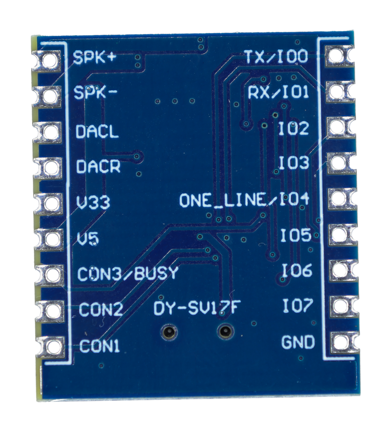
Pin Definition
No. | Pin Name | Instruction |
1 | TXD/IO0 | IO trigger mode is input IO0;UART mode is TX. |
2 | RXD/IO1 | IO trigger mode is input IO1;UART mode is RX. |
3 | IO2 | IO trigger mode input IO2. |
4 | IO3 | IO trigger mode input IO3. |
5 | IO4/ONE_LINE | IO mode input IO4;One_Line mode data receiver pin. |
6 | IO5 | IO trigger mode input IO5. |
7 | IO6 | IO trigger mode input IO6. |
8 | IO7 | IO trigger mode input IO7. |
9 | GND | Ground |
10 | CON1 | Mode Configuration pin1. |
11 | CON2 | Mode Configuration pins2. |
12 | CON3/BUSY | It is Mode configuration pin3 within 30ms after power on.Then is BUSY output.Output low level signal(0V) when playing and output high(3.3V) after |
13 | V5 | 5V work voltage positive pole input terminal |
14 | V33 | 3.3V output voltage positive(Max 80mA) |
15 | DACR | Audio left channel output |
16 | DACL | Audio right channel output |
17 | SPK- | 5W Amplifier Output – and connect to speaker |
18 | SPK+ | 5W Amplifier Output + and connect to speaker |
Dimension
Working Principle
The working process of the DY-SV17F can be broke down to four core steps: Storage Reading → Audio Decoding → Control Response → Audio Output. These steps work together to achieve the audio playback function.
Storage Media Reading Principle
When you power on the module, first checks if there has a TF card, USB drive, or SPI Flash connected:
- If it finds a storage device, it uses the right protocol to read the device partition table. It makes sure the format is FAT32.
- Then it reads audio files in the root folder, and makes a track index list in the order of filenames like “mp3”, “002.mp3”.
Note: It only recognizes files in the root folder.
When it gets a “play a specific track” command, it finds the file’s storage address using the index list. It reads the audio data in 512-byte blocks and saves it to the module’s internal 2KB buffer. This keeps it from reading the storage device too often, making things more stable.
Audio Decoding Principle
The compressed audio data (like MP3) in the buffer needs the decoding chip to process it into playable analog signals:
- MP3 decoding: First, the chip parses the MP3 file’s frame header (to get things like bit rate and sample rate). Then it does Huffman decoding, inverse quantization, and subband synthesis on the compressed data—turning it back into PCM-format digital audio signals.
- WAV decoding: WAV is lossless, so the chip just parses the file header for sample rate and channel count, then pulls out the PCM data. No fancy decompression needed.
Sound effect tuning: The decoded PCM signal goes through the built-in EQ module. It adjusts the audio’s frequency spectrum based on the sound effect you set (like boosting bass for Rock mode). Then it sends the signal to the volume control module, which adjusts the signal strength by 0-30 volume levels.
Control Response Principle
The module has two ways to react to external signals, depending on the control mode:
IO Independent Mode: When the KEY1/KEY2 pins detect a low level (like when you press a button), the internal IO detection circuit waits 10ms to filter out glitches. Once it confirms the signal is real, it uses preset function logic (e.g., KEY1 = “Play/Pause”) to directly control the decoding and storage-reading modules. The AD_KEY pin uses an internal AD converter to check the divided voltage. It compares that voltage to a preset threshold (like 0.8V = “Previous Track”) and triggers the right function.
Serial Port Control Mode: The main controller sends a 5-byte command frame (0x7E + Command + Parameter + Check + 0xEF). After the module’s RX pin gets it, first it checks the check byte—calculated as (0x7E + Command + Parameter) & 0xFF. If the check passes, it parses the command (e.g., 0x02 means “Play Specified Track”), where the parameter is the track number. Then it runs the matching function.
Audio Output Principle
The decoded PCM digital signal needs to turn into an analog signal and get amplified for output:
Single-ended output (HP_OUT): The digital signal goes through a DAC (Digital-to-Analog Converter) to become an analog audio signal. Then an operational amplifier boosts it to 50mW@32Ω power—enough to drive headphones directly.
Differential output (SPK±): The analog signal goes through a differential amplifier circuit to make a differential signal (this cuts down on common-mode interference). You’ll need an external amp (like the TDA2822M) to boost the power to 2-3W so it can drive a speaker.
Status feedback: While playing, the LED pin shows the module’s status with voltage levels. It blinks when playing (periodic high-low levels) and stays bright when paused—so you can tell what’s going on at a glance
Working Mode Configuration
FAQs
Q: Audio has noise
A:Connect a 0.1μF ceramic capacitor in parallel between the VCC and GND of the DY-SV17F to reduce power ripple. Keep the audio cable (from SPK+/- to the speaker) as short as possible and avoid running it parallel to the power cable to reduce interference. If using a breadboard, make sure the connections are good—oxidation on the breadboard may cause poor contact and noise.
Q: Failed to upload code via serial port
A: When using hardware serial port connection, the TX/RX of the DY-SV17F occupies the 0 and 1 pins of the Arduino, causing a conflict during upload.
Solution: Disconnect the TX and RX wires of the DY-SV17F before uploading the code. After the upload is complete, reconnect TX/RX and then power on the module.
Q: Module has no response
A: Power check: Make sure the DY-SV17F’s VCC is hooked up to the Arduino’s 5V. 3.3V won’t work great—there’s not enough current, so the module might act wonky. Also, don’t forget to common ground the GND pins.
Serial port baud rate: The module’s default baud rate is 9600bps. This has to match whatever number you put in Serial.begin() or sv17fSerial.begin() in your Arduino code. If they don’t line up, it won’t work.
Command format: Use the Serial Monitor to print the command frame you’re sending . Just double-check it’s a 5-byte format—starts with 0x7E and ends with 0xEF. If that’s right, you’re good to go.
TF card issue: Check if the TF card is in FAT32 format and if the files are in the root directory and