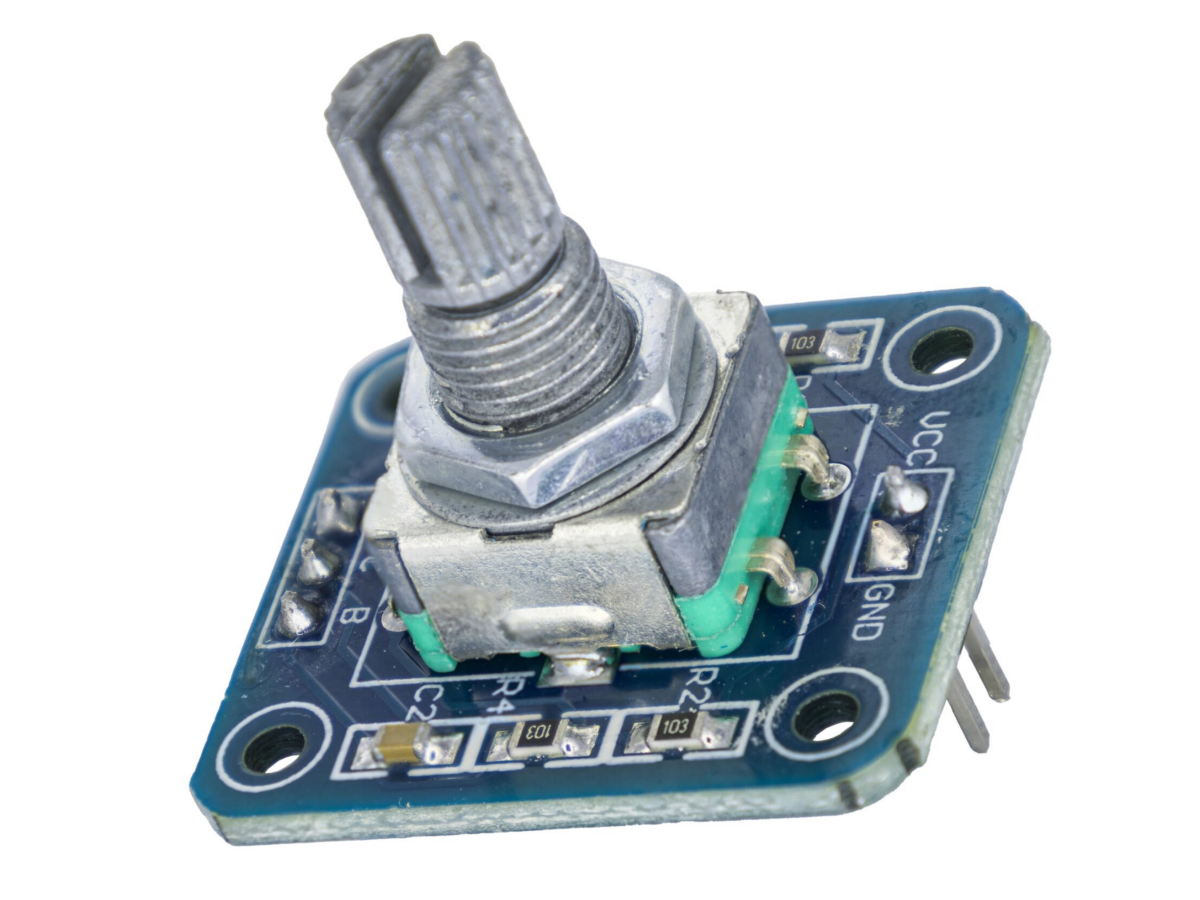
The 360°EC11 rotary encoder is a fantastic choice for your next rotary encoder switch project! With its smooth rotation, tactile feedback, and reliable performance, it’s perfect for DIY electronics, audio controls, and more. Plus, the rotary encoder price is budget-friendly, making it a great pick for hobbyists and professionals alike. Let’s dive into how to use this little powerhouse!
In the vast realm of modern technology, the rotary encoder stands out as a precise and shining star, playing an irreplaceable role in numerous industrial and automation applications. Simply put, rotary encoders are magical devices that accurately convert mechanical rotational displacement into electrical signals. It is like a sharp observer, capable of precisely capturing and clearly quantifying every bit of rotational movement.
What is a rotary encoder module EC11?
The EC11 rotary encoder is a high-precision electromechanical component that converts rotational motion into digital signals, making it ideal for volume controls, user interfaces, and industrial automation. With its clear tactile positioning, and built-in push-button functionality, it offers both precision and versatility. Its durable metal shaft and smooth rotation ensure long-term performance in demanding applications. The encoder is mainly used for parameter control of frequency adjustment, height adjustment, temperature adjustment and volume adjustment.
EC11 Working Principle
The rotary encoder is an electromechanical device that can convert the angular motion of an axis into pulse signals with a 90°phase difference between A and B phases, where C is the reference point of the A/B signals.
- The direction of rotation (forward or reverse) can be determined based on the phase relationship of the A/B signals.
- The number of steps of rotation can be obtained by counting the pulses.
- The angular velocity can be obtained by counting the pulses within a unit time.
Working principle:
The rotating shaft drives two sets of coaxial grid discs. There is a certain angle deviation between the grid discs. The rotating grids will intermittently block the light signal emitted by the light-emitting diode, causing the photodiode to generate high and low level changes. Because there is a certain angle deviation between the two sets of grid discs, two sets of A/B phase signals with a 90°phase difference will be generated.
When both A and B phases output square waves:
When rotating clockwise, phase A leads phase B by 90 degrees;
When rotating counterclockwise, phase B leads phase A by 90 degrees.
| Clockwise movement |
Counter-clockwise movement |
| AB |
AB |
| 11 |
11 |
| 01 |
10 |
| 00 |
00 |
| 10 |
01 |
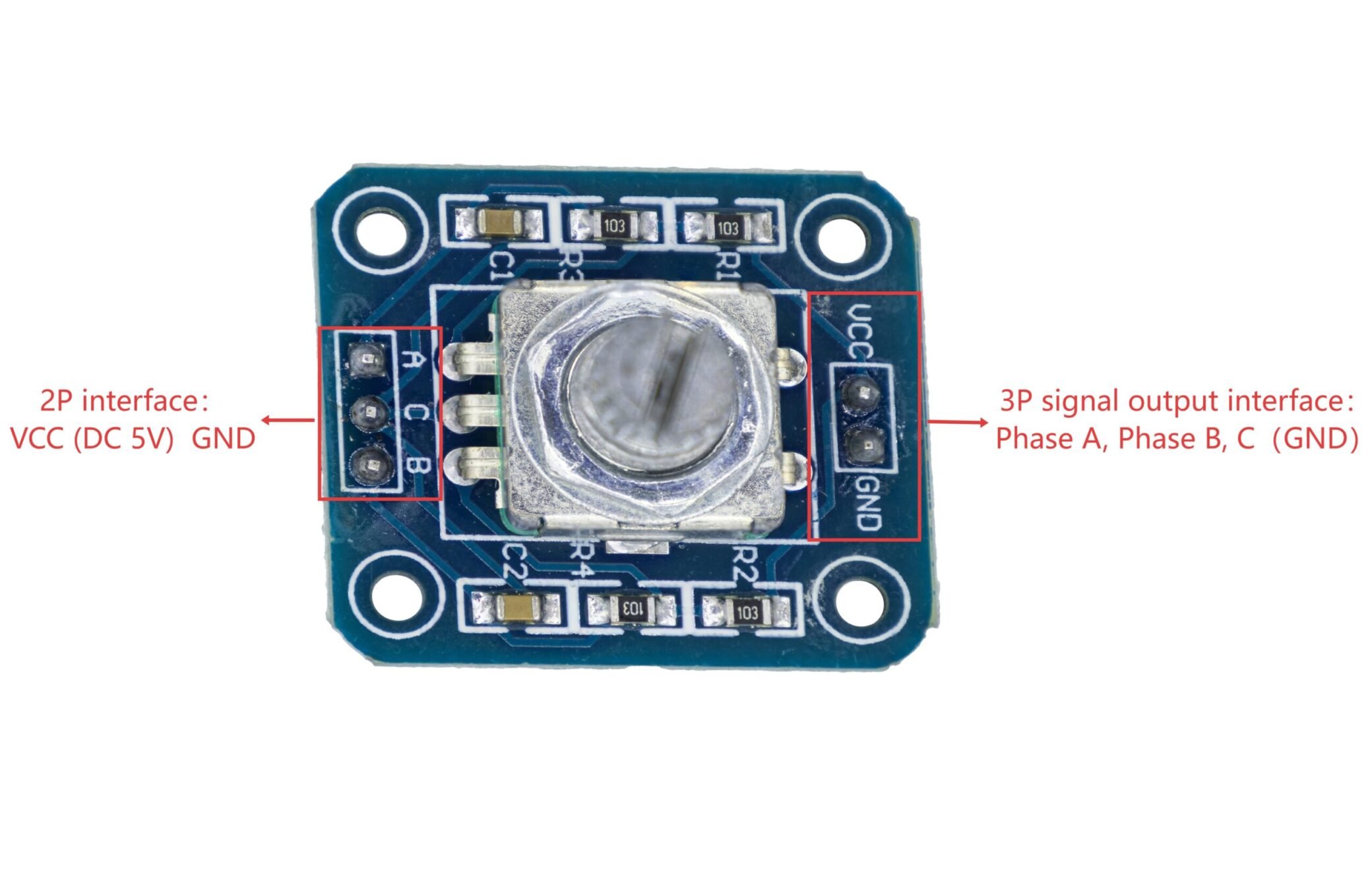
EC11 Pin Functions
EC11 Rotary Encoder Module Pin Diagram
EC11 Specifications
| Parameter |
Value |
| Rated voltage |
DC 5V |
| Each phase conductor AB phase |
0.5mA (Max 5mA, Min 0.5mA) |
| Common wire C |
1mA (Max 10mA, Min 0.5mA) |
| Operating temperature |
-30°C to +80°C |
| Storage temperature range |
-40°C to +85°C |
| Dimensions |
27.0*24.0*23.0 mm |
EC11 Arduino
EC11 Pinout
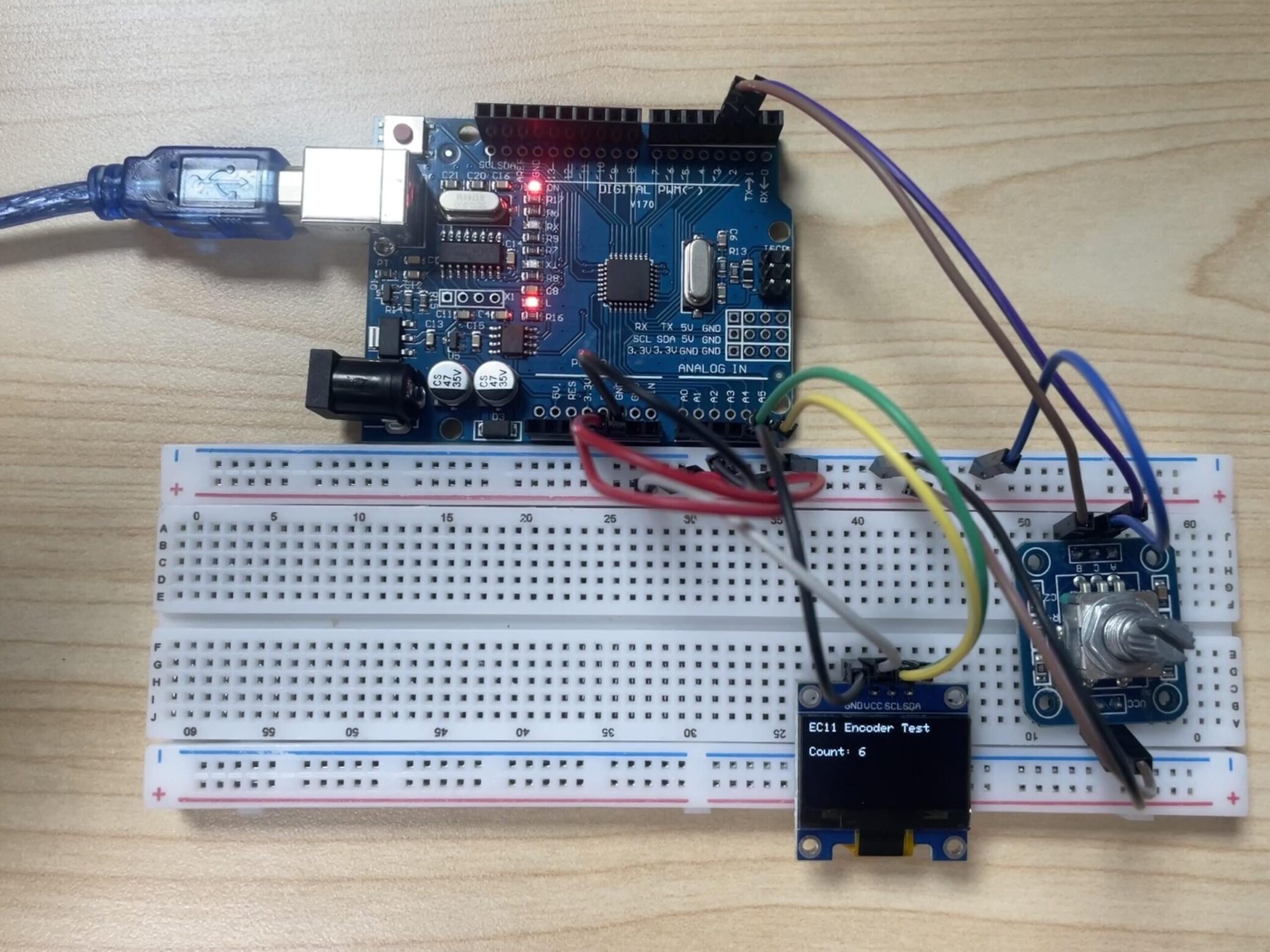
- EC11 Rotary Encoder Module:
A——> D2 VCC ——> 5V
B——> D3 GND ——> GND
C——>GND
VCC ——> 3.3V SCL ——> A5
GND ——> GND SDA ——> A4
EC11 Wiring Diagram
EC11 Arduino Code
EC11 Effect Demonstration
EC11 Rotary Encoder Module Note
- Avoid storing the rotary encoder in a place at high temperature,high humidity and in Corrosive gases.If any remainder left after packing is opened, please store it with proper moistureproofing, gasproofing etc.
- The encoder pulses count method should be designed with taking operating speed,sampling time and esign of the microcomputer software into cosideration.
- Care must be taken not to expose this rotary encoder to water or dew to prevent possible problemin pluses output waveform.
- During actual use of EC11, there are often issues of jitter. Sometimes, we just rotate by one grid, but the microcontroller enters two interrupt processes. If we need a smoother operation, that is, rotating by one grid only triggers one external interrupt, at this point, we need to perform anti-jitter processing on the EC11 encoder.
① Hardware anti-jittering
This is usually achieved by using parallel capacitors. By taking advantage of the property that capacitor voltage does not change abruptly, it is filtered.
② Software anti-jittering
This is generally done through the use of delay. By avoiding the period when mechanical jitter occurs, the purpose of filtering is achieved. For example, our independent buttons often use the method of software filtering.
- Set up a timer interrupt with a timing period of 1ms
- EC11 enters an external interrupt, temporarily disabling it for 50ms (or even shorter, such as 20ms), and activates the delay variable to start timing.
- After the timing is completed, clear the interrupt flag and the delay variable, and enable the external interrupt again.
EC11 Application Scenarios
The EC11 rotary encoder is widely used in electronic devices that require precise adjustment and position detection, including volume control in audio equipment (such as mixing consoles, amplifiers), home appliance interfaces (oven, washing machine knobs), industrial equipment (CNC machines, 3D printers), vehicle systems (central control knobs, dashboard adjustment), and smart home applications (light brightness, curtain control), etc. Its long service life and stable performance make it an ideal choice for human-machine interaction control, especially suitable for various electronic devices that require reliable knob operation.
Relative Information
EC11 Rotary Encoder Module Purchase Link
FAQ
When using EC11, the following issues may arise:
- Signal jitter: In addition to software anti-jitter, add hardware anti-jitter capacitors (usually 0.1μF) connected between the A/B pins and GND
- Decoding errors: Try using a more precise state machine decoding method, or reduce the complexity of the interrupt handling function
- Slow response: Ensure that the interrupt handling function is as short as possible, and complex processing is placed in the main loop
- Inaccurate rotation: This might be a mechanical issue. Check if the EC11 is of good quality, or reduce the step size for each brightness adjustment
What is the difference between EC12 and EC11 encoder?
The EC11 is small in size and low in price, making it suitable for consumer electronics (such as keyboard knobs). The EC12 has greater torque and a longer lifespan, targeting industrial applications (such as instrument adjustment). Key differences: The EC12 is more durable, while the EC11 is more economical.
How to check if a rotary encoder is working?
The following steps can be followed to quickly check if the rotary encoder is functioning properly:
- Signal testing: Use an oscilloscope to observe the output waveforms of the A/B phases (they should be 90° phase-shifted square waves) or use a multimeter to measure the voltage of the signal lines (when NPN/PNP type is conducting, it is close to the power supply voltage, and when it is off, it is close to 0V);
- Mechanical inspection: Confirm that the encoder is installed firmly without any looseness, and that the coupling has no slipping or wear;
- Function verification: When rotating the shaft, the PLC or counter should correctly count the pulses and the direction should be consistent with the physical rotation. If there is any abnormality, check the power supply, grounding, and anti-interference measures.
Why do rotary encoders fail?
The reasons for the failure of the rotary encoder usually involve multiple factors such as mechanical, electrical, environmental and installation. Here are the common causes and brief explanations:
1) Mechanical wear and looseness
- Bearing damage: After long-term use, the wear of bearings will cause the rotation to be unsmooth or the signal to be unstable.
- Coupling/axle sleeve loosening: Insecure installation or poor alignment may cause position deviation or pulse loss.
2) Electrical faults
- Power supply problems: Unstable voltage (below 4.75V) or aging power lines can cause the encoder to fail to work properly.
- Signal interference: Unshielded cables or nearby strong electromagnetic devices (such as frequency converters) may cause signal distortion or loss.
3) Environmental factors
- Contamination and corrosion: Dust and oil entering the encoder’s interior will contaminate the optical or magnetic scale, affecting the signal output.
- Extreme temperature: High temperatures accelerate the aging of electronic components, while low temperatures may cause grease to solidify, leading to mechanical jamming.
4) Improper installation and maintenance
- Installation too tight/loose: Incorrect installation of the shaft system will directly damage the encoder or reduce measurement accuracy.
- Lack of maintenance: Failure to clean or calibrate regularly will lead to cumulative errors and eventual failure.
5) Cable and connection issues
- Cable breakage/contact failure: High frequency faults, manifested as intermittent signal or complete interruption.
Summary: Failure is often caused by a combination of factors, such as mechanical vibration superimposed on power fluctuations, or the combined effect of contamination and temperature. Regular checks of power supply, cables, mechanical components and environmental adaptability are crucial for prevention.
What are the symptoms of a bad encoder?
When an encoder malfunctions, common symptoms can be classified into several categories, covering mechanical, electrical, and functional abnormalities:
1) Abnormal motion control
- Motor does not rotate or rotates abnormally: Loss of encoder signal or waveform distortion may cause the motor to fail to start, or exhibit phenomena such as sudden speed changes, jitter, etc.
- Servo system alarm: The driver may report errors such as “encoder signal loss”, “excessive deviation alarm”, or “excessive following error”, indicating abnormal signals or a mismatch between feedback values and instructions.
2) Signal output issues
- Abnormal waveforms: Missing A/B phase pulses in incremental encoders, phase difference not being 90°, or irregular Z phase zero position signals (such as multiple occurrences per revolution).
- Data jumps or no updates: Feedback position values of absolute encoders do not change, jump, or communication is interrupted (such as SSI/EnDat protocol errors).
3) Mechanical and installation faults
- Position deviation or decreased accuracy: Loose installation, misalignment of the shaft (radial deviation > 0.02mm), or bearing wear, resulting in position offset after homing or exceeding the repeat accuracy.
- Rotational jamming or noise: Shaft deformation, insufficient lubrication, or contaminants (such as dust, oil) entering the grating/magnetic scale, causing inflexible rotation or abnormal sounds.
4) Electrical and environmental factors
- Power supply issues: +5V power supply voltage lower than 4.75V (or 24V power supply lower than 23V), causing the encoder to fail to work properly or have unstable signals.
- Interference or shielding failure: When the shielded wire is not connected or grounding is poor, the signal is subject to electromagnetic interference (such as near a frequency converter), manifested as waveform jitter or communication errors.
5) Special type faults
- Absolute encoder battery failure: Multi-turn encoders lose the turn count memory due to insufficient battery voltage (<3V), requiring recalibration of the reference point.
- Cable and connection faults: Open circuit, short circuit, or poor contact (accounting for the highest failure rate), manifested as intermittent or complete signal interruption.
Summary: Fault manifestations are often a combination of symptoms. For example, motor jitter may be caused by both signal interference (electrical) and bearing wear (mechanical). It is recommended to prioritize checking the power supply, cable connections, and installation status, and then use an oscilloscope or driver alarms for further localization.