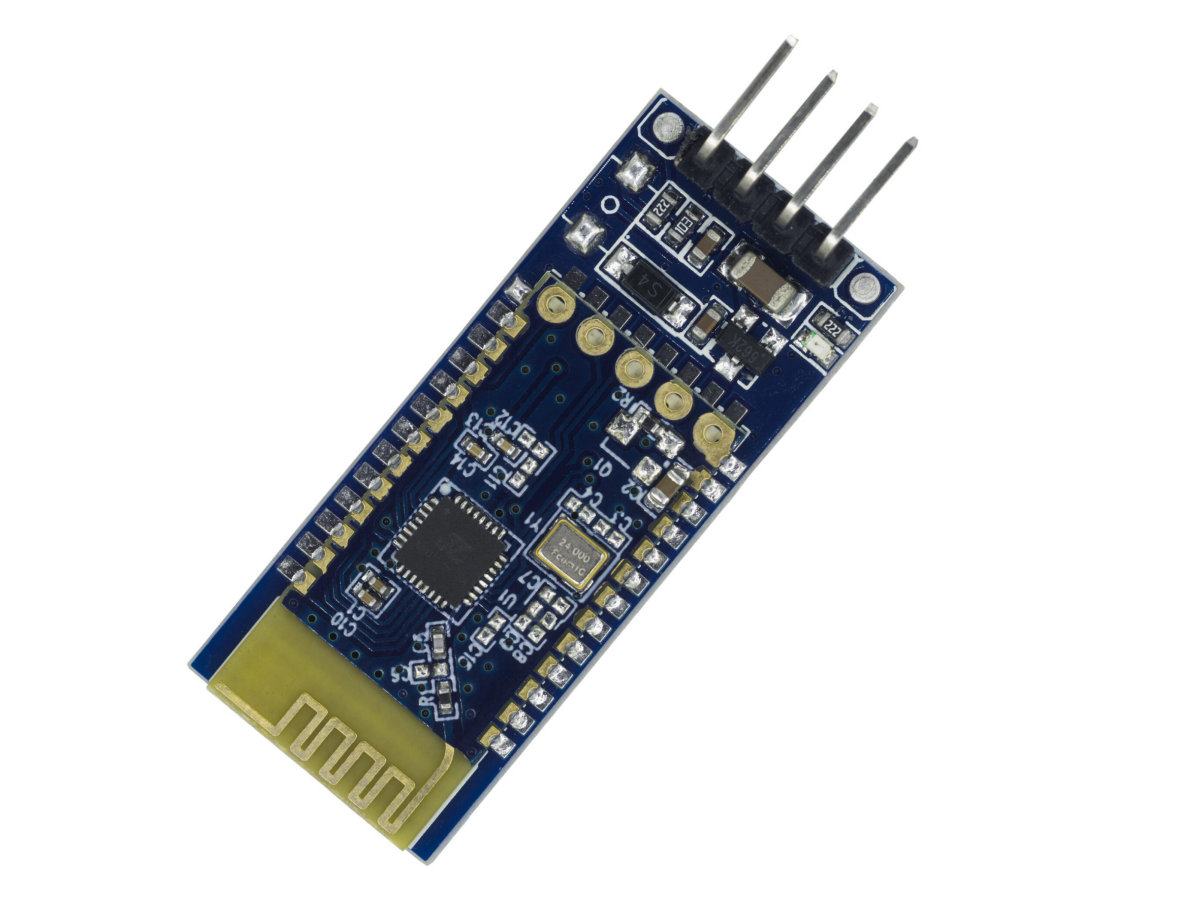
The new favorite of Bluetooth 3.0 that surpasses HC-05/06,what are you waiting for?
Meet the JDY-31 – Your Tiny Bluetooth Powerhouse!
Need a Bluetooth Low Energy (BLE) module that won’t break the bank?
This JDY-31 Bluetooth communication module is a smartphone’s best friend.
Configuring it? Easy-peasy! The Bluetooth module configuration is a breeze with simple AT commands—change names, baud rates, or pairing modes in seconds. Want to go from zero to wireless hero? The JDY-31’s got your back!
The JDY-31 baseboard Bluetooth module, with its outstanding compatibility and advanced Bluetooth 3.0 technology, has become the new favorite among many electronic enthusiasts. This article will deeply analyze the functional features of JDY-31, compare its advantages with traditional HC-05 bluetooth module/HC-06 bluetooth module , and provide detailed usage instructions to help you gain support on the path of developing smart devices.
What is JDY-31 Bluetooth Module?
The JDY-31 Bluetooth transmission module is a wireless communication module based on Bluetooth technology. It features fast transmission speed, high stability, and low power consumption. This module supports multiple Bluetooth protocols and can be widely applied in fields such as the Internet of Things, smart home, and smart wearables.
Bluetooth Module Working Principle
JDY-31 Bluetooth module is a low-power Bluetooth module, commonly used in wireless communication and data transmission.
Its working principle is as follows:
- Bluetooth communication protocol: The JDY-31 Bluetooth module uses the Bluetooth communication protocol for data transmission. The Bluetooth communication protocol is a short-range wireless communication technology that transmits data between devices via wireless means.
- Master-slave mode: The JDY-31 Bluetooth module can establish a connection between the master device and the slave device. The master device initiates the connection request, and the slave device accepts the request and establishes the connection.
- Bluetooth chip: The JDY-31 Bluetooth module integrates a Bluetooth chip internally, which is responsible for handling Bluetooth communication protocols, data transmission, and connection management functions.
- Serial port communication: The JDY-31 Bluetooth module communicates with the master device through the serial port. The master device sends the data to be transmitted to the Bluetooth module, and the Bluetooth module transmits the data to the connected device via the Bluetooth communication protocol.
- Low-power design: The JDY-31 Bluetooth module adopts a low-power consumption design, which can reduce power consumption in standby mode and extend battery life.
JDY-31 AT Commands
Introduction to AT Command
The AT command is a collection of commands used for interacting with modems or other communication devices. “AT” is the abbreviation for “ATtention”, indicating that the user wishes to communicate with the device.
The AT command is usually used for device configuration, control and query. By sending different AT commands, users can request specific commands from the device. The device will execute the corresponding operation based on the received command and return the processing result. Common AT commands are used to control the working mode of the modem, dialing, sending text messages, querying the network, etc.
- The steps to interact with the device using AT commands are as follows:
- Open serial communication: Connect the serial port of the terminal device to the serial port pins of the target device (such as a Bluetooth module). Ensure that the serial port connection configuration is correct, including the baud rate (communication speed), data bits, stop bits, and parity bits, etc.
- Send AT commands: Use a serial communication tool (such as a terminal emulator or a serial port debugging assistant) , then open a serial port connection and send AT commands through the serial port. You can directly input the AT command in the command line of the terminal emulator and send it, or create a new command script in the serial port debugging assistant and send it.
- Receiving and processing responses: After the target device (such as a Bluetooth module) receives the AT command, it will perform the corresponding operation and return the processing result. The response message returned by the target device is received and displayed through a serial communication tool. The response message is usually returned in a standard text format, including “OK” indicating successful command execution, “ERROR” indicating failed command execution, and other specific response messages.
- Parse and handle responses: Based on the received response message, you can parse and handle the information returned by the device. Depending on different AT commands, the response message may contain useful data, status information, or error messages.
AT Instruction Set
Note: When sending AT commands to the JDY-31 module via the serial port debugging assistant, be sure to add “\r\n”.
If the option of sending new lines and carriage return is selected in the serial port debugging assistant, then there is no need to add “\r\n” in the AT command.
| Command | Response | Parameter |
|---|
| AT+VERSION | 1+VERSION=JDY-31-V1.35,Bluetooth V3.0 | no |
| Command | Response | Parameter |
|---|
| AT+RESET | +OK | no |
| Command | Response | Parameter |
|---|
| AT+DISC | +OK | no |
Effective after connection
4. BLE Bluetooth MAC address
| Command | Response | Parameter |
|---|
| AT+LADDR | +LADDR=<Param> | no |
5. Baud rate setting / query
| Command | Response | Parameter |
|---|
| AT+BAUD<Param> | +OK | Param:(from 4 to 9)
4:9600
5:19200
6:38400
7:57600
8:115200
9:128000 |
| AT+BAUD | +BAUD=<Param> |
JDY-31 supports continuous data transmission and reception at a baud rate of 128,000, without packet loss, and the transmission speed can reach 16K bytes per second.
6. SPP Bluetooth pairing password
| Command | Response | Parameter |
|---|
| AT+PIN<Param> | +OK | Param : 4-digit password
Default PIN : 1234 |
| AT+PIN | +PIN=<Param> |
7. Broadcast Name Setting / Query
| Command | Response | Parameter |
|---|
| AT+NAME<Param> | +OK | Param:BLE Broadcast Name
Maximum length: 18 bytes
Default broadcast name: JDY-31-SPP |
| AT+NAME | +NAME=<Param> |
8. Restore factory settings
| Command | Response | Parameter |
|---|
| AT+DEFAULT | +OK | no |
JDY-31 AT Command Debugging
Serial Port Debugging Assistant Download : Simple Simple Monitor V1.0.0.3
- The JDY-31 uses the UART communication method. It can establish a connection with the computer using a USB-TTL downloader like CH340, and then perform operations such as command debugging, data sending and receiving through the serial port assistant. Please note that the RXD and TXD should be cross-connected, as shown in the figure.
| USB-TTL | JDY-31 |
|---|
| 5V | VCC |
| GND | GND |
| TXD | RXD |
| RXD | TXD |
2. After connecting the computer, open the serial port assistant. The default baud rate is 9600. Then, send the AT command to start the configuration. As shown in the following figure.
It should be noted that, for example, the command to query the Bluetooth name is AT+NAME. Just send AT+NAME directly, and remember to check the option of sending new lines and carriage return. If you need to modify the name, then send AT+NAMErainbow. The “rainbow” following the instruction is the name that needs to be modified. There is no need to add an equal sign between the instruction and the name. Pay attention to the format. After modification, you need to power on the JDY-31 again to make it take effect. The same applies to other instructions, such as modifying the baud rate, password, etc.
JDY-31 Feature
- Based on Bluetooth 3.0 SPP design, it supports data transmission between Windows, Linux and Android systems.
- The working frequency band is 2.4GHz, using GFSK modulation method. The maximum transmission power is 8dBm and the maximum transmission distance can reach 30 meters.
- Supports modification of device name, baud rate and other settings via AT commands, providing flexible and convenient usage.
- Four pins are provided, which are used for power input, ground wire, serial port transmission (TX) and reception (RX), simplifying the installation and wiring process.
JDY-31 Pin Functions
| PIN |
Pin Function |
| VCC |
Power supply pin is connected to the positive power supply (recommend 5V). By providing the module with an appropriate power supply, it can operate normally. |
| GND |
The ground pin is connected to the negative ground terminal. It is used to form a circuit loop with the power supply pin to provide the grounding for the power supply. |
| TXD |
Serial data transmission pin, used to send data from the module to an external device. You can connect the receiving pin (RXD) of the external device to the TXD pin of JDY-31 to receive data from the Bluetooth module. |
| RXD |
Serial data receiving pin, used to receive data sent by external devices. You can connect the transmitting pin (TXD) of the external device to the RXD pin of JDY-31 to send data to the Bluetooth module. |
| EN |
The enable pin is used to control the working state of the module. By providing a high level (usually 3.3V or 5V) to the EN pin, the module can be put into operation. When there is no input to the enable pin or a low level is given, the module will be in a low-power standby state. |
| STATE |
The status pin is used to provide the status information of the module. By monitoring the level changes of the STATE pin, you can obtain the connection status of the module or other related status information. |
JDY-31 Parameters
| Model |
JDY-31 |
| Working frequency |
2.4GHz |
| Communication interface |
UART |
| Input voltage with soldered baseboard |
3.6V to 6V (recommend 5V) |
| Operating temperature |
-40℃ to +80℃ |
| Antenna |
Built-in PCB antenna |
| Transmission distance |
30 meters |
| Master-slave support |
slave |
| Module size |
38.0mm * 16.0mm |
| Bluetooth version |
Bluetooth 3.0 SPP |
| STM soldering temperature |
<260℃ |
| Unconnected operating current |
4.7mA |
| Current after BLE connection |
7.3mA |
| Transmitting power |
8db (MAX) |
| Receive sensitivity |
-97dbm SPP |
| Maximum throughput |
16K bytes/s (Android, Windows) |
JDY31 3.0SPP VS HC05
| Feature | JDY31 | HC05 |
|---|
| Bluetooth Version | Bluetooth 3.0 + EDR (SPP Profile) | Bluetooth 2.1 + EDR (Class 2) |
| Functioning Pattern | A low-power slave Bluetooth module, small in size and with extremely low power consumption, is particularly suitable for applications with strict power requirements. The JDY-31 is mainly used as a slave device and cannot actively connect to other devices. It can only be connected by the master device. | The classic Bluetooth serial port module supports the switching between master and slave modes, enabling quick pairing with other Bluetooth devices and suitable for short-distance data transmission. It can be used as either the master device or the slave device, offering high flexibility. |
| Cost | The price is relatively affordable and it has the same pin layout as HC06 bluetooth module. It can be regarded as a more economical alternative to HC05/HC06. | The price is relatively higher and the functions are also more powerful. |
| Application Scenarios | Due to its low power consumption feature, it is suitable for devices powered by batteries, such as wearable devices and IoT sensors. | Due to its support for master-slave mode, it is suitable for projects that require frequent connections and data transmission, such as smart homes and wireless sensor networks. |
Compared with the traditional HC-05/06 modules, the greatest advantage of JDY-31 lies in its comprehensive compatibility and higher transmission rate. Although HC-05/06 has wide recognition and application foundation in the market, they have become somewhat outdated in certain aspects, especially when facing more demanding modern applications.
JDY-31 not only supports Bluetooth 3.0 standard, providing faster data transmission speed, but also can better adapt to complex wireless environments, reduce interference, and improve connection stability. These improvements make JDY-31 an ideal choice for smart home and IoT device development.
The choice between JDY31 and HC05 mainly depends on the specific requirements of the project. If you need a flexible master-slave mode and a wide range of configuration options, HC05 is the better choice. If you have strict power consumption requirements and a limited budget, JDY31 is more suitable.
JDY-31 Arduino
JDY-31 Pinout(Connect Arduino to Bluetooth module)
| Bluetooth Module | Arduino |
|---|
| VCC | 5V |
| GND | GND |
| TXD | D0 (RX) |
| RXD | D1 (TX) |
· Simulated Wiring Diagram
· Physical Wiring Diagram
JDY-31 Arduino Code
Bluetooth Module JDY-31 Effect Demonstration
Click here to download the Mobile Bluetooth Debugging Assistant (Only available for Android phone, not for iPhones):Serial Bluetooth Terminal
Open the Bluetooth debugging assistant on your mobile device,
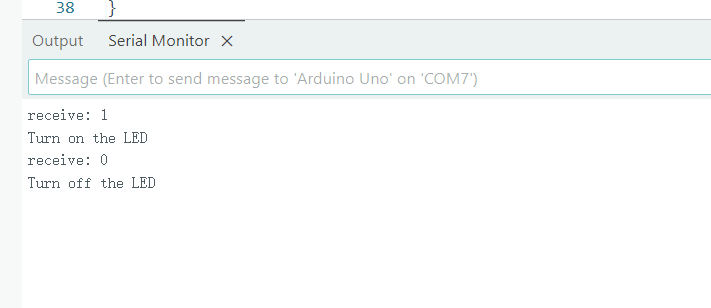
connect to Bluetooth (the default Bluetooth name : JDY-31-SPP), and then send “1” or “0” to control the LED on and off.
Send “1”: Turn on the LED, send “0”: Turn off the LED.
Mobile Phone Bluetooth Debugging Assistant
JDY-31 Bluetooth Module Application Note
1、Connection issue: If the module fails to connect, check whether it is in the correct working mode and ensure that the main device can detect the JDY-31 module.
2、Compatibility issue: In different computer systems, some USB-to-TTL modules may have compatibility problems. It is recommended to use the CH340 module for testing.
By following the above precautions, you can use the JDY-31 Bluetooth module for wireless communication more smoothly. Make sure to carefully read the relevant documentation before use, so as to better understand the functions and limitations of the module.
Bluetooth JDY-31 Application Scenarios
With the development of Internet of Things technology, the application scenarios of Bluetooth modules are becoming increasingly widespread. JDY-31, with its excellent performance and compatibility, has great potential for development in multiple fields such as smart home, remote monitoring, and wearable devices.
In the future, we can expect JDY-31 to further optimize its software protocol stack, enhance compatibility with more devices, and even possibly introduce more intelligent features, such as automatic pairing and adaptive transmission rate adjustment, to provide users with a more convenient and efficient usage experience.
In conclusion, the JDY-31 baseboard Bluetooth module is not only a high-performance hardware product, but also one of the key technologies driving the development of smart devices. Whether you are an electronics enthusiast or a professional developer, you should consider this powerful tool. It might become the secret weapon for your next innovative project.
Bluetooth JDY-31 Application Video
Relative Information
JDY-31 Bluetooth Module Purchase Link
FAQ
Was there no response when sending the command?
First, you need to check the wiring. The wiring must be crossed, that is, RXD-TXD, TXD-RXD. Secondly, check if the baud rate is correct. For JDY-31, the default baud rate is 9600. If all of the above are normal, then you need to check if the sent command and format are correct. Also, pay attention to checking the option of sending new lines and carriage return. You can try sending the test command for version query, AT+VERSION, to see if there is a reply. If there is a reply, it is normal. For other commands, such as changing the name, do not add an equal sign. Just put the name directly after the command, for example, AT+NAMErainbow, where AT+NAME is the command for changing the name, and rainbow is the name to be changed. The same applies to other commands for modifying the baud rate, modifying the password, make sure the format is correct.
Why does the mobile phone always automatically disconnect from the Bluetooth module?
The most likely cause is a power supply issue.
Can the two JDY-31 devices communicate with each other?
No. The JDY-31 can only be used as a slave device, meaning it can only be connected to others but cannot initiate a connection on its own. Only modules like HC-05, which support both master and slave modes, can both initiate and accept connections. You can use a Bluetooth module that supports the master mode to establish a connection with the JDY-31. For example, set an HC-05 to the master mode and then connect it to the JDY-31. In this way, the two devices can communicate with each other.
How do I choose a Bluetooth module?
When choosing a Bluetooth module, we should refer to aspects such as the chip, power consumption, transmission content, transmission rate, transmission distance, packaging form, interface, and master-slave relationship.
According to the application scenario, choose a classic Bluetooth module or a low-power Bluetooth module. The low-power Bluetooth module is suitable for mobile internet and health care fields, while the dual-mode Bluetooth module is suitable for the Internet of Things and smart home. Select a wireless module with strong anti-interference ability.